
How I Brief AI to Write Industry-Specific Content That Does Not Sound Generic
This is the final post in the series. You can read the full strategy overview, keyword mapping, Sonar research process, cluster architecture, and publishing calendar strategy in the earlier posts.
The Problem With Generic AI Content
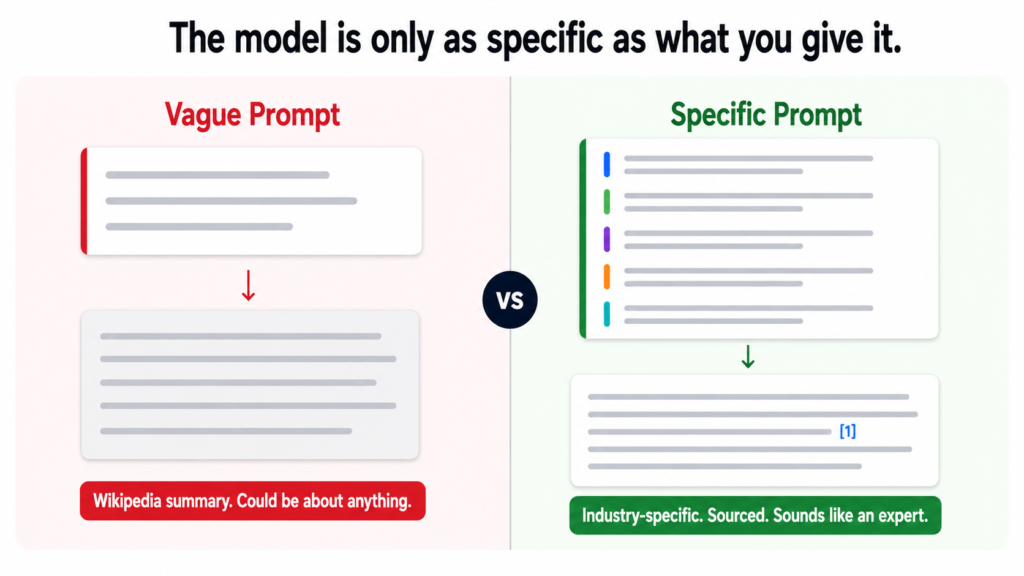
Ask any AI to write a blog post about AI for law firms without a proper prompt and you will get something that reads like a Wikipedia summary written by a consultant who has never worked with a law firm. Every sentence is technically accurate. Nothing is specific. The tone is the same whether the audience is a solo attorney or a healthcare CFO. It sounds like every other AI blog post because it was produced the same way every other AI blog post is produced.
The fix is not a better AI model. It is a better input. The model is only as specific as what you give it. A vague prompt produces vague output. A highly specific prompt with clear tone rules, structural requirements, and sourced research data produces something that actually reads like it came from someone who knows the industry.
For the Tiger Tail project, 110 posts across five distinct industries needed to sound different from each other. A home services contractor does not want to read the same prose style as a law firm partner. Healthcare administrators do not respond to the same tone as accounting firm owners. The writing framework had to produce genuinely different output for genuinely different audiences from the same underlying system.
A prompt is not a topic request. It is a detailed instruction set that constrains how the model writes, what it includes, what it avoids, and how it adapts to each audience. The more specific the constraint, the more specific the output.
The Master Prompt Structure
Every blog post across all 110 briefs was written through a single master prompt. The prompt has five core sections. Each one does a specific job.
Who the brand is. Who they serve. What they do.
What the reader looks like when they land on this post.
This grounds every word in a specific person reading it.Section 2 — Writing Style Rules
Be direct. Say the thing plainly. No hedging.
Short sentences. Vary the rhythm.
Never open with a filler line.
No corporate speak. No em dashes anywhere.
Data leads. Back every strong claim with a named source.
Have a point of view. React to the data, do not just report it.Section 3 — Tone by Industry
Home Services: plain and blunt. Lead with money and time.
Real Estate: practical and fast-moving. Leads and closings.
Legal: precise and careful. Acknowledge complexity and risk.
Healthcare: empathetic and accurate. Never oversell.
Finance and Accounting: numbers first. Conservative claims.
Section 4 — Structure Rules
No fixed template. Let intent guide structure.
Headers only when the content genuinely needs them.
Open with the specific problem. End with a concrete takeaway.
CTA once only, placed where it earns its place.
Section 5 — Link and Citation Rules
External links embedded inline on the stat they support.
Internal links placed naturally in body context.
No links listed at the bottom. No forced placements.
The brand and audience context section is what most prompts skip entirely. Without it, the model has no reference point for who is reading. With it, every sentence is written toward a specific person in a specific situation rather than a generic professional in a vague industry.
The Tone Rules That Make the Biggest Difference
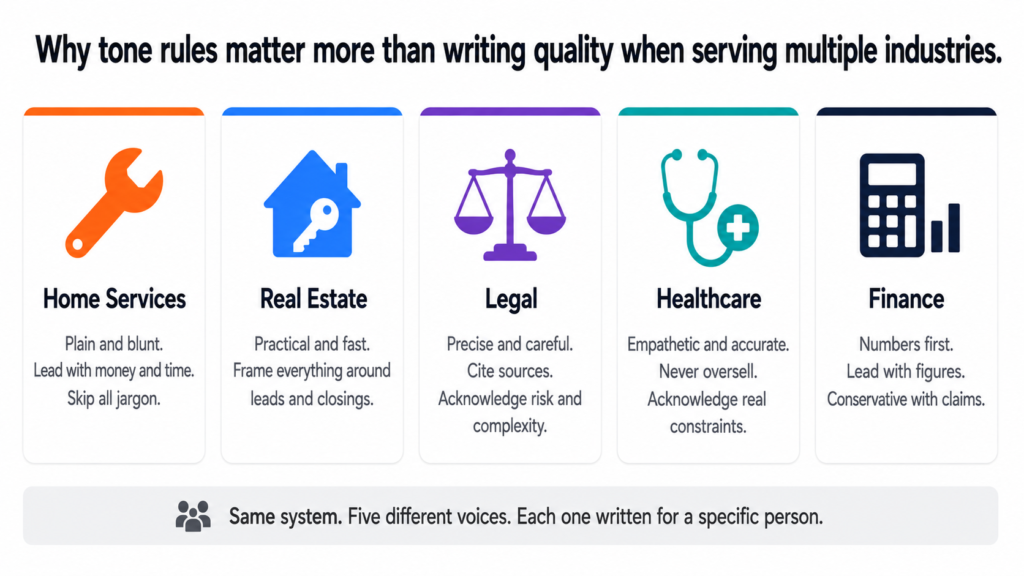
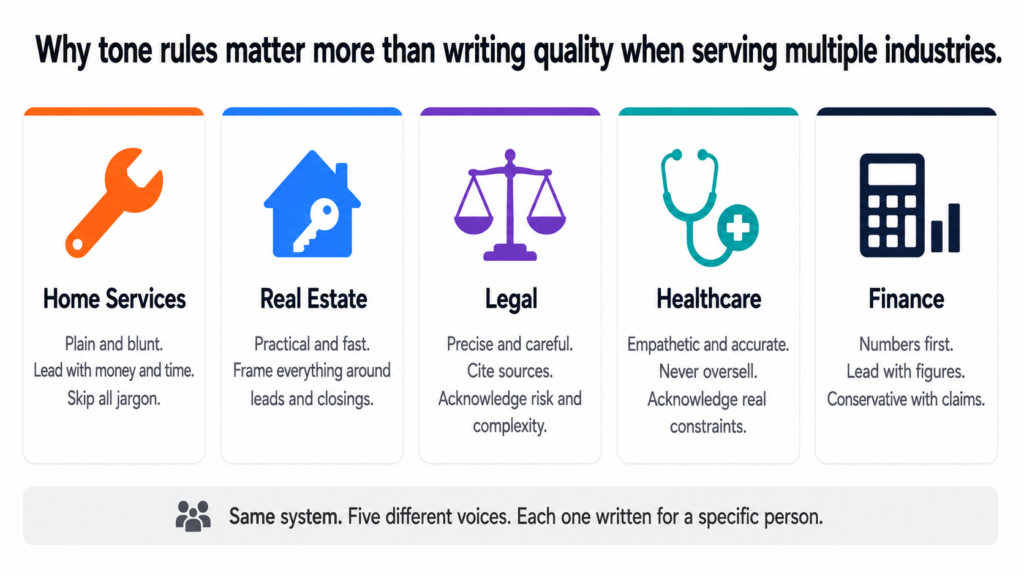
The tone-by-industry section of the prompt is what makes a legal post read differently from a home services post even though both go through the same system. Here is what each industry tone rule actually produces in practice:
| Industry | Tone Rule | What It Produces |
|---|---|---|
| Home Services | Plain and blunt. Lead with money and time. Skip jargon entirely. | A contractor reads it and thinks: this person gets how my business works. |
| Real Estate | Practical and fast-moving. Frame everything around leads, response time, and closings. | An agent reads it and immediately applies it to their pipeline. |
| Legal | Precise and careful. Cite sources properly. Acknowledge complexity and risk. | A lawyer reads it and trusts the accuracy. Does not feel oversold to. |
| Healthcare | Empathetic and accurate. Never oversell. Acknowledge real constraints. | A physician reads it and feels understood rather than marketed to. |
| Finance | Numbers first. Lead with figures. Be conservative with claims. | An accountant reads it and finds it credible enough to share with clients. |
The difference between a healthcare post and a home services post is not just vocabulary. It is the entire posture of the writing. Healthcare content that leads with money the way home services content does would feel wrong to a physician. Home services content that hedges and acknowledges complexity the way legal content does would lose a contractor in the first paragraph.
The Filler Openers List
One of the most specific sections of the prompt is a list of opening lines the model is explicitly told never to use. This matters more than it sounds. AI defaults to filler openers because they are the most statistically common way articles begin in its training data. Without a specific prohibition, the model will produce them every time.
“As businesses continue to evolve…”
“In an era of rapid technological change…”
“Whether you are a small business or a large enterprise…”
“Artificial intelligence is transforming the way…”
“It is no secret that…”
“Now more than ever…”
“In recent years, the rise of AI has…”
“Let us dive in.”
“Here is what you need to know.”INSTEAD: Open with the specific problem.
Name it plainly. No warm-up. No throat-clearing.
The reader should feel addressed by the second sentence.
Every one of those openers signals to a reader that the content was not written for them specifically. They have read that sentence a hundred times on a hundred different sites. Banning them forces the model to find a more direct entry point, which almost always produces a better opening than the default.
The Humanizer Pass
Even with a strong prompt, AI writing has patterns that accumulate across a long piece. Small habits that individually seem fine but collectively make the content feel generated rather than written. The humanizer pass catches these before anything gets published.
“Testament to”, “pivotal moment”, “underscores”,
“highlights the importance of”, “it is worth noting”.
Replace with the plain statement the inflation was hiding.Promotional language
Any word that sounds like marketing copy.
Seamless. Robust. Transformative. Game-changing.
These words mean nothing. Remove them.
Superficial -ing phrases
“Showcasing”, “reflecting”, “contributing to”,
“fostering”, “enabling”. These verbs add no meaning.
Replace with a direct statement of what actually happened.
Rule of three
Listing three synonyms when one would do.
“Efficient, productive, and streamlined.”
Pick one. The best one. Cut the other two.
Negative parallelism
“It is not just X, it is Y.” Always feels performative.
Just say Y. The contrast adds nothing.
Vague attributions
“Experts say”, “studies show”, “research indicates”.
Name the expert. Name the study. Name the year.
If you cannot, remove the claim entirely.
Generic positive conclusions
“The future is bright”, “now is the time to act”,
“the possibilities are endless”.
End with something specific or do not end with a conclusion.
The humanizer pass is not a stylistic preference. It is a quality gate. Every one of those patterns makes content feel less trustworthy to the reader, even if they cannot articulate why. Removing them is what takes a competent draft and makes it feel like something a real expert wrote.
The Final Check Before Publishing
Before any post from the Tiger Tail calendar goes live, it passes a final checklist. This is the last gate between the draft and the published URL.
No filler opener in the first paragraph
Every stat has an inline external link to its named source
Internal links appear naturally in context, not forced
CTA appears once only, where it earns its place
Tone matches the industry cluster it belongs to
Primary keyword in H1, first paragraph, and one H2
Meta title under 60 characters
Meta description under 160 characters
Image with descriptive alt text present
URL slug matches primary keyword
Humanizer pass completedAsk before publishing:
“What makes this obviously AI-generated?”
Fix those things. Then publish.
The last question in that checklist is the most important one. Not “does this read well” but “what would make a reader suspect this was generated.” That question forces a more honest review than general proofreading does because it is looking for the specific patterns that erode trust rather than just checking for errors.
What the Whole System Produces
Put together, the five layers covered across this series produce something most content strategies never achieve: a system where every post is intentional before it is written, researched before it is briefed, structured before it is published, and reviewed against the right standard before it goes live.
The keyword map tells you what to write and where it belongs. The Sonar research tells you what to say and how to back it up. The cluster architecture tells you how each post relates to everything around it. The calendar tells you when to publish it and removes every remaining decision. The writing framework and humanizer tell you how to make it sound like it was written by a person who genuinely knows what they are talking about.
None of these layers is complicated on its own. The value comes from all five working together. A calendar without research produces thin content. Research without a cluster produces isolated posts. Clusters without a framework produce inconsistent writing. The system only works when all five parts are in place.
I Built All of This. I Can Build It for Your Business.
The full content system — built for your website, your industry, your audience
Everything covered in this series is something I build for businesses and agencies. The keyword map. The Perplexity Sonar research data pack. The cluster architecture. The 24-month calendar with every row pre-loaded. The master writing prompt adapted to your brand voice and your industries. The humanizer rules built into every brief.
This is not a template. Every system I build is specific to the client. The Tiger Tail project took 11 clusters across 5 industries and produced 110 posts with full research and briefs. Yours will be built around your pages, your keywords, and your audience.
Here is what the engagement covers:
- Full keyword research and page mapping for your entire site
- Cluster architecture designed around your commercial pages
- Perplexity Sonar research data pack — real stats, named sources, citation URLs — for every post
- Complete publishing calendar with every row pre-loaded: meta titles, meta descriptions, intent, internal links, external sources, CTAs, and status tracking
- Master writing prompt built for your brand voice and adapted by industry or service area
- Humanizer checklist and final publish gate built into the workflow
- Publishing pace and cluster priority order matched to your domain’s current authority level
If you are a business owner who wants organic search working for you without paying for ads every month, or an agency that wants to deliver this kind of strategy for clients, book a call and let us talk through what it looks like for your specific situation.
Book a free 30-minute call
See the full SEO strategy service
This is the fifth post in the series. You can read the strategy overview, keyword mapping, research process, and cluster architecture in the earlier posts.
Why Most Content Calendars Get Abandoned
A content calendar that lives in a spreadsheet and gets ignored by week three is not a calendar. It is a guilt document.
Most content calendars fail for one of two reasons. Either they are built with titles and dates and nothing else, which means every publishing cycle starts with a blank page and a deadline. Or they are built with so much structure that maintaining the document takes more effort than writing the actual content.
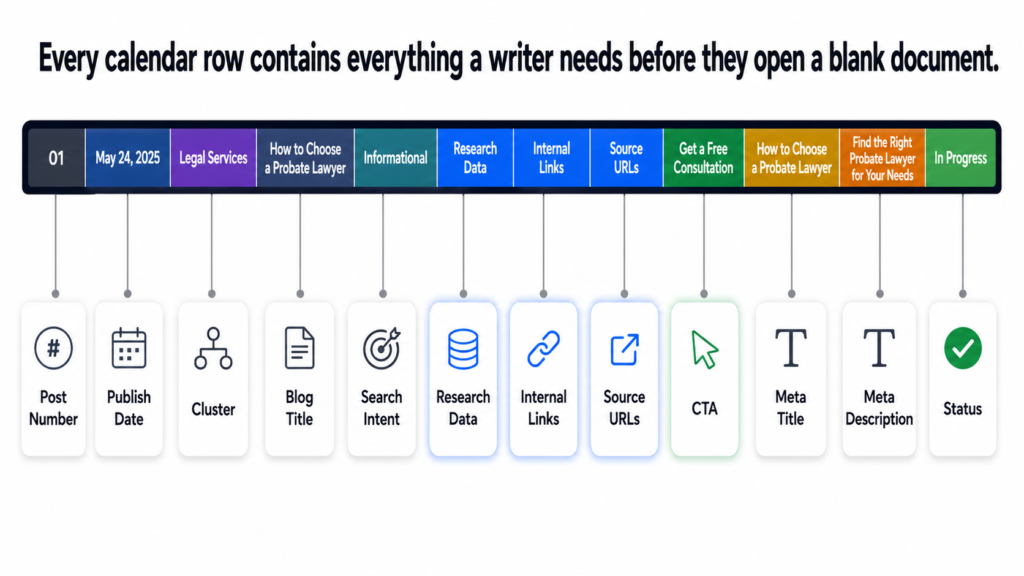
The calendar I built for Tiger Tail was designed around one principle: every row should contain everything a writer needs to start immediately with no additional briefing required. The calendar is the brief. The moment a post moves to “in progress,” the writer already has the research data, the source URLs, the internal links, the intent classification, and the CTA. Nothing is left to figure out.
A content calendar is only useful if it removes decisions, not adds them. Every decision about a post should be made when the calendar row is built, not when the writer opens a blank document.
What Every Calendar Row Contains
Here is the exact column structure used for every one of the 110 posts in the Tiger Tail calendar:
| Column | What It Contains | Why It Matters |
|---|---|---|
| Post Number | Sequential 1 to 110 | Tracks progress at a glance |
| Publish Date | Specific date from June 2026 | Removes scheduling decisions |
| Cluster | Which of the 11 clusters | Links post to parent page |
| Blog Title | Working title | Keyword-aligned, intent-matched |
| Search Intent | Informational, How-To, Comparison | Determines structure and depth |
| Research Data | Full stats from Perplexity Sonar | Writer uses this directly |
| Internal Links | Specific tigertail.co pages | No guessing where to link |
| External Links | Source URLs for every stat | Inline citations ready to use |
| CTA | One specific call to action | Placed once, where it earns its place |
| Meta Title | Under 60 characters | SEO-ready before publishing |
| Meta Description | Under 160 characters | No writing needed at publish time |
| Status | Not Started, In Progress, Written, Edited, Published | Single source of truth for progress |
Twelve columns per row. One hundred and ten rows. Every decision about every post made before the writing starts. A writer who picks up a brief from this calendar does not need to ask any questions. Everything is already there.
The Publishing Pace and Why It Was Set This Way
The publishing pace for a new domain is not just a volume decision. It is a trust-building decision. Google needs time to learn a new site. Publishing fifty posts in the first month on a brand new domain does not accelerate that process. It looks like a spam pattern to a domain with no history.
1 post per week on Mondays
Why: New domain needs consistent signals, not volume bursts.
Google indexes and evaluates early posts carefully.
Foundation being established. Quality over quantity.
8 posts published. All 11 clusters get early coverage.PHASE 2 — Week 9 onwards (July 27 2026)
2 posts per week — Mondays and Thursdays
Why: Domain has 8 weeks of consistent publishing history.
Google has begun learning the site structure.
Increasing pace signals growth, not spam.
102 remaining posts published across 51 weeks.
TOTAL DURATION
Approximately 24 months from first publish to post 110.
This is not slow. This is sustainable and compound-friendly.
The ramp from one to two posts per week was deliberately delayed until week nine. Eight weeks of consistent single-post publishing gives the domain enough history that doubling the pace looks like organic growth rather than a sudden content dump. The distinction matters to how Google interprets the signal.
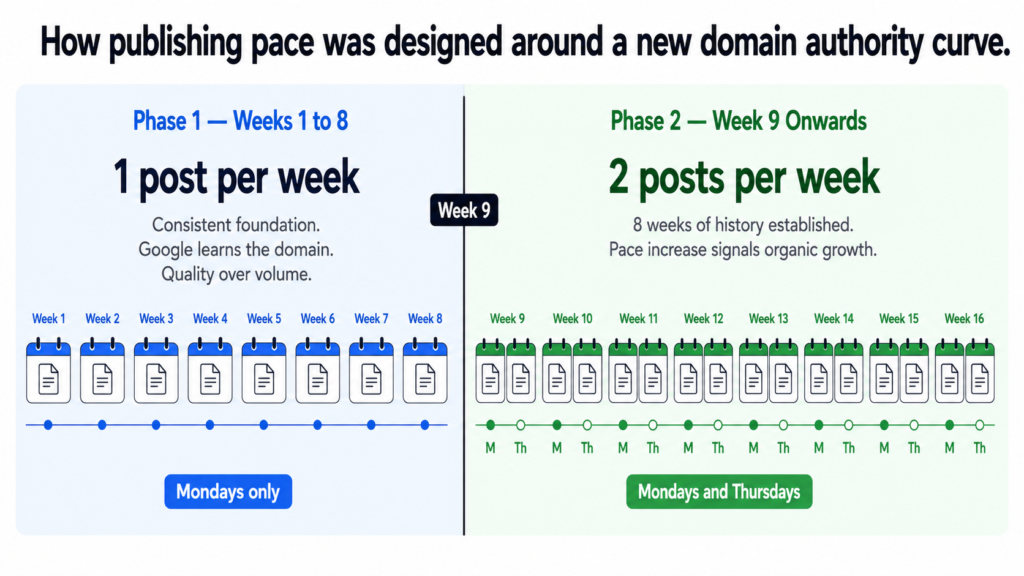
Publishing frequency on a new domain is a trust signal, not just a volume metric. Sudden spikes in publishing on a site with no history look very different to Google than a gradual ramp that mirrors how a real business grows its content operation.
The Cluster Priority Order
The order in which clusters get their first posts published was not decided alphabetically or by which felt most important to the client. It was decided by competition level and by what would give the domain the fastest path to early ranking signals.
| Priority | Cluster | Reason |
|---|---|---|
| 1st | AI Audit and Strategy | Establishes what the business does. First impression for Google. |
| 2nd | Home Services | Lower competition. Local long-tail keywords. Early wins possible. |
| 3rd | Workflow Automation | Strong long-tail demand. Less dominated by big brands. |
| 4th | Legal | Higher volume. Domain has history by now. Timing matters here. |
| 5th | Real Estate | Competitive but authority building from clusters 1 to 4. |
| 6th | Healthcare | Mid-competition. Domain credibility growing by this point. |
| 7th | Finance and Accounting | Specialist audience. Benefits from established domain trust. |
| 8th | Custom AI Development | Competitive space. Needs domain authority to compete. |
| 9th | Growth Engineering | Broad keyword competition. Later timing is strategic. |
| 10th | Systems and Operations | Niche audience. Works better once domain has full authority. |
| 11th | AI Training and Enablement | Lowest search volume. Low competition but small audience. |
The first three clusters were chosen because they give a new domain the fastest path to real ranking signals. Lower competition keywords on a new domain rank faster. Those early rankings build the domain authority that makes it possible to compete for the higher-volume keywords in clusters four through seven later in the program.
Starting with the legal cluster, which targets “ai for law firms” at 1,300 monthly searches, on a brand new domain would mean months of sitting on page ten for a keyword that Forbes, HubSpot, and established legal tech publications are already competing for. Starting there after six months of authority building from clusters one through three changes that calculation significantly.
On-Page Requirements Built Into Every Row
The calendar also carries on-page SEO requirements for every post so nothing gets published with missing elements. These are not suggestions. They are publishing gates.
Meta title under 60 characters — pre-written in calendar
Meta description under 160 characters — pre-written in calendar
At least one image with descriptive alt text
URL slug matching the primary keyword
Internal link to the parent service or industry page
2 to 3 internal links to related posts in the same cluster
CTA pointing to the relevant service page or booking link
All external stats linked inline to their source URLs
These are gates, not guidelines.
A post missing any of these does not get published.
The meta title and meta description are written when the calendar row is built, not when the post is about to go live. This matters because writing SEO metadata under deadline pressure produces generic titles that do not perform. Writing them as part of the planning process, when there is no urgency, produces titles that are actually designed to be clicked.
The Domain Authority Building Work That Runs Alongside Content
Content is the primary organic acquisition channel but it does not operate in a vacuum on a new domain. The calendar strategy included a set of parallel activities designed to accelerate the authority-building process from day one.
Clutch, G2, DesignRush, GoodFirms.
Each listing is a citation and a potential backlink.
Priority: first 30 days.
One guest post in first 3 months
One authoritative industry publication in the AI or SMB space.
A single quality backlink early on does more than
ten directory listings for domain authority signals.
Resource page outreach
Relevant AI consulting and automation resource pages.
Ask to be listed where genuinely relevant.
LinkedIn publishing
Every blog post shared on LinkedIn at publish time.
Drives early traffic signals back to new content.
Google notices traffic from social as a relevance signal.
Google Search Console setup — day one
Submit sitemap immediately. Monitor crawl coverage.
Catch indexing issues before they compound.
Google Analytics setup — day one
Track what is working from the first post published.
Data from month one informs decisions in month six.
Content without any off-page authority signals takes longer to move. These parallel activities do not replace the content work. They compress the timeline by giving Google additional trust signals while the cluster authority is still building.
What a 24-Month Calendar Actually Delivers
By the end of month 24, the Tiger Tail content program will have published 110 posts across 11 clusters, each one mapped to a commercial page, each one backed by real research and source citations, and each one part of an interconnected architecture that compounds in value every month it runs.
That is not a blog. That is an organic acquisition system that runs on a schedule, requires no paid media, and gets more valuable over time rather than less.
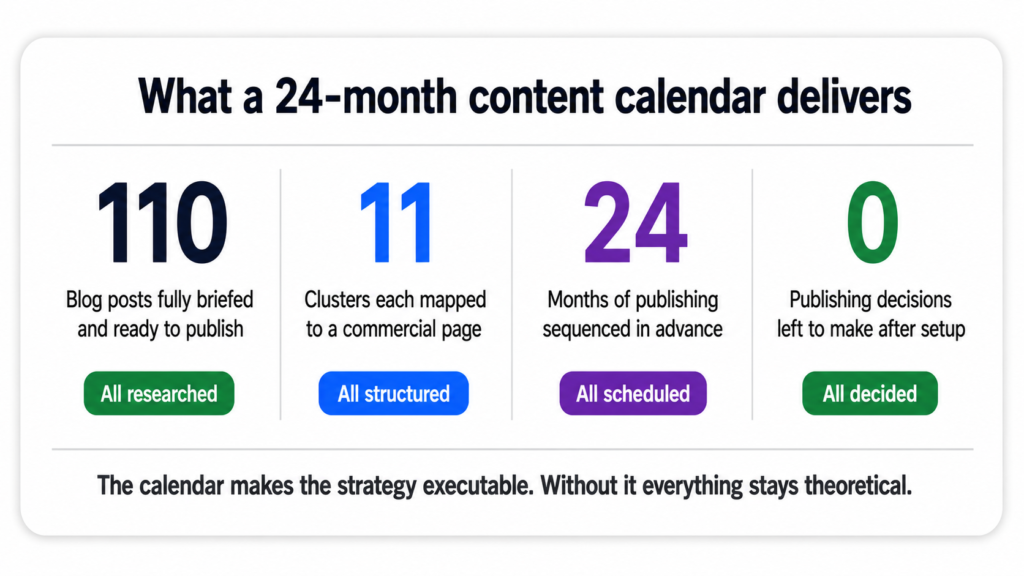
The calendar is not the strategy. It is the system that makes the strategy executable. Without it, even the best keyword research and cluster architecture stays theoretical. With it, 110 decisions are already made and every week the next post is ready to publish.
I Built This for a Client. I Can Build It for You.
A complete blog calendar built for your business — researched, structured, and ready to publish
What I built for Tiger Tail — the keyword mapping, the Perplexity Sonar research, the cluster architecture, the 110-post calendar with every row pre-loaded — is something I build for businesses and agencies. If your content is not producing organic traffic, the calendar and the structure behind it is almost always the missing piece.
Here is what you get:
- Full keyword research mapped to every page on your site
- Cluster architecture designed around your services and industries
- Research data pack for every post — real stats, named sources, citation URLs
- Complete publishing calendar with meta titles, meta descriptions, intent classification, internal links, CTAs, and status tracking — all pre-built
- Publishing pace and cluster priority order matched to your domain’s current authority level
Book a free 30-minute call
See the full SEO strategy service
The last post in this series covers how I brief AI to write industry-specific content that actually sounds like it was written by someone who knows the subject: how I brief AI to write content that does not sound generic.
This is the second post in a series about building a 110-post SEO content strategy from scratch. If you missed the first one, start here for the full overview.
The Problem With Keyword Research Done in Isolation
Most businesses approach keyword research the same way. They find a tool, type in their industry, get a list of terms with search volumes, pick the ones that look promising, and hand them to a writer. The writer produces content. The content gets published. Nothing ranks.
The missing step is not better keywords. It is understanding which page on the website each keyword belongs to and why. A keyword does not exist in a vacuum. It needs a home. And that home needs to be the right type of page for the intent behind the search.
Without that mapping, you end up in one of two bad situations. Either you create blog posts competing against your own service pages for the same keywords, or you create service pages targeting keywords that should be blog content. Both confuse Google and split your ranking potential instead of concentrating it.
The Two Types of Pages That Need Keywords
For the Tiger Tail project, the website had two distinct types of pages before a single blog post was written. Service pages and industry pages. Each type needs its own keyword logic.
Service pages target keywords where the searcher is looking for a solution or a provider. Someone searching “ai strategy consultant” or “workflow automation services” has commercial intent. They are not looking for an explanation. They are looking for someone to hire. These keywords belong on service pages, not blogs.
Industry pages target keywords where the searcher is a specific type of business looking for AI solutions relevant to their sector. Someone searching “ai for law firms” or “ai for real estate agents” has commercial intent too, but with an industry-specific lens. These keywords belong on the industry pages, not the blog either.
Blog posts serve a different purpose. They capture informational searches from people who are not ready to buy yet but are researching the problem. The blog content feeds authority to the service and industry pages. The pages convert. The blog attracts.
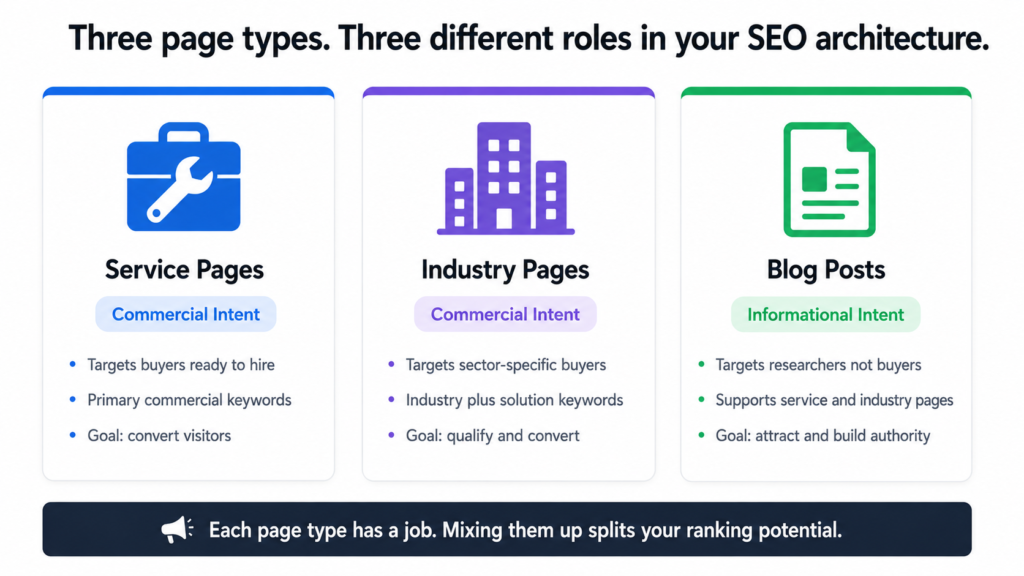
Service pages and industry pages target buyers. Blog posts target researchers. Mixing them up is one of the most common and most damaging SEO mistakes a business can make.
The Actual Mapping: Real Data From the Project
Here is what the keyword-to-page mapping looked like for the Tiger Tail service pages. Every page got its primary keywords and monthly search volumes confirmed before any content was briefed.
service-page-keyword-map.txt
Page URL                              Primary Keyword                    Monthly Searches

/services/ai-audit-strategy            ai strategy consultant                      880
/services/ai-audit-strategy            ai readiness assessment                     720
/services/ai-audit-strategy            ai implementation consultant                390
/services/ai-audit-strategy            automation consultant                       480
/services/workflow-automation          business process automation services        320
/services/custom-ai-development        custom ai development company               480
/services/custom-ai-development        ai integration services                     590
/services/growth-engineering           ai marketing automation                     720
/services/growth-engineering           ai lead generation agency                   110
/services/ai-training-enablement       corporate ai training                        40
And here is the same mapping for the industry pages:
industry-page-keyword-map.txt
Page URL                              Primary Keyword                    Monthly Searches

/ai-for-legal                          ai for law firms                          1,300
/ai-for-real-estate                    ai real estate agent                        590
/ai-for-real-estate                    ai for real estate agents                   480
/ai-for-healthcare                     healthcare workflow automation              170
/ai-for-finance-accounting             ai for accounting firms                      70
/ai-for-home-services                  ai for contractors                          110
/ai-for-legal                          legal document automation                   170
/ai-for-healthcare                     ai for medical billing                       90
Looking at this data together, the legal page stands out immediately. “Ai for law firms” at 1,300 searches per month is the single highest-volume keyword across all pages on the site. That tells you the legal cluster needs serious depth in the blog to give that page the authority it needs to compete.
The corporate AI training page, on the other hand, targets “corporate ai training” at just 40 searches per month. That is a low-volume keyword but the commercial intent behind it is very high. Someone searching that phrase is almost certainly a business ready to spend money on training. Low volume does not mean low value.
How Search Volume Shapes Priority, Not Just Selection
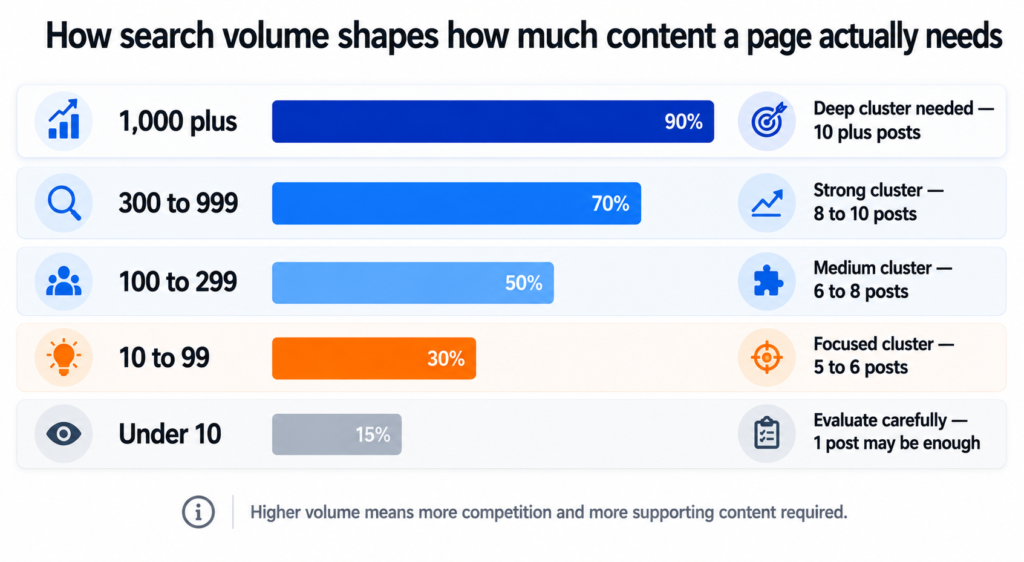
This is the part most keyword guides miss. Search volume is not just a filter for deciding which keywords to target. It is an input for prioritising which content to build first and how much of it you need.
A page targeting a keyword with 1,300 monthly searches needs more supporting blog content around it than a page targeting 40 monthly searches. Not because the second page matters less, but because Google needs to see more topical depth before it will trust a new domain with a high-volume, competitive keyword.
volume-to-priority-logic.txt
Volume Range      What It Means                          Content Priority

1,000+            High demand. High competition.             Deep cluster needed.
                  Big brands likely dominating page 1.       10+ supporting posts.
                  New domain needs time and authority.

300 to 999        Solid demand. Beatable competition         Strong cluster needed.
                  with quality content and good structure.   8 to 10 supporting posts.

100 to 299        Moderate demand. Often less competitive.   Medium cluster.
                  Good early target for a new domain.        6 to 8 supporting posts.

10 to 99          Low volume. Often high commercial intent.  Focused cluster.
                  Worth targeting if buyer intent is clear.  5 to 6 supporting posts.

Under 10          Very niche. May still be worth it          Evaluate carefully.
                  if the buyer value per conversion is high. Single post may be enough.
This framework shaped the entire cluster structure for the project. The legal cluster targeting 1,300 searches got ten posts. The AI training cluster targeting 40 searches also got ten posts, but those posts are written differently. More specific, more technical, more conversion-oriented, because the person reading them is further along in their decision.
Intent Is More Important Than Volume
Search volume tells you how many people are searching. Search intent tells you why. Getting the intent wrong is worse than targeting a low-volume keyword because it means you are attracting the wrong people even when you do rank.
Every keyword in the Tiger Tail mapping got an intent classification before it was assigned to a page. The classification is simple but it matters every time.
search-intent-classification.txt
Intent Type       What the Searcher Wants                 Right Page Type

Informational     Learning about a topic.                     Blog post.
                  Not ready to buy yet.
                  Example: "what is ai readiness assessment"

How-To            Looking for a process or steps.             Blog post or guide.
                  Example: "how to automate workflow"

Commercial        Researching providers or solutions.         Service or industry page.
                  Getting close to a decision.
                  Example: "ai strategy consultant"

Comparison        Evaluating options.                         Blog post or landing page.
                  Example: "make vs zapier vs custom automation"

Transactional     Ready to buy or contact.                    Service page with clear CTA.
                  Example: "hire ai implementation consultant"
A keyword like “what is an ai readiness assessment” is informational. It belongs in the blog as a post that educates the reader and links to the service page at the end. A keyword like “ai readiness assessment” with no qualifier is commercial. Someone typing that is likely comparing providers. It belongs on the service page itself.
Those two keywords look similar. They would land on completely different pages in a well-structured site. Getting that distinction right is what separates a site that converts from one that attracts traffic that never does anything.
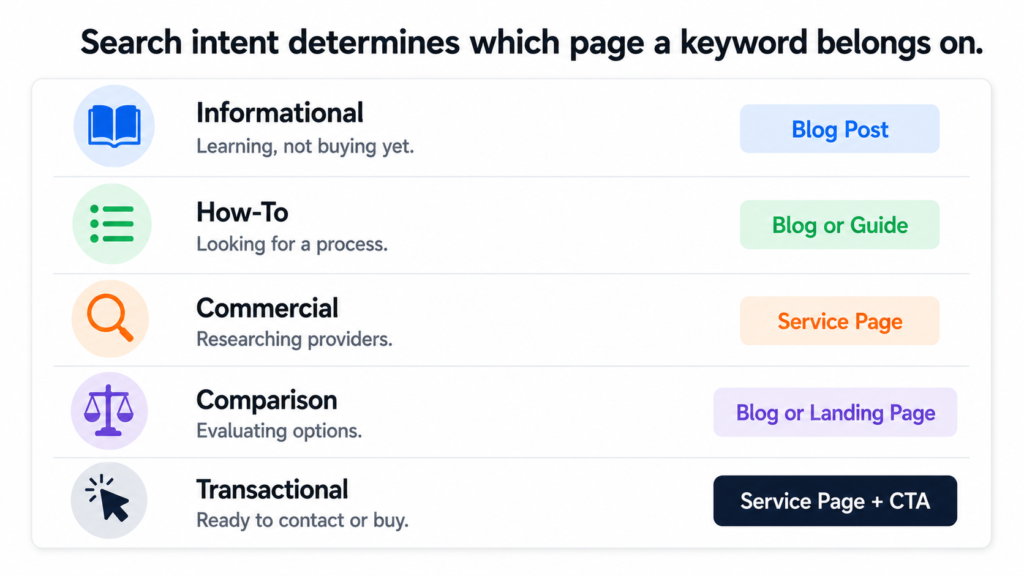
Putting commercial intent keywords on blog posts and informational keywords on service pages is one of the most common ways content strategies fail quietly. The traffic numbers look fine. The conversions never come.
The Before and After of Keyword Mapping
Here is what the approach looks like without mapping versus with it:
before-vs-after-mapping.txt
WITHOUT KEYWORD MAPPING

"Let's write a blog about AI for law firms."
"Let's write about what an AI consultant does."
"Let's cover AI pricing."

Result: Random posts. No page authority built.
        Service pages get no support.
        Blog competes with its own pages.
        Nothing ranks for anything meaningful.


WITH KEYWORD MAPPING

"ai for law firms" (1,300/mo, commercial) → /ai-for-legal service page
"how small law firms use ai" (informational) → blog post in legal cluster
"ai contract review" (informational/how-to) → blog post in legal cluster
"legal document automation" (170/mo, commercial) → /ai-for-legal page
"ai and billing ethics law firms" (informational) → blog post in legal cluster

Result: Service page targets commercial keywords.
        Blog cluster builds topical authority around it.
        Every post links back to the parent page.
        Google sees depth and relevance. Rankings follow.
The difference is not subtle. In the first approach, a business is just publishing. In the second, every piece of content has a specific job to do and a specific place in the architecture.
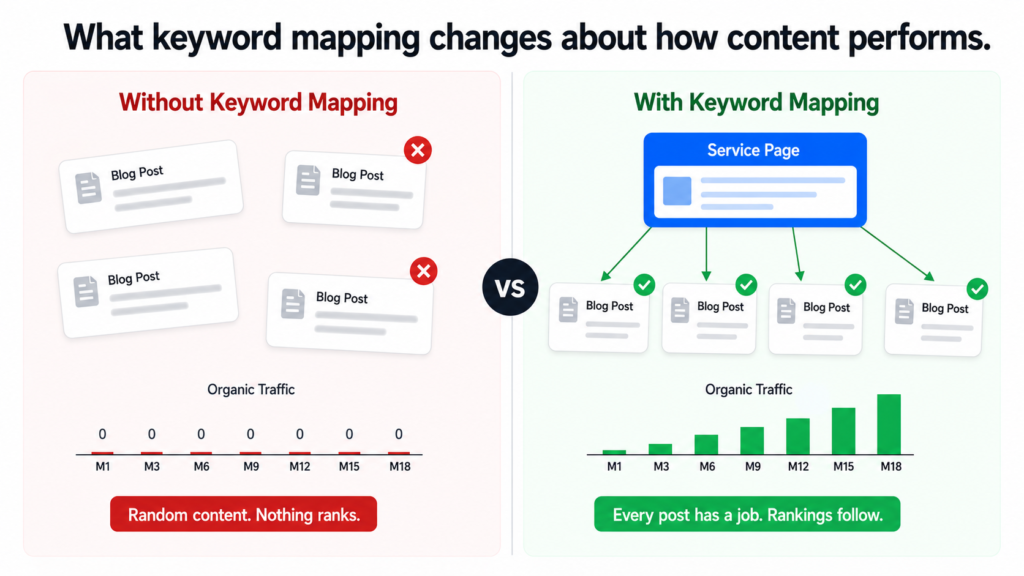
What Good Keyword Mapping Produces
By the time the keyword mapping was done for the Tiger Tail project, every page on the site had a clear primary keyword, a confirmed search volume, an intent classification, and a list of supporting blog topics that would feed it authority over time.
That groundwork meant every brief written after it had a reason to exist. Not just “here is a topic someone might find interesting” but “here is a keyword a real person searches for, here is the page it supports, here is how it fits into the cluster that will eventually rank the parent page.”
Keyword mapping is not a research exercise. It is a structural decision. It determines what gets built, where it lives, and what it is supposed to accomplish. Every hour spent on it saves ten hours of rewriting content that landed in the wrong place.
What Comes Next
With the keyword map in place, the next step was research. Not the generic kind where you read a few articles and summarise them. Proper data-backed research using Perplexity Sonar that produced real statistics, named sources, and proof points for every single post across all 110 briefs.
That process is what I cover in the next post: how I use Perplexity Sonar to research blog topics with real data.
If you want to talk through what keyword mapping would look like for your own website, book a call. I can usually tell within the first conversation whether a site’s content architecture is working for it or against it.
See how I approach SEO strategy →
Dhruv is an SEO consultant working with business owners, founders, and agencies. If organic search is not delivering for your business, this is where to start.
If you have not read the earlier posts in this series, start here to understand why most blogs fail and here for the competitor research approach.
Two Problems That Are Actually the Same Problem
The first problem is not knowing what to write about when competitor data is not an option. Either nobody in the niche is blogging with measurable results, the industry is too specific for competitor keywords to be meaningful, or the business simply wants to create content on its own terms rather than chasing what others are ranking for.
The second problem is that even when topic ideas exist, they never become a consistent publishing schedule. A blog calendar gets created in a meeting, lives in a Google doc for two weeks, and then quietly disappears. Publishing becomes irregular. Months go by. The blog never builds the compounding value it was supposed to.
These two problems look different on the surface but they come from the same place: there is no system underneath the content. The persona approach solves both at once. It gives you a method for generating months of relevant topics and a calendar that is specific enough to actually use.
Why Persona-Driven Content Works Differently
Keyword research tells you what people are searching for. Persona research tells you why they are searching for it and what they actually need when they get there.
Both matter. But for building long-term authority and genuine trust with your audience, persona-driven content wins. It speaks directly to the person behind the search rather than just matching the query. Readers feel understood. That is what makes them come back, share the content, and eventually reach out.
Content written without persona thinking tends to feel generic even when it is technically accurate. It covers the topic but it does not resonate with anyone in particular. It gets read and forgotten. It builds no relationship and no trust.
A blog that speaks to a specific person with a specific problem will always outperform a blog that speaks to everyone about a general subject. Specificity is what builds authority.
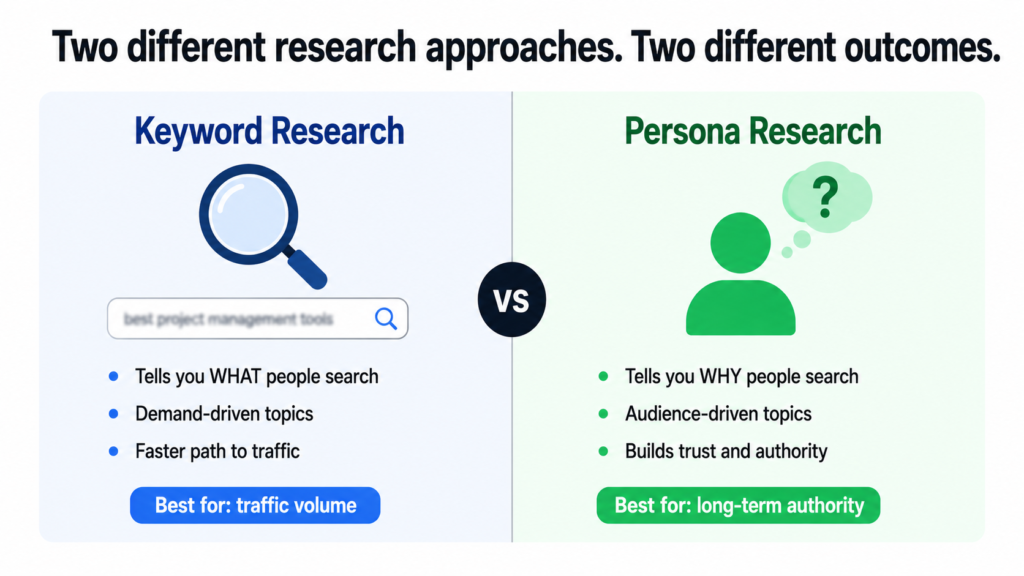
What a Buyer Persona Actually Is
A buyer persona is a detailed profile of an ideal customer. Not a demographic summary. A real picture of the person: their job role, their industry, what their day looks like, what keeps them stuck, what they are trying to achieve, what they search for when they have a problem, and what kind of content actually helps them make decisions.
Most businesses either have no defined personas or have ones that are too vague to be useful. Something like “marketing manager, 30 to 45, works at a mid-sized company” is not a persona. It is a demographic filter. A useful persona includes the specific frustrations, the exact questions they type into Google, and the outcomes they are trying to reach.
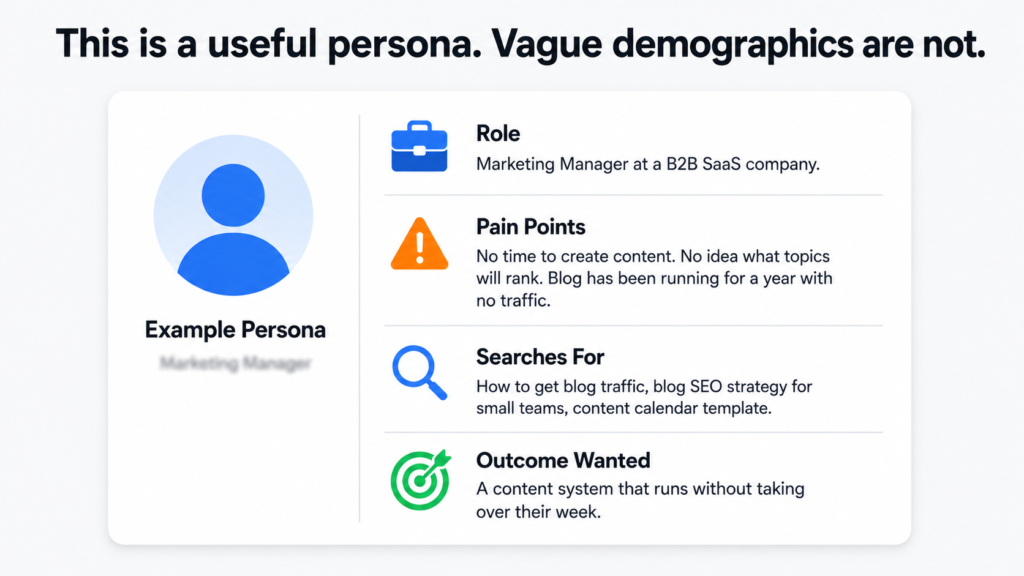
The good news is that you do not need a formal persona document to start. A rough description from someone who knows the customers well is enough to build on.
Why Blogs Without Persona Thinking Fail to Build Authority
The content is technically correct but feels like it could have been written for anyone. There is no consistent point of view. The topics jump around instead of building a coherent body of knowledge in one area. Readers do not feel like the brand actually understands their situation. They read, get the information they needed, and leave without ever considering the business behind the content.
Trust does not come from being informative. It comes from being specifically relevant to the person reading. That only happens when the content was built around a real understanding of who that person is.
The Full Process: From Personas to Published Calendar
Step 1 — Collect the buyer personas
Ask the business directly. Most will give you two to four personas without much prompting. What you need from each one: job title or role, the industry they work in, their biggest daily challenges, and the outcomes they are trying to achieve. If the business has never formally defined their personas, a rough description is fine to start. You are building a foundation, not a final document.
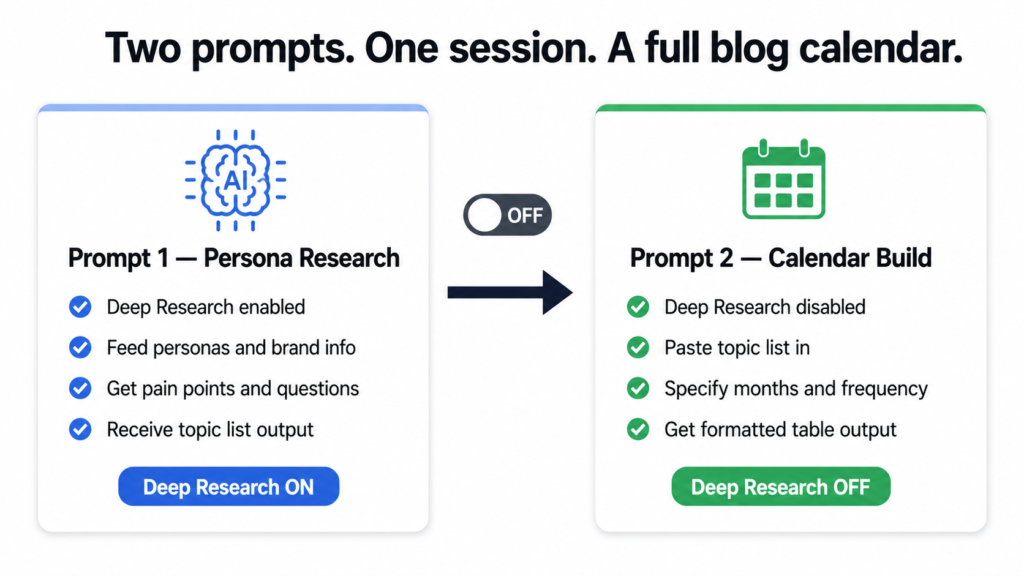
Step 2 — Use AI with Deep Research enabled
Open an AI tool that supports Deep Research mode. This feature allows the model to actively search the web rather than drawing only on its training data. That means the persona research it returns is grounded in current, real information: forums, communities, Reddit threads, LinkedIn discussions, industry publications, and survey data where it exists. This is what separates useful persona research from generic assumptions.
Step 3 — Run the persona research prompt
Feed the AI the business name and URL, a brief description of what it does and who it serves, the buyer personas, and the target location. Then ask it to research each persona in depth and return a specific number of blog topics based on what it finds. Here is the exact prompt to use:
I am building a blog content strategy for [Brand Name].
The website is [URL].
The brand [describe what it does and who it serves].

The buyer personas are:
[List each persona with job title or description]

Target location: [country or region]

Please use deep research to give me a detailed breakdown
of each persona including:
- Who they are
- Their biggest pain points and daily challenges
- The questions they commonly search for online
- The type of information they look for before making decisions
- What content would genuinely help them

After completing the research, generate [number] blog topic
ideas directly based on the pain points and questions you found.

Topics should be educational and informational, not promotional.
Format the topics as a numbered list.
Step 4 — Turn off Deep Research before the next step
Once you have the topic list, disable Deep Research. The next step is a formatting and planning task, not a research task. Keeping Deep Research on slows things down without adding value at this stage.
Step 5 — Build the calendar with a second prompt
Paste the topic list back into the AI and ask it to turn those topics into a structured blog calendar. Here is the prompt:
Using the blog topics listed above, please create a blog
calendar for [Brand Name].

Starting month: [month and year]
Blogs per month: [number]
Total duration: [number of months]

For each blog topic include:
- The topic title
- A brief content outline covering the key points
- The target buyer persona this post is written for
- A suggested publish date

Format this as a table with four columns:
Topic Title | Content Outline | Persona | Publish Date

So I can copy it directly into a spreadsheet.
In one working session, you now have a 3 to 6 month blog calendar with clear topics, content outlines, persona targeting, and publish dates. A writer can start immediately without further briefing. A client can review it as a deliverable.
What the Calendar Actually Gives You
The obvious output is a publishing plan. But the less obvious output is the removal of decision fatigue. One of the main reasons blogs become inconsistent is that every publishing cycle starts with the question of what to write next. That question never fully gets answered, the deadline passes, and the blog goes quiet for another month.
With a calendar in place, that question is already answered for the next six months. The only job left is execution. That shift from deciding to doing is what makes consistent publishing actually happen in practice rather than just in plans.
For consultants and agencies, the calendar also works as a client deliverable. It demonstrates strategic thinking beyond just writing. It shows that the content has a reason to exist, a defined audience, and a structure that builds toward something over time.
Why Consistency Is the Most Underrated Factor in Blog SEO
One blog post almost never produces meaningful results on its own. SEO from blogging is a compounding activity. The value builds as more posts are published, more keywords get covered, and Google increasingly recognises the website as a trustworthy source on a specific set of topics.
A business that publishes four well-targeted posts per month for six months has 24 pages competing for organic traffic. A business that publishes randomly has gaps, inconsistency, and a much weaker topical authority signal. Google notices the difference.
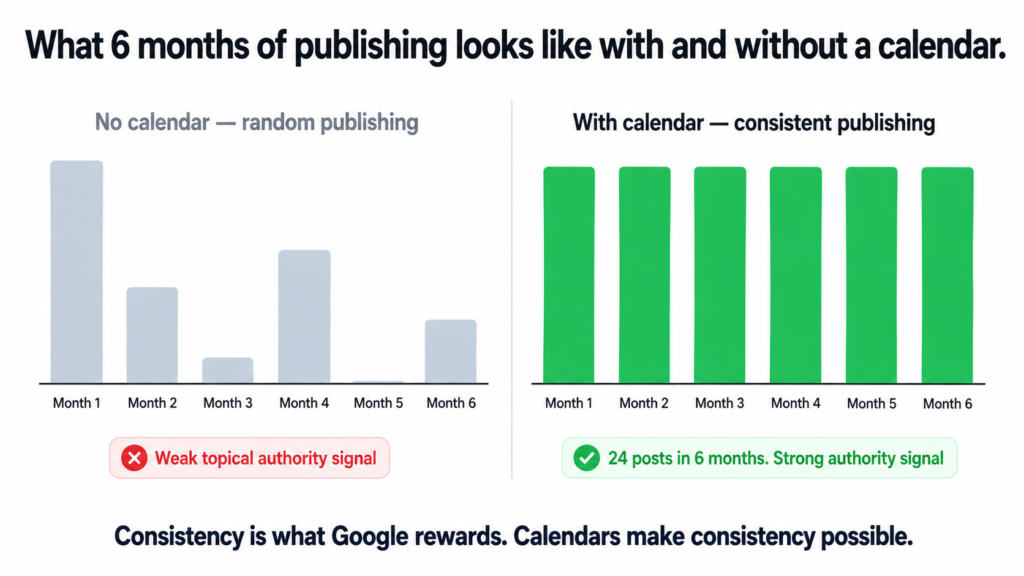
The calendar is not just a content planning document. It is the system that makes compounding SEO possible by turning irregular publishing into a predictable habit.
Topical authority does not come from one great post. It comes from consistent coverage of a specific subject area over time. Google needs to see a pattern before it starts treating a website as an authority on anything.
Competitor Approach vs Persona Approach — Which One Is Right
The competitor approach works best when there is proven search demand in the niche, multiple competitors are already getting blog traffic, and the primary goal is capturing a share of existing organic traffic as efficiently as possible.
The persona approach works best when the industry is niche or specialist, competitors are not actively blogging, the business wants to build a distinct voice, or the goal is long-term audience trust rather than short-term traffic volume.
The strongest content strategies use both. The competitor approach fills the calendar with high-demand topics that have a direct path to organic rankings. The persona approach fills the gaps with audience-first content that builds deeper relevance and trust over time. Together they cover both the traffic goal and the authority goal that I wrote about in the first post in this series.
Want Help Building This for Your Business?
A blog calendar built on real persona research gives you months of direction in a single session. But the research is only as good as the understanding of the audience behind it. If you want to build a content strategy that is actually tailored to your customers and your business goals, this is something I work through with clients directly.
Whether you need a full content strategy, help with SEO, or a conversation about what your blog should actually be doing for your business, book a call and we can get into the specifics.
See how I approach content and SEO strategy →
Dhruv is an SEO consultant working with business owners, founders, and agencies. If you want a blog that actually builds something, this is where to start.
Published by Dhruv — SEO Consultant for Agencies & Businesses
TL;DR
I built an AI workflow to write long-form blog content at scale. It took four rounds of iteration, broke in four different ways, and never fully hit the original word count target. But it now produces a clean, on-brand 1,300 to 1,450-word draft in about 3 minutes, costs $0.20 per post, and needs only 5 to 10 minutes of human editing. Here is exactly what happened, what failed, and what I actually ended up with.
I want to start with something most AI content posts will not tell you: the first version was pretty bad.
Not unusable. Not embarrassing. But nowhere near what I needed. And the gap between “it kind of works” and “I would actually publish this” took a lot longer to close than I expected.
This is the honest version of that story.
What I Was Trying to Build
The goal was a repeatable system for long-form blog content. Each post needed to land between 1,950 and 2,100 words, follow a specific structure, carry 4 to 5 internal links placed naturally, stay within short readable paragraphs, and sound like it was written by someone who actually knows the industry. No filler. No generic advice dressed up as insight.
Before this system existed, one blog post took 4 to 5 hours of combined writing and editing time, and cost anywhere from $50 to $150 depending on who was writing it. Across 52 posts a year, that is 208 to 260 hours and up to $7,800. Those numbers made it very easy to justify building something better.
Round One: It Just Stopped Halfway
The first approach was simple. Write one prompt, get one blog post. It seemed reasonable.
What actually happened was that the model would write a decent introduction and a solid first section, then quietly start losing structure. By the time it reached the middle of the article, paragraphs were getting longer, sections were getting thinner, and the whole thing just stopped around 950 to 1,200 words. About half of what I needed.
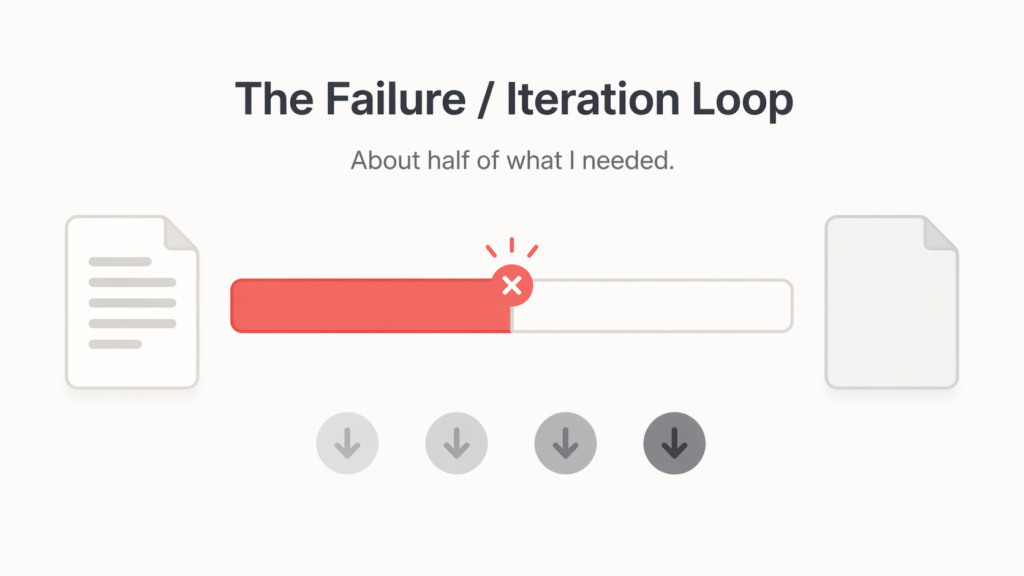
The links were almost never there. When they were, they appeared once, usually in the wrong section. Paragraph length crept up to 90 to 150 words regularly. The brand voice held for the first third and then drifted.
The lesson from round one was simple: a single prompt cannot hold the shape of a long article. The model does not forget what you asked for, but it does lose discipline over distance.
Round Two: Split It Into Two Passes
The fix seemed obvious. Break the article into two prompts. First prompt handles the introduction and the first three sections. Second prompt handles the remaining sections, the checklist, and the close.
This was better. The structure got more consistent and the output felt more controlled. But two new problems appeared almost immediately.
First, the total word count only reached 1,250 to 1,450 words. Still short. Second, the second prompt kept repeating the article title at the top of its output, even when I told it not to. Every single time. It was one of those things that seemed easy to fix with a clearer instruction, and then kept happening anyway.
Two-pass generation was clearly the right direction. But prompting alone was not going to solve everything.
Round Three: Stop Trying to Fix Everything in the Prompt
This was the turning point, and it came from accepting something uncomfortable: some problems are easier to fix with code than with words.
The internal linking issue was a good example. Asking the model to place links naturally and distribute them across the article produced inconsistent results. Sometimes it worked. Sometimes all four links landed in the same paragraph. Trying to write a prompt that reliably fixed this was a diminishing returns exercise.
So instead, I introduced ALL CAPS placeholders inside the generated content. The model would write something like “working with a NYC EVENT PRODUCTION team means…” and a post-processing script would replace that placeholder with the actual hyperlink after generation. Clean output during writing, correct links in the final version.
The duplicate title problem got solved the same way. A function scanned the combined output for any repeated H1 and removed it automatically. Two lines of code that worked every time, compared to prompt instructions that worked most of the time.
Round Four: Tighten Everything and Accept the Tradeoff
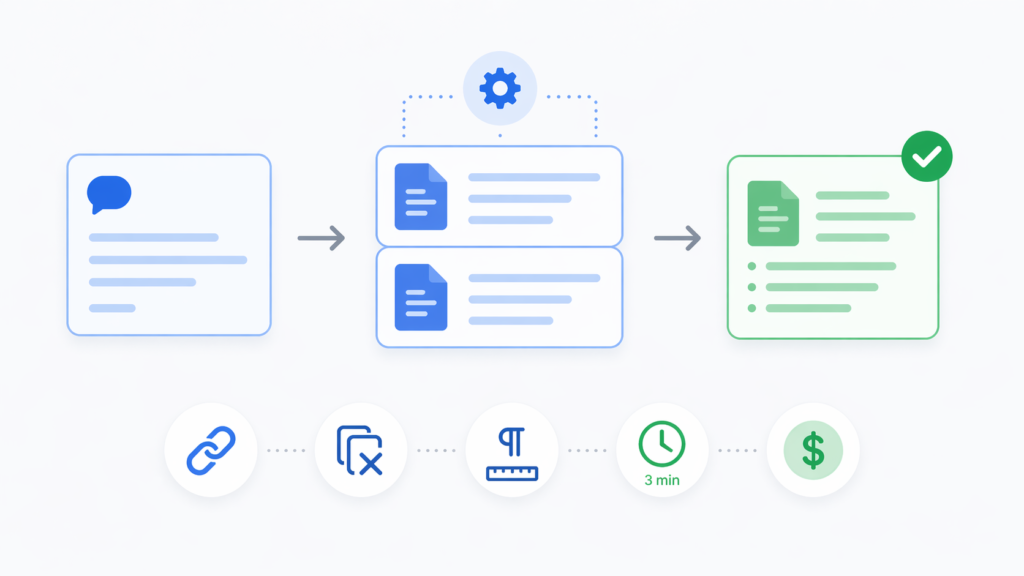
The final version of the system pulled everything together. Two-pass GPT-4o generation with lower temperature for consistency, maximum token allowance to reduce early stopping, strict paragraph length instructions, the duplicate title remover, and the link post-processing step.
Here is what stable output looked like:
- Word count: 1,320 to 1,450 words per post
- Generation time: around 3 minutes
- Human editing time: 5 to 10 minutes
- Internal links: 4 to 5, placed naturally
- Paragraph length: almost always under 70 words
- Cost per post: approximately $0.20
- Brand voice: consistently strong
The one thing that did not get solved was the word count target. The original goal was 1,950 to 2,100 words. The system never reliably got there. After a while, I stopped trying to force it and started asking a different question: is a consistent 1,380-word post that ships every time actually worse than a 2,000-word post that requires constant intervention?
For this workflow, the answer was no. The shorter, cleaner draft was more useful.
What the Numbers Actually Look Like
Compared to the manual baseline, the impact was significant across every metric that mattered.
- Annual writing time dropped from 208 to 260 hours down to roughly 26 to 39 hours including editing
- Cost per post dropped from $50 to $150 down to about $0.20 in generation cost
- Annual content cost dropped from up to $7,800 to just over $10 in API spend
- Time saved across 52 posts: roughly 180+ hours per year

The word count shortfall meant each post needed a bit more from the human editor to expand key sections. But that tradeoff was worth it given everything else the system got right.
The Four Things That Kept Breaking
If you are building something similar, these are the failure modes worth knowing about before you hit them yourself.
Word count collapse. Single-pass prompts consistently fell short. The model does not run out of knowledge, it just loses structural discipline over long outputs. Two-pass generation is the practical minimum for anything over 1,200 words.
Link clustering. Left to itself, the model tends to place multiple links close together or in a single section. Post-processing is far more reliable than prompt instructions for solving this.
Title duplication. The second prompt often repeated the article title even with explicit instructions to skip it. A simple programmatic check fixed this permanently.
Paragraph bloat. Explanation-heavy sections regularly ballooned past 140 words. Explicit limits help, but a human pass is still the most reliable way to catch this.
The Actual Takeaway
The system did not produce the perfect 2,000-word automated blog post I originally planned for. What it produced was something more practical: a dependable, brand-consistent draft that is ready for a light human edit in under 10 minutes, at a cost that makes weekly publishing genuinely viable for any business.
The biggest mindset shift was treating the human editor as part of the system rather than as evidence that the system failed. The AI handles the structural heavy lifting. The editor catches what slipped through. Together, they produce something neither would get to as quickly alone.
If you are trying to build the same thing, start with two-pass generation, move formatting fixes into post-processing early, and pick a word count you can hit consistently rather than one you can hit occasionally.
Want to Talk Content Systems or SEO Strategy?
This kind of workflow thinking sits at the intersection of content operations and SEO. If you are trying to build something similar for your agency or business, or if you just want to talk through what a content system could look like for your specific situation, I am happy to get into it.
Dhruv is an SEO consultant working with agencies, founders, and business owners. 500+ projects. 6+ years. No fluff.
Let's Work Together.
Ready to grow? Pick the way that works for you.