
How I Brief AI to Write Industry-Specific Content That Does Not Sound Generic
This is the final post in the series. You can read the full strategy overview, keyword mapping, Sonar research process, cluster architecture, and publishing calendar strategy in the earlier posts.
The Problem With Generic AI Content
Ask any AI to write a blog post about AI for law firms without a proper prompt and you will get something that reads like a Wikipedia summary written by a consultant who has never worked with a law firm. Every sentence is technically accurate. Nothing is specific. The tone is the same whether the audience is a solo attorney or a healthcare CFO. It sounds like every other AI blog post because it was produced the same way every other AI blog post is produced.
The fix is not a better AI model. It is a better input. The model is only as specific as what you give it. A vague prompt produces vague output. A highly specific prompt with clear tone rules, structural requirements, and sourced research data produces something that actually reads like it came from someone who knows the industry.
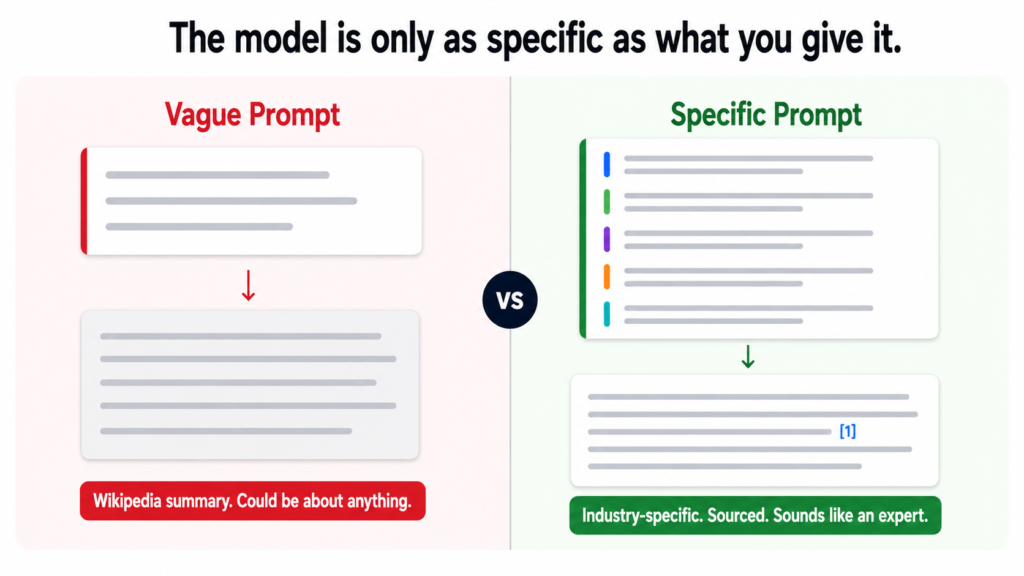
For the Tiger Tail project, 110 posts across five distinct industries needed to sound different from each other. A home services contractor does not want to read the same prose style as a law firm partner. Healthcare administrators do not respond to the same tone as accounting firm owners. The writing framework had to produce genuinely different output for genuinely different audiences from the same underlying system.
A prompt is not a topic request. It is a detailed instruction set that constrains how the model writes, what it includes, what it avoids, and how it adapts to each audience. The more specific the constraint, the more specific the output.
The Master Prompt Structure
Every blog post across all 110 briefs was written through a single master prompt. The prompt has five core sections. Each one does a specific job.
Who the brand is. Who they serve. What they do.
What the reader looks like when they land on this post.
This grounds every word in a specific person reading it.Section 2 — Writing Style Rules
Be direct. Say the thing plainly. No hedging.
Short sentences. Vary the rhythm.
Never open with a filler line.
No corporate speak. No em dashes anywhere.
Data leads. Back every strong claim with a named source.
Have a point of view. React to the data, do not just report it.Section 3 — Tone by Industry
Home Services: plain and blunt. Lead with money and time.
Real Estate: practical and fast-moving. Leads and closings.
Legal: precise and careful. Acknowledge complexity and risk.
Healthcare: empathetic and accurate. Never oversell.
Finance and Accounting: numbers first. Conservative claims.
Section 4 — Structure Rules
No fixed template. Let intent guide structure.
Headers only when the content genuinely needs them.
Open with the specific problem. End with a concrete takeaway.
CTA once only, placed where it earns its place.
Section 5 — Link and Citation Rules
External links embedded inline on the stat they support.
Internal links placed naturally in body context.
No links listed at the bottom. No forced placements.
The brand and audience context section is what most prompts skip entirely. Without it, the model has no reference point for who is reading. With it, every sentence is written toward a specific person in a specific situation rather than a generic professional in a vague industry.
The Tone Rules That Make the Biggest Difference
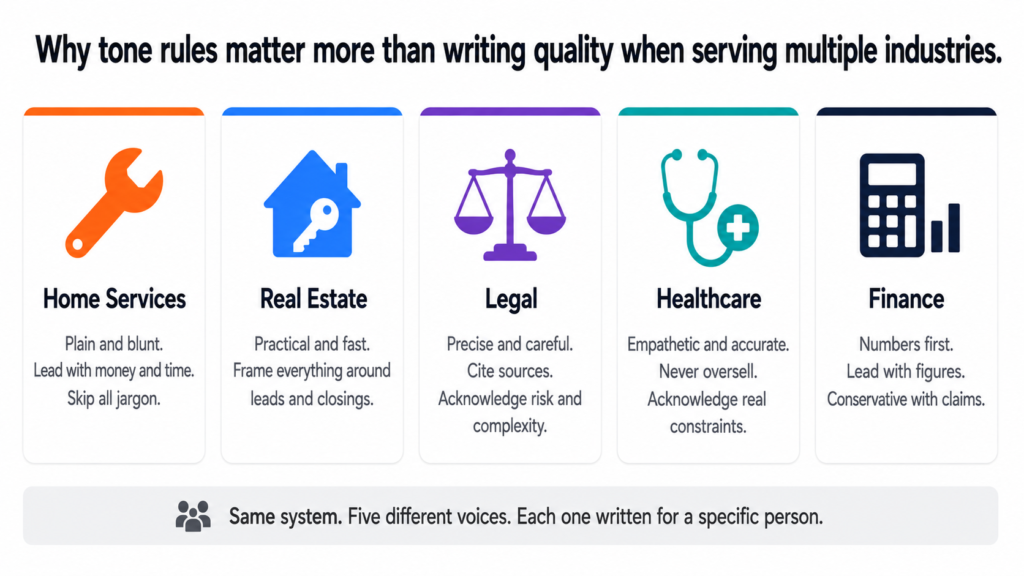
The tone-by-industry section of the prompt is what makes a legal post read differently from a home services post even though both go through the same system. Here is what each industry tone rule actually produces in practice:
| Industry | Tone Rule | What It Produces |
|---|---|---|
| Home Services | Plain and blunt. Lead with money and time. Skip jargon entirely. | A contractor reads it and thinks: this person gets how my business works. |
| Real Estate | Practical and fast-moving. Frame everything around leads, response time, and closings. | An agent reads it and immediately applies it to their pipeline. |
| Legal | Precise and careful. Cite sources properly. Acknowledge complexity and risk. | A lawyer reads it and trusts the accuracy. Does not feel oversold to. |
| Healthcare | Empathetic and accurate. Never oversell. Acknowledge real constraints. | A physician reads it and feels understood rather than marketed to. |
| Finance | Numbers first. Lead with figures. Be conservative with claims. | An accountant reads it and finds it credible enough to share with clients. |
The difference between a healthcare post and a home services post is not just vocabulary. It is the entire posture of the writing. Healthcare content that leads with money the way home services content does would feel wrong to a physician. Home services content that hedges and acknowledges complexity the way legal content does would lose a contractor in the first paragraph.
The Filler Openers List
One of the most specific sections of the prompt is a list of opening lines the model is explicitly told never to use. This matters more than it sounds. AI defaults to filler openers because they are the most statistically common way articles begin in its training data. Without a specific prohibition, the model will produce them every time.
“As businesses continue to evolve…”
“In an era of rapid technological change…”
“Whether you are a small business or a large enterprise…”
“Artificial intelligence is transforming the way…”
“It is no secret that…”
“Now more than ever…”
“In recent years, the rise of AI has…”
“Let us dive in.”
“Here is what you need to know.”INSTEAD: Open with the specific problem.
Name it plainly. No warm-up. No throat-clearing.
The reader should feel addressed by the second sentence.
Every one of those openers signals to a reader that the content was not written for them specifically. They have read that sentence a hundred times on a hundred different sites. Banning them forces the model to find a more direct entry point, which almost always produces a better opening than the default.
The Humanizer Pass
Even with a strong prompt, AI writing has patterns that accumulate across a long piece. Small habits that individually seem fine but collectively make the content feel generated rather than written. The humanizer pass catches these before anything gets published.
“Testament to”, “pivotal moment”, “underscores”,
“highlights the importance of”, “it is worth noting”.
Replace with the plain statement the inflation was hiding.Promotional language
Any word that sounds like marketing copy.
Seamless. Robust. Transformative. Game-changing.
These words mean nothing. Remove them.
Superficial -ing phrases
“Showcasing”, “reflecting”, “contributing to”,
“fostering”, “enabling”. These verbs add no meaning.
Replace with a direct statement of what actually happened.
Rule of three
Listing three synonyms when one would do.
“Efficient, productive, and streamlined.”
Pick one. The best one. Cut the other two.
Negative parallelism
“It is not just X, it is Y.” Always feels performative.
Just say Y. The contrast adds nothing.
Vague attributions
“Experts say”, “studies show”, “research indicates”.
Name the expert. Name the study. Name the year.
If you cannot, remove the claim entirely.
Generic positive conclusions
“The future is bright”, “now is the time to act”,
“the possibilities are endless”.
End with something specific or do not end with a conclusion.
The humanizer pass is not a stylistic preference. It is a quality gate. Every one of those patterns makes content feel less trustworthy to the reader, even if they cannot articulate why. Removing them is what takes a competent draft and makes it feel like something a real expert wrote.
The Final Check Before Publishing
Before any post from the Tiger Tail calendar goes live, it passes a final checklist. This is the last gate between the draft and the published URL.
No filler opener in the first paragraph
Every stat has an inline external link to its named source
Internal links appear naturally in context, not forced
CTA appears once only, where it earns its place
Tone matches the industry cluster it belongs to
Primary keyword in H1, first paragraph, and one H2
Meta title under 60 characters
Meta description under 160 characters
Image with descriptive alt text present
URL slug matches primary keyword
Humanizer pass completedAsk before publishing:
“What makes this obviously AI-generated?”
Fix those things. Then publish.
The last question in that checklist is the most important one. Not “does this read well” but “what would make a reader suspect this was generated.” That question forces a more honest review than general proofreading does because it is looking for the specific patterns that erode trust rather than just checking for errors.
What the Whole System Produces
Put together, the five layers covered across this series produce something most content strategies never achieve: a system where every post is intentional before it is written, researched before it is briefed, structured before it is published, and reviewed against the right standard before it goes live.
The keyword map tells you what to write and where it belongs. The Sonar research tells you what to say and how to back it up. The cluster architecture tells you how each post relates to everything around it. The calendar tells you when to publish it and removes every remaining decision. The writing framework and humanizer tell you how to make it sound like it was written by a person who genuinely knows what they are talking about.
None of these layers is complicated on its own. The value comes from all five working together. A calendar without research produces thin content. Research without a cluster produces isolated posts. Clusters without a framework produce inconsistent writing. The system only works when all five parts are in place.
I Built All of This. I Can Build It for Your Business.
The full content system — built for your website, your industry, your audience
Everything covered in this series is something I build for businesses and agencies. The keyword map. The Perplexity Sonar research data pack. The cluster architecture. The 24-month calendar with every row pre-loaded. The master writing prompt adapted to your brand voice and your industries. The humanizer rules built into every brief.
This is not a template. Every system I build is specific to the client. The Tiger Tail project took 11 clusters across 5 industries and produced 110 posts with full research and briefs. Yours will be built around your pages, your keywords, and your audience.
Here is what the engagement covers:
- Full keyword research and page mapping for your entire site
- Cluster architecture designed around your commercial pages
- Perplexity Sonar research data pack — real stats, named sources, citation URLs — for every post
- Complete publishing calendar with every row pre-loaded: meta titles, meta descriptions, intent, internal links, external sources, CTAs, and status tracking
- Master writing prompt built for your brand voice and adapted by industry or service area
- Humanizer checklist and final publish gate built into the workflow
- Publishing pace and cluster priority order matched to your domain’s current authority level
If you are a business owner who wants organic search working for you without paying for ads every month, or an agency that wants to deliver this kind of strategy for clients, book a call and let us talk through what it looks like for your specific situation.
Book a free 30-minute call
See the full SEO strategy service
This is the fifth post in the series. You can read the strategy overview, keyword mapping, research process, and cluster architecture in the earlier posts.
Why Most Content Calendars Get Abandoned
A content calendar that lives in a spreadsheet and gets ignored by week three is not a calendar. It is a guilt document.
Most content calendars fail for one of two reasons. Either they are built with titles and dates and nothing else, which means every publishing cycle starts with a blank page and a deadline. Or they are built with so much structure that maintaining the document takes more effort than writing the actual content.
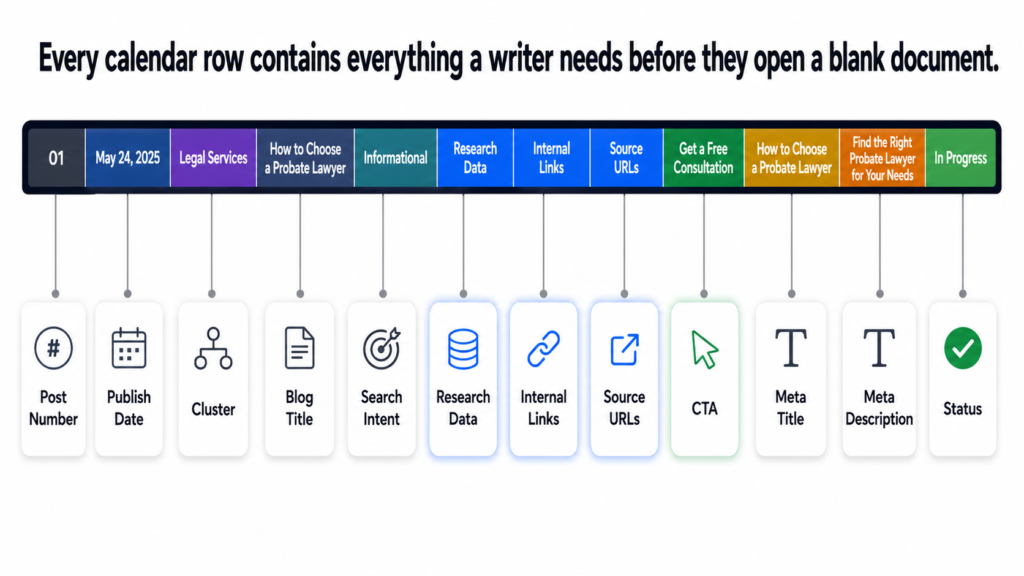
The calendar I built for Tiger Tail was designed around one principle: every row should contain everything a writer needs to start immediately with no additional briefing required. The calendar is the brief. The moment a post moves to “in progress,” the writer already has the research data, the source URLs, the internal links, the intent classification, and the CTA. Nothing is left to figure out.
A content calendar is only useful if it removes decisions, not adds them. Every decision about a post should be made when the calendar row is built, not when the writer opens a blank document.
What Every Calendar Row Contains
Here is the exact column structure used for every one of the 110 posts in the Tiger Tail calendar:
| Column | What It Contains | Why It Matters |
|---|---|---|
| Post Number | Sequential 1 to 110 | Tracks progress at a glance |
| Publish Date | Specific date from June 2026 | Removes scheduling decisions |
| Cluster | Which of the 11 clusters | Links post to parent page |
| Blog Title | Working title | Keyword-aligned, intent-matched |
| Search Intent | Informational, How-To, Comparison | Determines structure and depth |
| Research Data | Full stats from Perplexity Sonar | Writer uses this directly |
| Internal Links | Specific tigertail.co pages | No guessing where to link |
| External Links | Source URLs for every stat | Inline citations ready to use |
| CTA | One specific call to action | Placed once, where it earns its place |
| Meta Title | Under 60 characters | SEO-ready before publishing |
| Meta Description | Under 160 characters | No writing needed at publish time |
| Status | Not Started, In Progress, Written, Edited, Published | Single source of truth for progress |
Twelve columns per row. One hundred and ten rows. Every decision about every post made before the writing starts. A writer who picks up a brief from this calendar does not need to ask any questions. Everything is already there.
The Publishing Pace and Why It Was Set This Way
The publishing pace for a new domain is not just a volume decision. It is a trust-building decision. Google needs time to learn a new site. Publishing fifty posts in the first month on a brand new domain does not accelerate that process. It looks like a spam pattern to a domain with no history.
1 post per week on Mondays
Why: New domain needs consistent signals, not volume bursts.
Google indexes and evaluates early posts carefully.
Foundation being established. Quality over quantity.
8 posts published. All 11 clusters get early coverage.PHASE 2 — Week 9 onwards (July 27 2026)
2 posts per week — Mondays and Thursdays
Why: Domain has 8 weeks of consistent publishing history.
Google has begun learning the site structure.
Increasing pace signals growth, not spam.
102 remaining posts published across 51 weeks.
TOTAL DURATION
Approximately 24 months from first publish to post 110.
This is not slow. This is sustainable and compound-friendly.
The ramp from one to two posts per week was deliberately delayed until week nine. Eight weeks of consistent single-post publishing gives the domain enough history that doubling the pace looks like organic growth rather than a sudden content dump. The distinction matters to how Google interprets the signal.
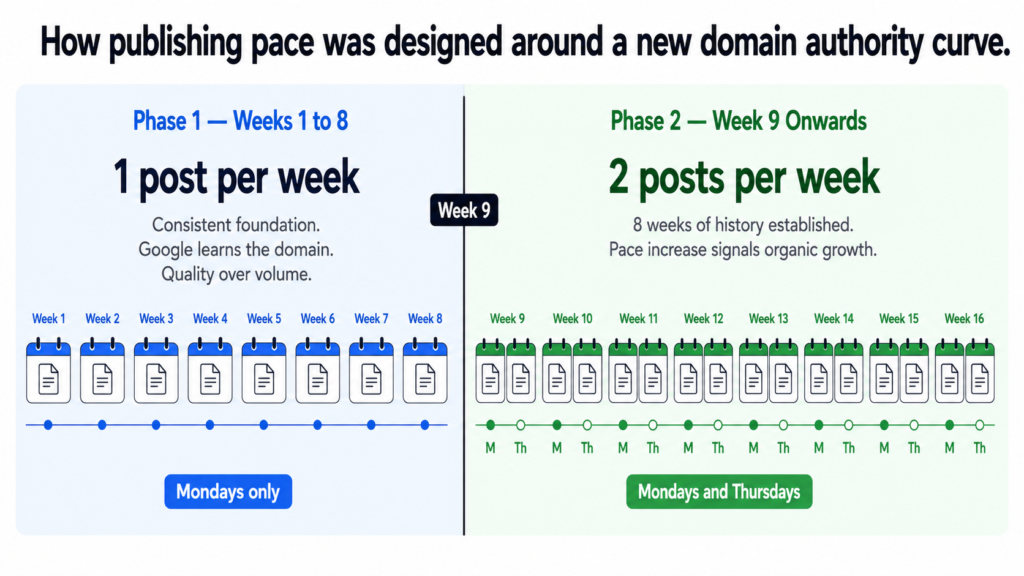
Publishing frequency on a new domain is a trust signal, not just a volume metric. Sudden spikes in publishing on a site with no history look very different to Google than a gradual ramp that mirrors how a real business grows its content operation.
The Cluster Priority Order
The order in which clusters get their first posts published was not decided alphabetically or by which felt most important to the client. It was decided by competition level and by what would give the domain the fastest path to early ranking signals.
| Priority | Cluster | Reason |
|---|---|---|
| 1st | AI Audit and Strategy | Establishes what the business does. First impression for Google. |
| 2nd | Home Services | Lower competition. Local long-tail keywords. Early wins possible. |
| 3rd | Workflow Automation | Strong long-tail demand. Less dominated by big brands. |
| 4th | Legal | Higher volume. Domain has history by now. Timing matters here. |
| 5th | Real Estate | Competitive but authority building from clusters 1 to 4. |
| 6th | Healthcare | Mid-competition. Domain credibility growing by this point. |
| 7th | Finance and Accounting | Specialist audience. Benefits from established domain trust. |
| 8th | Custom AI Development | Competitive space. Needs domain authority to compete. |
| 9th | Growth Engineering | Broad keyword competition. Later timing is strategic. |
| 10th | Systems and Operations | Niche audience. Works better once domain has full authority. |
| 11th | AI Training and Enablement | Lowest search volume. Low competition but small audience. |
The first three clusters were chosen because they give a new domain the fastest path to real ranking signals. Lower competition keywords on a new domain rank faster. Those early rankings build the domain authority that makes it possible to compete for the higher-volume keywords in clusters four through seven later in the program.
Starting with the legal cluster, which targets “ai for law firms” at 1,300 monthly searches, on a brand new domain would mean months of sitting on page ten for a keyword that Forbes, HubSpot, and established legal tech publications are already competing for. Starting there after six months of authority building from clusters one through three changes that calculation significantly.
On-Page Requirements Built Into Every Row
The calendar also carries on-page SEO requirements for every post so nothing gets published with missing elements. These are not suggestions. They are publishing gates.
Meta title under 60 characters — pre-written in calendar
Meta description under 160 characters — pre-written in calendar
At least one image with descriptive alt text
URL slug matching the primary keyword
Internal link to the parent service or industry page
2 to 3 internal links to related posts in the same cluster
CTA pointing to the relevant service page or booking link
All external stats linked inline to their source URLs
These are gates, not guidelines.
A post missing any of these does not get published.
The meta title and meta description are written when the calendar row is built, not when the post is about to go live. This matters because writing SEO metadata under deadline pressure produces generic titles that do not perform. Writing them as part of the planning process, when there is no urgency, produces titles that are actually designed to be clicked.
The Domain Authority Building Work That Runs Alongside Content
Content is the primary organic acquisition channel but it does not operate in a vacuum on a new domain. The calendar strategy included a set of parallel activities designed to accelerate the authority-building process from day one.
Clutch, G2, DesignRush, GoodFirms.
Each listing is a citation and a potential backlink.
Priority: first 30 days.
One guest post in first 3 months
One authoritative industry publication in the AI or SMB space.
A single quality backlink early on does more than
ten directory listings for domain authority signals.
Resource page outreach
Relevant AI consulting and automation resource pages.
Ask to be listed where genuinely relevant.
LinkedIn publishing
Every blog post shared on LinkedIn at publish time.
Drives early traffic signals back to new content.
Google notices traffic from social as a relevance signal.
Google Search Console setup — day one
Submit sitemap immediately. Monitor crawl coverage.
Catch indexing issues before they compound.
Google Analytics setup — day one
Track what is working from the first post published.
Data from month one informs decisions in month six.
Content without any off-page authority signals takes longer to move. These parallel activities do not replace the content work. They compress the timeline by giving Google additional trust signals while the cluster authority is still building.
What a 24-Month Calendar Actually Delivers
By the end of month 24, the Tiger Tail content program will have published 110 posts across 11 clusters, each one mapped to a commercial page, each one backed by real research and source citations, and each one part of an interconnected architecture that compounds in value every month it runs.
That is not a blog. That is an organic acquisition system that runs on a schedule, requires no paid media, and gets more valuable over time rather than less.
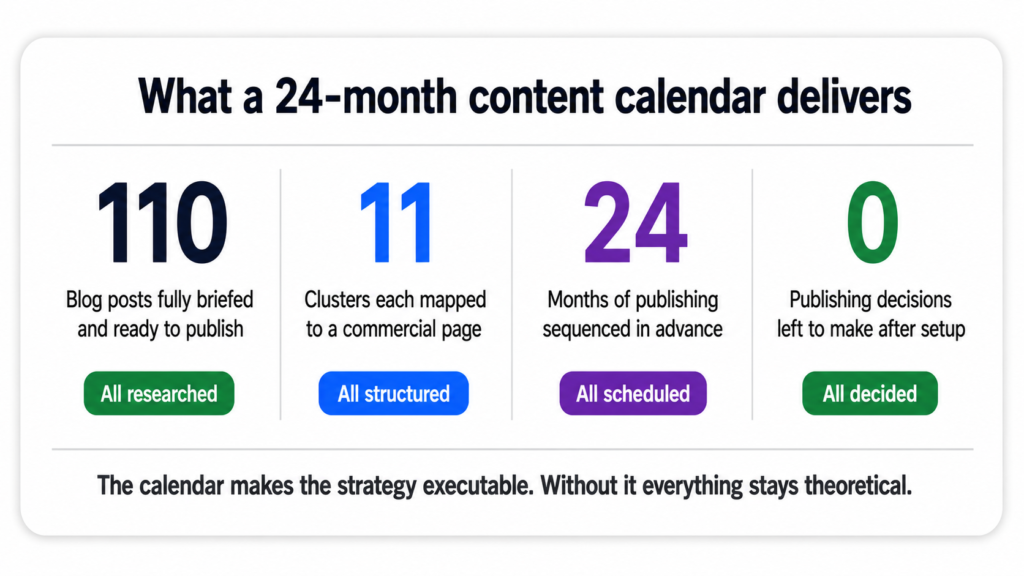
The calendar is not the strategy. It is the system that makes the strategy executable. Without it, even the best keyword research and cluster architecture stays theoretical. With it, 110 decisions are already made and every week the next post is ready to publish.
I Built This for a Client. I Can Build It for You.
A complete blog calendar built for your business — researched, structured, and ready to publish
What I built for Tiger Tail — the keyword mapping, the Perplexity Sonar research, the cluster architecture, the 110-post calendar with every row pre-loaded — is something I build for businesses and agencies. If your content is not producing organic traffic, the calendar and the structure behind it is almost always the missing piece.
Here is what you get:
- Full keyword research mapped to every page on your site
- Cluster architecture designed around your services and industries
- Research data pack for every post — real stats, named sources, citation URLs
- Complete publishing calendar with meta titles, meta descriptions, intent classification, internal links, CTAs, and status tracking — all pre-built
- Publishing pace and cluster priority order matched to your domain’s current authority level
Book a free 30-minute call
See the full SEO strategy service
The last post in this series covers how I brief AI to write industry-specific content that actually sounds like it was written by someone who knows the subject: how I brief AI to write content that does not sound generic.
This is the fourth post in a series about building a 110-post SEO content strategy from scratch. You can read the full strategy overview here, the keyword mapping post here, and the research process post here.
Why One Post Is Almost Never Enough
Here is a situation most business owners recognise. You write a detailed, well-researched blog post on a subject you genuinely know. You publish it. You wait. Three months later it is sitting on page four of Google and bringing in almost no traffic. The content is good. The keyword is real. Nothing happened.
The most common diagnosis for this is that the post needs more backlinks, or better on-page SEO, or a longer word count. Sometimes those things help. But the more fundamental issue is often that a single post on a new or mid-authority domain does not give Google enough to go on.
Google does not just evaluate individual pages. It evaluates patterns across a domain. A website that has published one post about AI for law firms is a website that mentioned the topic once. A website that has published ten interconnected posts about AI for law firms, each covering a different aspect and all linking to the same parent page, is a website that demonstrably understands the subject. Those two situations produce very different ranking outcomes.
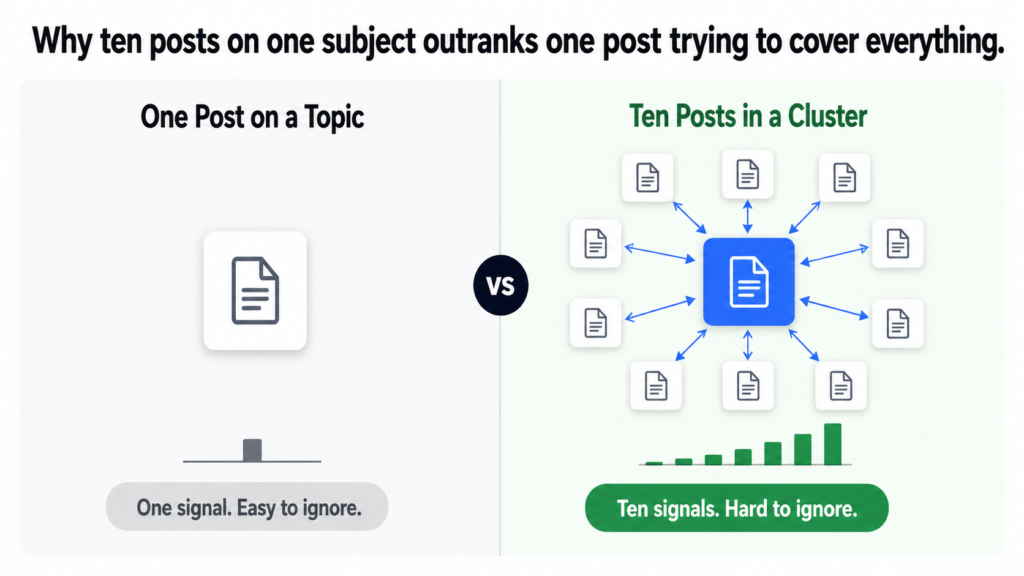
Topical authority is not about depth on one page. It is about breadth across multiple pages that together cover a subject more completely than any single competitor page can.
What a Content Cluster Actually Is
A content cluster is a group of related blog posts that all cover different aspects of the same subject, linked together and to a central parent page. The parent page targets a commercial keyword. The cluster posts target informational keywords around the same subject. Together they create a web of relevance that Google can follow in every direction and find consistent, substantive content.
The structure looks like this for the Tiger Tail legal cluster:
tigertail.co/ai-for-legal
Targets: “ai for law firms” — 1,300 monthly searches
Purpose: Convert visitors into leadsCLUSTER POSTS — all link back to parent page
Post 1: How Small and Mid-Size Law Firms Are Using AI in 2026
Post 2: How Much Time Are Your Lawyers Actually Spending on Billable Work?
Post 3: Legal Document Automation: How to Draft Faster Without Sacrificing Quality
Post 4: AI Contract Review: How to Cut Review Time From Hours to Minutes
Post 5: Client Intake Automation for Law Firms: Never Drop a Lead Again
Post 6: AI and Billing Ethics: What Every Lawyer Needs to Know About ABA Opinion 512
Post 7: How Law Firms Are Using AI to Win More Clients Without More Marketing Spend
Post 8: Matter Management Automation: How to Keep Every Case Moving
Post 9: Data Security and Confidentiality When Using AI at a Law Firm
Post 10: Solo and Small Firm AI: How Lawyers With Limited Budgets Can Compete
INTERNAL LINKING PATTERN
Every post links back to /ai-for-legal (parent page)
Every post links to 2-3 related posts within the cluster
Parent page links to the most relevant posts in the cluster
Ten posts. One parent page. Every post covers a different question a law firm partner might search for when researching AI. Together they build a complete picture of what the website knows about AI in legal. Individually, most of them would struggle to rank. As a cluster, each post lifts the others.
How Clusters Create Compounding Authority
The mechanism behind why clusters work is worth understanding properly because it changes how you think about content investment.
When Google crawls a new blog post, it evaluates that page partly on its own merits and partly on the context of the domain it sits on. A post published on a domain that already has nine related posts on the same subject starts with more context than a post published in isolation. Google can see that the domain consistently covers this topic. The new post is not a one-off mention. It is part of a pattern.
As the cluster grows, internal links pass authority between posts. A post that earns a backlink from an external source does not just benefit itself. Through internal linking, it passes some of that authority to every other post in the cluster and to the parent page. The whole cluster benefits when any one post performs well.
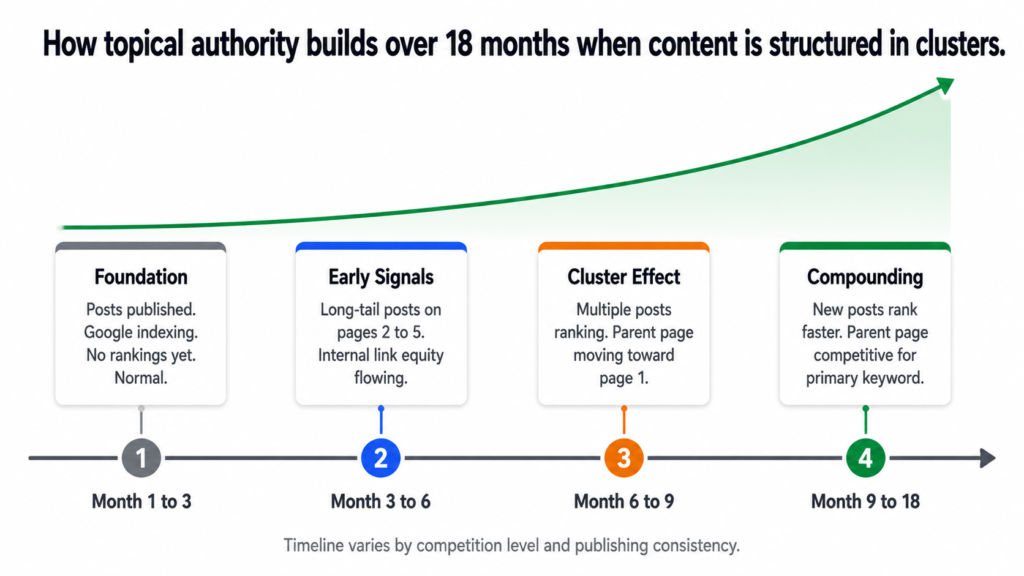
First cluster posts published.
Google crawls and indexes them.
Little to no ranking yet. Normal.
Domain is building context around the topic.Month 3 to 6: Early signals
Long-tail informational posts start appearing
on pages 2 to 5 for lower competition queries.
Internal link equity beginning to flow.
Parent page gains indirect authority.
Month 6 to 9: Cluster effect visible
Multiple posts from the same cluster ranking
for different keywords in top 20.
Parent page moving toward page 1 for primary keyword.
Google recognises topical depth.
Month 9 to 18: Compounding
Earlier posts strengthen as domain authority grows.
New posts in the cluster rank faster than early ones did.
Parent page competitive for high-volume keywords.
Cluster becomes a self-reinforcing authority signal.
This compounding effect is why the cluster approach produces better long-term returns than publishing the same number of posts on random topics. Forty posts spread across forty different subjects build forty isolated signals. Forty posts built across four clusters of ten each build four areas of genuine depth, and those four areas lift the entire domain.
How the 11 Clusters Were Decided
For Tiger Tail, the clusters were not chosen arbitrarily. Each one maps directly to either a service page or an industry page that already existed on the site. This matters because every blog post in a cluster has a clear commercial destination to link back to.
| Cluster | Parent Page | Primary Keyword | Monthly Searches |
|---|---|---|---|
| AI Audit and Strategy | /services/ai-audit-strategy | ai strategy consultant | 880 |
| Workflow Automation | /services/workflow-automation | business process automation services | 320 |
| Custom AI Development | /services/custom-ai-development | custom ai development company | 480 |
| Systems and Operations | /services/systems-operations-design | business systems consultant | 210 |
| Growth Engineering | /services/growth-engineering | ai marketing automation | 720 |
| AI Training | /services/ai-training-enablement | corporate ai training | 40 |
| Home Services | /ai-for-home-services | ai for contractors | 110 |
| Real Estate | /ai-for-real-estate | ai real estate agent | 590 |
| Legal | /ai-for-legal | ai for law firms | 1,300 |
| Healthcare | /ai-for-healthcare | healthcare workflow automation | 170 |
| Finance and Accounting | /ai-for-finance-accounting | ai for accounting firms | 70 |
Every cluster has a commercial destination. The blog posts in the legal cluster do not just exist to attract readers. They exist to attract readers who are researching AI for their law firm, build trust with them through genuinely useful content, and then point them toward a page where they can take action. The informational content and the commercial page work together rather than separately.
The Round-Robin Publishing Approach
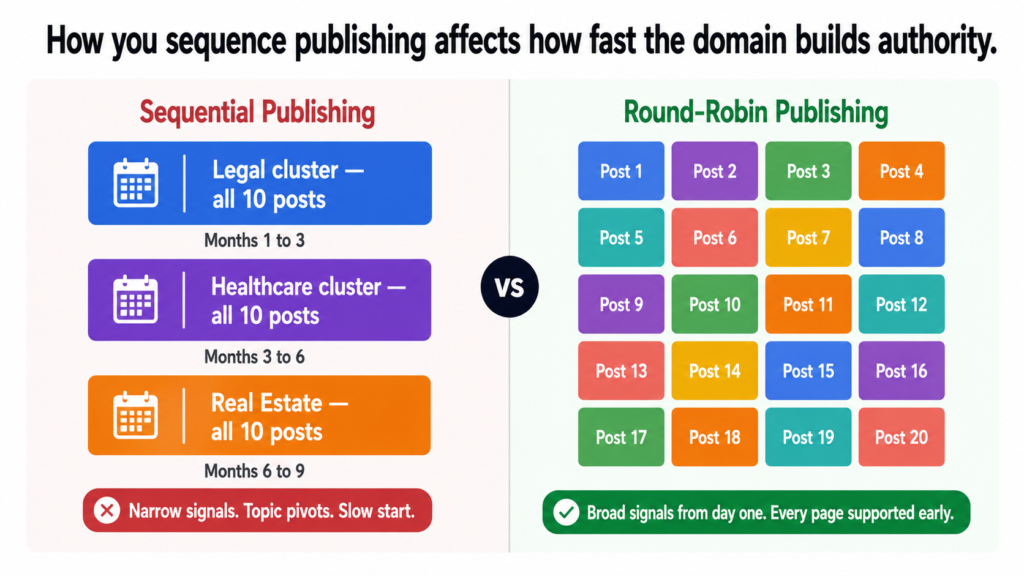
One structural decision worth explaining is that the publishing calendar does not work through one entire cluster before starting the next. It rotates across all eleven clusters from the beginning.
Months 1 to 3: Publish all 10 legal posts
Months 3 to 6: Publish all 10 healthcare posts
Months 6 to 9: Publish all 10 real estate postsProblem: Domain looks like it pivots between topics.
Google sees bursts of content then silence on a subject.
No broad topical signals in early months.
ROUND-ROBIN APPROACH (what we did)
Week 1: AI Audit and Strategy post 1
Week 2: Home Services post 1
Week 3: Workflow Automation post 1
Week 4: Legal post 1
Week 5: Real Estate post 1
… continues cycling through all 11 clusters
Result: Domain builds broad topical signals from day one.
Google sees consistent coverage across the full subject area.
Every page category gets early signals rather than delayed ones.
The round-robin approach means every cluster gets its first post in the early weeks. Every service page and industry page on the site starts receiving supporting content within the first few months. Nothing waits six months for its cluster to begin.
Publishing all content for one cluster before starting the next feels logical but it creates a domain that looks narrow early on. Google sees a site entirely focused on one topic and then suddenly pivoting. Round-robin publishing signals consistent, broad expertise from the start.
What Clusters Do That Individual Posts Cannot
The simplest way to understand the cluster advantage is to compare two domains publishing the same total number of posts over the same time period.
Each post covers one subject with no related content nearby.
No internal linking architecture.
No commercial page to feed authority into.
Google sees breadth but no depth on any subject.
Result: Most posts on pages 4 to 10. Low traffic. Few conversions.DOMAIN B — 50 posts across 5 clusters of 10
Each cluster covers one subject from 10 different angles.
Posts interlink within clusters and to parent pages.
Commercial pages benefit from cluster authority.
Google sees consistent depth on five clear subjects.
Result: Cluster posts on pages 1 to 3. Parent pages ranking.
Organic traffic building. Leads coming in.
Both domains published fifty posts. Same effort. Very different outcomes. The difference is entirely structural.
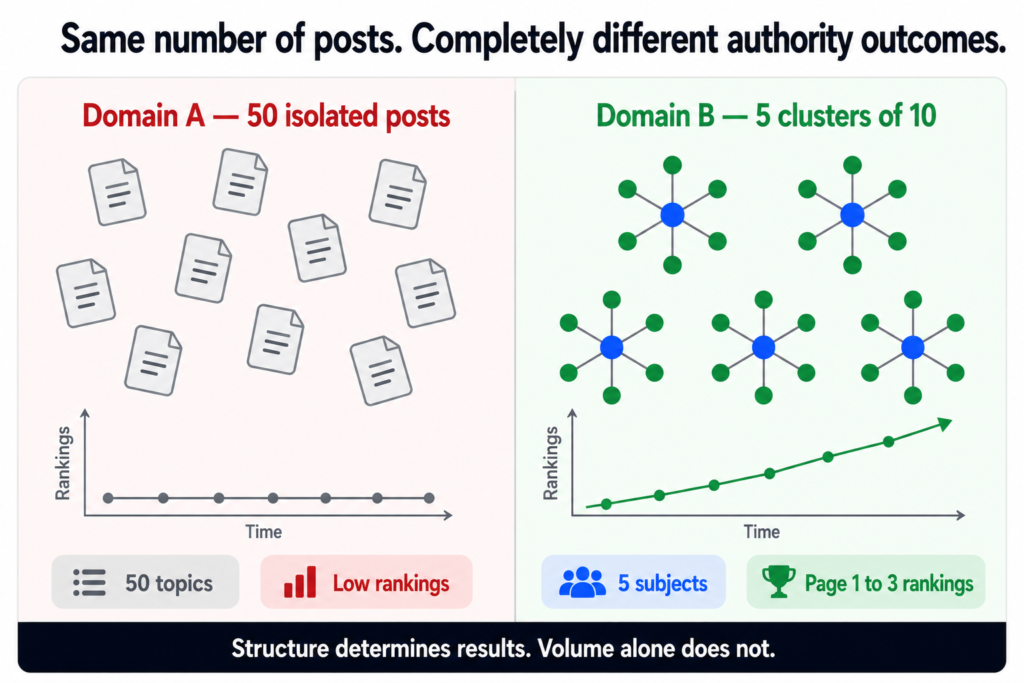
Clusters are not a content strategy preference. They are the mechanism by which a domain with limited authority competes with established sites. Ten posts covering one subject from ten angles consistently outranks one post trying to cover everything at once.
What Comes Next
With the cluster architecture designed and the research in place, the final structural decision was how to sequence the publishing calendar to get the most out of the domain authority building process. That is what I cover in the next post: how I build a 24-month blog calendar that a client can actually follow.
If you want a content strategy built around proper cluster architecture for your own website, book a call. The structure is what most content strategies are missing and it is the first thing I look at.
See how I approach SEO strategy →
Dhruv is an SEO consultant working with business owners, founders, and agencies. If organic search is not delivering for your business, this is where to start.
This is the third post in a series about building a 110-post SEO content strategy from scratch. Start with the overview here or read about keyword mapping here if you missed the earlier posts.
Why Most AI-Generated Content Feels Empty
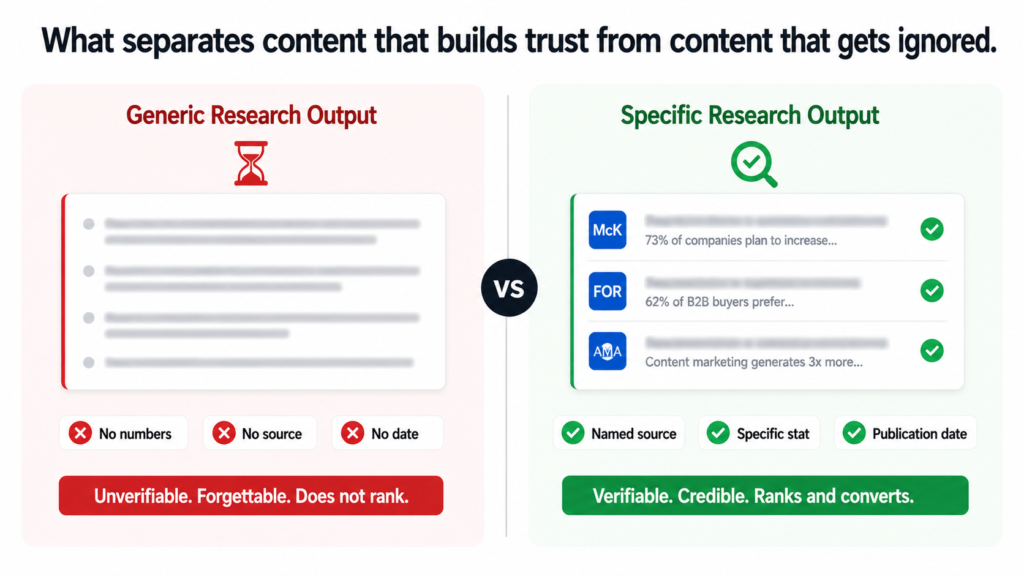
There is a specific feeling you get when you read AI-generated content that was not properly researched. It is technically accurate. It covers the topic. But it says nothing you could not have guessed without reading it. No numbers. No named sources. No dates. Just confident-sounding sentences that gesture at the subject without actually saying anything specific about it.
That content does not rank well because Google has seen millions of pages that say the same thing in slightly different words. It does not convert well because readers who are evaluating whether to hire someone do not trust vague claims. And it does not build authority because there is nothing in it that a competitor could not produce in three minutes.
The fix is not better writing. It is better research input before the writing starts.
What Perplexity Sonar Actually Does
Perplexity Sonar is the API version of Perplexity AI with live web search enabled. Unlike standard language models that draw only on training data, Sonar actively searches the web in real time and returns answers with cited sources.
For content research, this matters for one specific reason. Training data gets stale. A model trained on data from 2023 does not know what the AMA published in 2024 about physician burnout rates or what McKinsey’s 2025 State of AI survey found about how many organisations are actually scaling AI versus still experimenting. Sonar pulls that data live with the source URLs attached.
The goal of research is not to fill a brief with statistics. It is to find the specific numbers that make a claim undeniable. One well-sourced stat from a named publication does more for credibility than ten vague assertions about industry trends.
The Research Prompt Structure
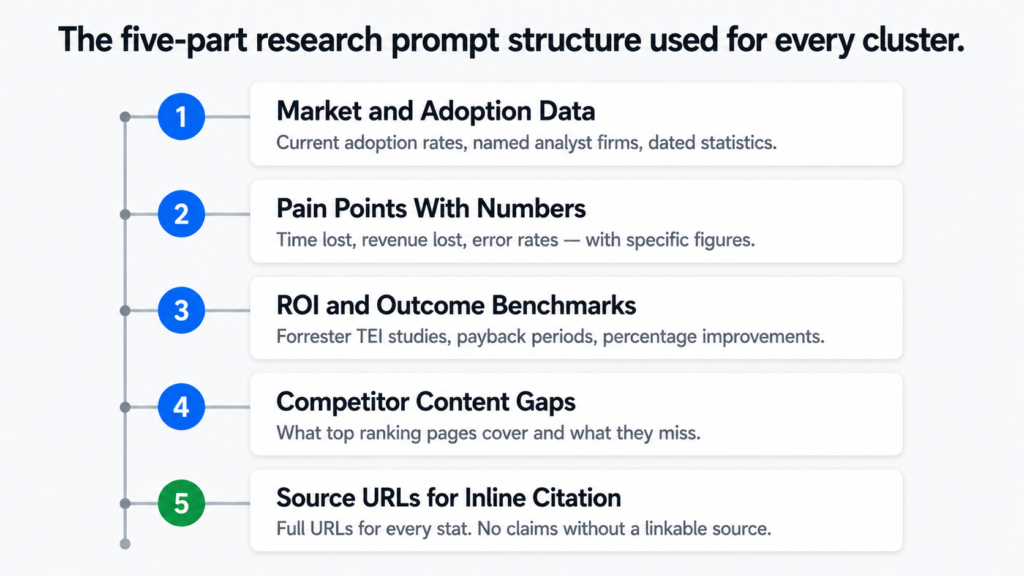
Every cluster in the Tiger Tail project got its own dedicated research prompt. Not a generic “tell me about AI in healthcare” request. A structured prompt designed to return exactly the categories of data the blog posts needed to be useful.
Here is the core structure I use for every cluster research prompt:
Current adoption rates with source and publication date.
How many businesses in this sector are using AI or automation.
Growth projections with named analyst firms.
2. Pain points with quantified data
Specific problems the audience faces, backed by survey data.
Time lost, revenue lost, errors caused — with numbers.
Named studies or reports, not vague attributions.
3. ROI and outcome benchmarks
What results do businesses actually see after implementation.
Forrester TEI studies, McKinsey surveys, industry reports.
Payback periods, percentage improvements, cost savings.
4. Competitor content gaps
Top 5 ranking pages for the primary keywords.
What they cover and what they miss.
Angles that are underserved in existing content.
5. Source URLs for inline citation
Full URLs for every stat returned.
Publication name, author where available, and date.
No stats used without a linkable source.
That structure applies to every cluster. What changes is the industry context and the specific questions asked within each category. A healthcare cluster research prompt asks about physician burnout rates and prior authorisation time. A legal cluster prompt asks about billable hour utilisation and contract review time. Same framework, different inputs.
What Good Research Output Looks Like
Here is an example of the difference between weak research output and strong research output for the same topic. Both are about physician burnout. Both are technically accurate. Only one is usable.
research-output-comparison.txt
——————————————————————————————————————
“Physician burnout is a serious and growing problem
in the healthcare industry. Many doctors report
feeling overwhelmed by administrative tasks and
documentation requirements. Studies show that
burnout rates have increased in recent years.”No numbers. No source. No date. No named study.
A reader cannot verify it. Google has seen it
a million times. Nobody finds it convincing.
STRONG RESEARCH OUTPUT
——————————————————————————————————————
“The AMA’s national physician burnout survey shows
that 43.2 percent of physicians reported at least
one symptom of burnout in 2024, down from 48.2
percent in 2023 but still far above 2011 levels.
AMA time-use data show physicians worked 57.8 hours
per week on average, spending 13 hours on indirect
patient care and 7.3 hours on administrative tasks.”
Source: AMA national physician burnout survey, 2024.
URL: ama-assn.org/[full path]
Specific percentage. Named organisation. Year.
Comparison data. Time breakdown. Linkable source.
A reader can verify it. Google can trust it.
The second version took the same amount of writing effort. The difference is entirely in the research input. Sonar returned the specific AMA data with the source URL. The writer used it. The post is now citing a real study from a named authority rather than making a vague claim that sounds like every other article on the subject.
How the Research Feeds the Brief
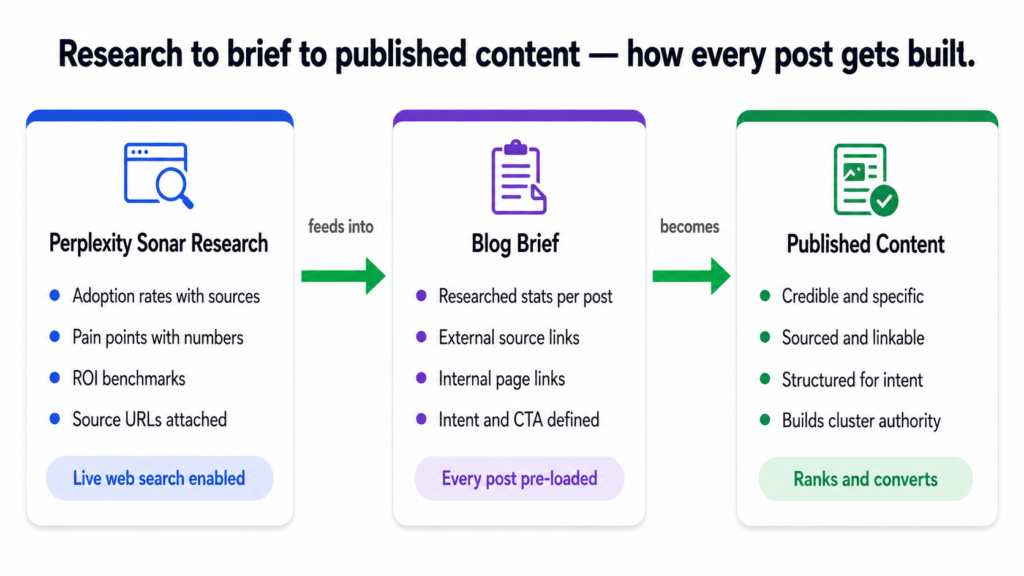
For the Tiger Tail project, every blog post brief was built around a structured data pack pulled from Sonar. Each brief included the following categories of research:
Full stats, proof points, and findings from Perplexity Sonar.
Sourced from 2024 to 2026 publications only.
Each stat matched to the specific post it would support.
External Links
Full source URLs for every statistic.
Only authoritative domains: AMA, McKinsey, Forrester,
Clio, Gartner, Deloitte, ABA, NAR, IBM, Zapier.
No aggregator sites. No low-authority citations.
Internal Links
Specific pages on tigertail.co to link to naturally.
Parent service or industry page for the cluster.
Related posts within the same cluster.
Search Intent
Informational, How-To, Comparison, or Commercial.
Determines structure, depth, and CTA placement.
CTA
One call to action per post, placed where it earns its place.
Not forced. Not repeated. One clear next step.
With that research in the brief, a writer does not need to go looking for statistics. They do not need to guess what sounds credible. Every claim they make is backed by something real before they write the first sentence.
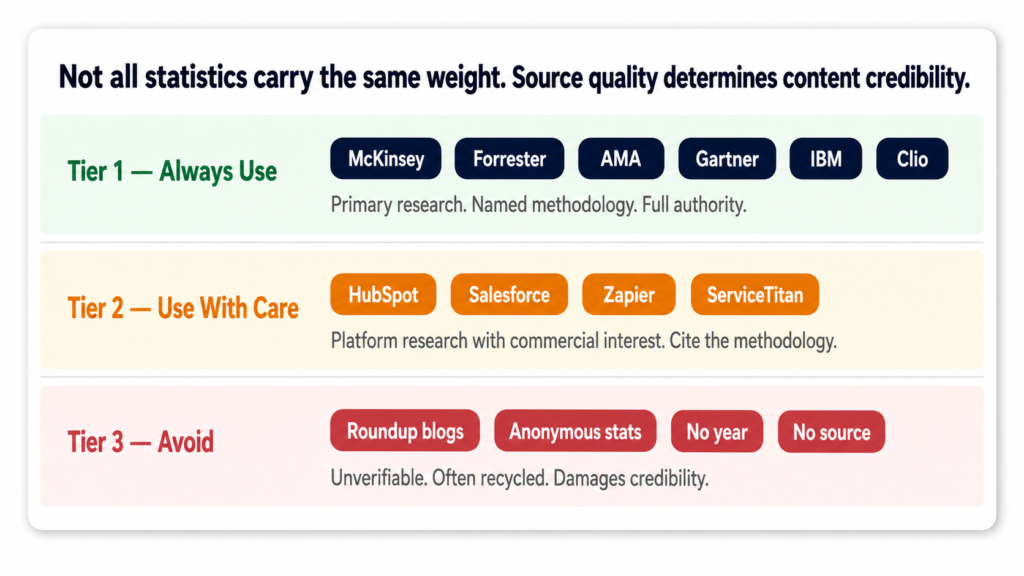
Why Source Quality Matters as Much as the Stat Itself
Not all statistics are equal. A stat from a Forrester Total Economic Impact study carries more weight than the same number repeated on a marketing blog. A figure from the AMA national physician survey is more credible than “experts say burnout is rising.”
For every cluster, the research was filtered to authoritative sources only. That meant primary research from named analyst firms, government or professional associations, peer-reviewed publications, and major industry platforms with named methodology. Anything that could not be traced back to a primary source did not make it into a brief.
McKinsey, Forrester, Gartner, Deloitte, BCG
AMA, ABA, NAR, AICPA, HIMSS, Clio Legal Trends
IBM Cost of Data Breach, Zapier State of Automation
Harvard Business Review, JAMA, NEJM
Government data: BLS, CMS, HHSUSE WITH CARE — Tier 2 Sources
Platform research from major SaaS companies
with named methodology and sample size.
Examples: HubSpot, Salesforce, ServiceTitan surveys.
Cite but note the source has a commercial interest.
AVOID — Tier 3 Sources
Anonymous blog posts repeating stats without sourcing.
Roundup articles that cite other roundup articles.
“According to experts” with no named expert.
Statistics without a year or methodology attached.
This filtering step is what protects the content long term. A blog post built on Tier 1 sources stays credible for years. A blog post built on recycled statistics from aggregator sites can be undermined the moment someone checks the original source and finds it does not say what the article claims.
The Real Reason This Step Cannot Be Skipped
It is tempting to move straight from keyword mapping to writing. Research feels like overhead. It adds time to the brief. It requires a tool and a process rather than just opening a document and starting.
But the research step is what separates content that builds genuine authority from content that just exists. Google can identify thin content. Readers can feel it. And in competitive niches like AI consulting, legal technology, or healthcare automation, you are competing against content backed by real data from serious publications. Vague claims do not compete with that.
Every post in the Tiger Tail project started with a research data pack. Every stat in every post has a source URL attached. That is not a quality-control step. It is the foundation the entire content strategy is built on.
What Comes Next
With keyword mapping done and research packed into every brief, the next decision was how to organise all 110 posts into a structure that builds compounding authority rather than just accumulating content. That is what cluster architecture is about and it is what I cover in the next post: why I build content in clusters, not one-off posts.
If you want a content strategy built this way for your own business, including the keyword mapping, Sonar research, and full brief pack, book a call and we can talk through what that looks like for your specific site.
See how I approach SEO strategy →
Learn about AEO and answer engine optimisation →
Dhruv is an SEO consultant working with business owners, founders, and agencies. If organic search is not delivering for your business, this is where to start.
This is the second post in a series about building a 110-post SEO content strategy from scratch. If you missed the first one, start here for the full overview.
The Problem With Keyword Research Done in Isolation
Most businesses approach keyword research the same way. They find a tool, type in their industry, get a list of terms with search volumes, pick the ones that look promising, and hand them to a writer. The writer produces content. The content gets published. Nothing ranks.
The missing step is not better keywords. It is understanding which page on the website each keyword belongs to and why. A keyword does not exist in a vacuum. It needs a home. And that home needs to be the right type of page for the intent behind the search.
Without that mapping, you end up in one of two bad situations. Either you create blog posts competing against your own service pages for the same keywords, or you create service pages targeting keywords that should be blog content. Both confuse Google and split your ranking potential instead of concentrating it.
The Two Types of Pages That Need Keywords
For the Tiger Tail project, the website had two distinct types of pages before a single blog post was written. Service pages and industry pages. Each type needs its own keyword logic.
Service pages target keywords where the searcher is looking for a solution or a provider. Someone searching “ai strategy consultant” or “workflow automation services” has commercial intent. They are not looking for an explanation. They are looking for someone to hire. These keywords belong on service pages, not blogs.
Industry pages target keywords where the searcher is a specific type of business looking for AI solutions relevant to their sector. Someone searching “ai for law firms” or “ai for real estate agents” has commercial intent too, but with an industry-specific lens. These keywords belong on the industry pages, not the blog either.
Blog posts serve a different purpose. They capture informational searches from people who are not ready to buy yet but are researching the problem. The blog content feeds authority to the service and industry pages. The pages convert. The blog attracts.
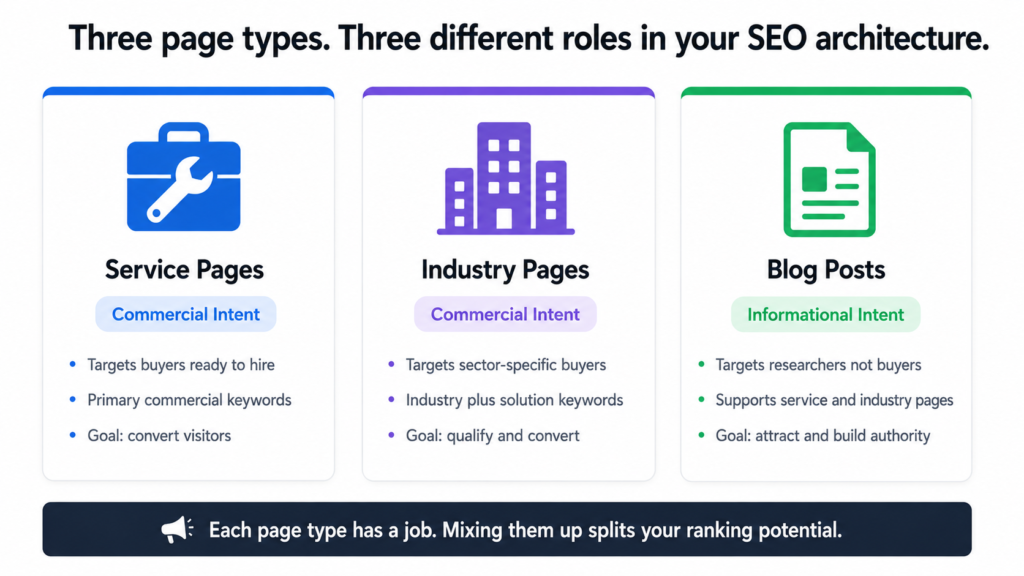
Service pages and industry pages target buyers. Blog posts target researchers. Mixing them up is one of the most common and most damaging SEO mistakes a business can make.
The Actual Mapping: Real Data From the Project
Here is what the keyword-to-page mapping looked like for the Tiger Tail service pages. Every page got its primary keywords and monthly search volumes confirmed before any content was briefed.
service-page-keyword-map.txt
Page URL                              Primary Keyword                    Monthly Searches

/services/ai-audit-strategy            ai strategy consultant                      880
/services/ai-audit-strategy            ai readiness assessment                     720
/services/ai-audit-strategy            ai implementation consultant                390
/services/ai-audit-strategy            automation consultant                       480
/services/workflow-automation          business process automation services        320
/services/custom-ai-development        custom ai development company               480
/services/custom-ai-development        ai integration services                     590
/services/growth-engineering           ai marketing automation                     720
/services/growth-engineering           ai lead generation agency                   110
/services/ai-training-enablement       corporate ai training                        40
And here is the same mapping for the industry pages:
industry-page-keyword-map.txt
Page URL                              Primary Keyword                    Monthly Searches

/ai-for-legal                          ai for law firms                          1,300
/ai-for-real-estate                    ai real estate agent                        590
/ai-for-real-estate                    ai for real estate agents                   480
/ai-for-healthcare                     healthcare workflow automation              170
/ai-for-finance-accounting             ai for accounting firms                      70
/ai-for-home-services                  ai for contractors                          110
/ai-for-legal                          legal document automation                   170
/ai-for-healthcare                     ai for medical billing                       90
Looking at this data together, the legal page stands out immediately. “Ai for law firms” at 1,300 searches per month is the single highest-volume keyword across all pages on the site. That tells you the legal cluster needs serious depth in the blog to give that page the authority it needs to compete.
The corporate AI training page, on the other hand, targets “corporate ai training” at just 40 searches per month. That is a low-volume keyword but the commercial intent behind it is very high. Someone searching that phrase is almost certainly a business ready to spend money on training. Low volume does not mean low value.
How Search Volume Shapes Priority, Not Just Selection
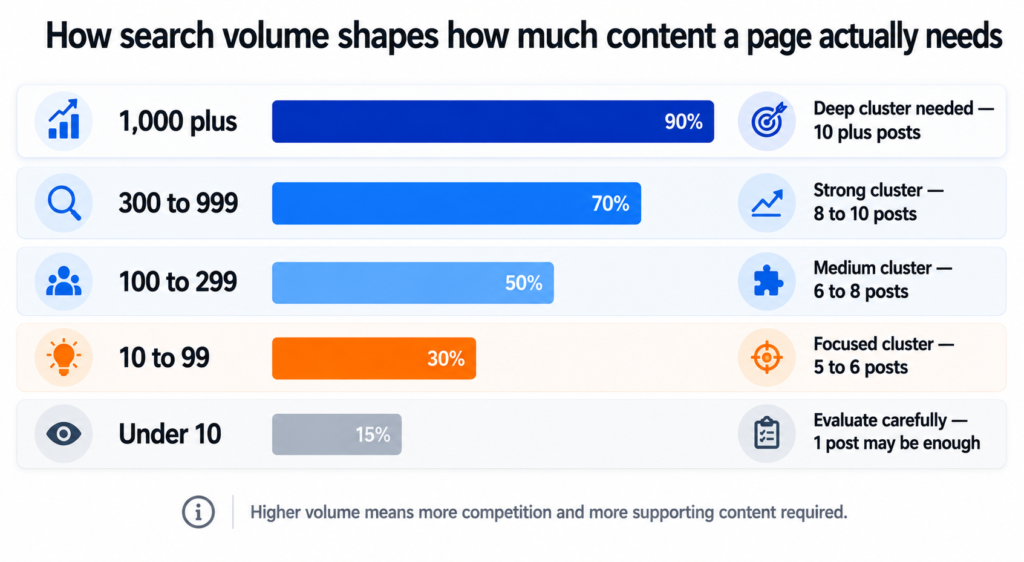
This is the part most keyword guides miss. Search volume is not just a filter for deciding which keywords to target. It is an input for prioritising which content to build first and how much of it you need.
A page targeting a keyword with 1,300 monthly searches needs more supporting blog content around it than a page targeting 40 monthly searches. Not because the second page matters less, but because Google needs to see more topical depth before it will trust a new domain with a high-volume, competitive keyword.
volume-to-priority-logic.txt
Volume Range      What It Means                          Content Priority

1,000+            High demand. High competition.             Deep cluster needed.
                  Big brands likely dominating page 1.       10+ supporting posts.
                  New domain needs time and authority.

300 to 999        Solid demand. Beatable competition         Strong cluster needed.
                  with quality content and good structure.   8 to 10 supporting posts.

100 to 299        Moderate demand. Often less competitive.   Medium cluster.
                  Good early target for a new domain.        6 to 8 supporting posts.

10 to 99          Low volume. Often high commercial intent.  Focused cluster.
                  Worth targeting if buyer intent is clear.  5 to 6 supporting posts.

Under 10          Very niche. May still be worth it          Evaluate carefully.
                  if the buyer value per conversion is high. Single post may be enough.
This framework shaped the entire cluster structure for the project. The legal cluster targeting 1,300 searches got ten posts. The AI training cluster targeting 40 searches also got ten posts, but those posts are written differently. More specific, more technical, more conversion-oriented, because the person reading them is further along in their decision.
Intent Is More Important Than Volume
Search volume tells you how many people are searching. Search intent tells you why. Getting the intent wrong is worse than targeting a low-volume keyword because it means you are attracting the wrong people even when you do rank.
Every keyword in the Tiger Tail mapping got an intent classification before it was assigned to a page. The classification is simple but it matters every time.
search-intent-classification.txt
Intent Type       What the Searcher Wants                 Right Page Type

Informational     Learning about a topic.                     Blog post.
                  Not ready to buy yet.
                  Example: "what is ai readiness assessment"

How-To            Looking for a process or steps.             Blog post or guide.
                  Example: "how to automate workflow"

Commercial        Researching providers or solutions.         Service or industry page.
                  Getting close to a decision.
                  Example: "ai strategy consultant"

Comparison        Evaluating options.                         Blog post or landing page.
                  Example: "make vs zapier vs custom automation"

Transactional     Ready to buy or contact.                    Service page with clear CTA.
                  Example: "hire ai implementation consultant"
A keyword like “what is an ai readiness assessment” is informational. It belongs in the blog as a post that educates the reader and links to the service page at the end. A keyword like “ai readiness assessment” with no qualifier is commercial. Someone typing that is likely comparing providers. It belongs on the service page itself.
Those two keywords look similar. They would land on completely different pages in a well-structured site. Getting that distinction right is what separates a site that converts from one that attracts traffic that never does anything.
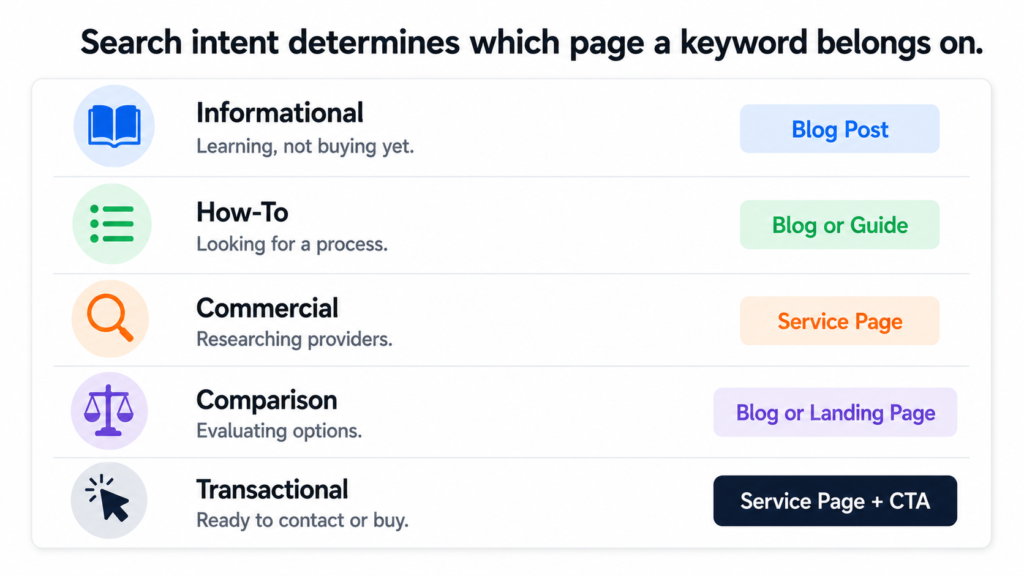
Putting commercial intent keywords on blog posts and informational keywords on service pages is one of the most common ways content strategies fail quietly. The traffic numbers look fine. The conversions never come.
The Before and After of Keyword Mapping
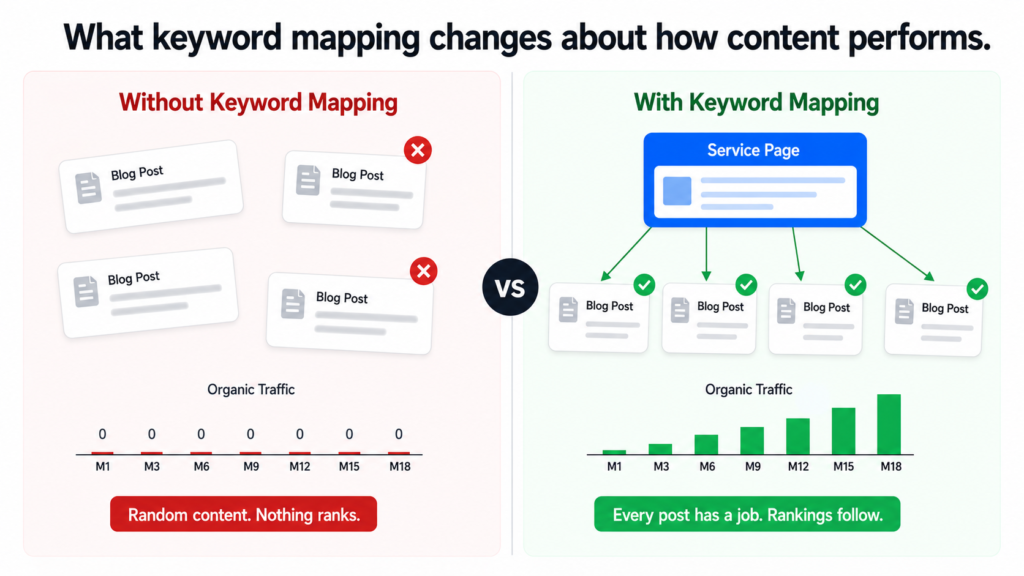
Here is what the approach looks like without mapping versus with it:
before-vs-after-mapping.txt
WITHOUT KEYWORD MAPPING

"Let's write a blog about AI for law firms."
"Let's write about what an AI consultant does."
"Let's cover AI pricing."

Result: Random posts. No page authority built.
        Service pages get no support.
        Blog competes with its own pages.
        Nothing ranks for anything meaningful.


WITH KEYWORD MAPPING

"ai for law firms" (1,300/mo, commercial) → /ai-for-legal service page
"how small law firms use ai" (informational) → blog post in legal cluster
"ai contract review" (informational/how-to) → blog post in legal cluster
"legal document automation" (170/mo, commercial) → /ai-for-legal page
"ai and billing ethics law firms" (informational) → blog post in legal cluster

Result: Service page targets commercial keywords.
        Blog cluster builds topical authority around it.
        Every post links back to the parent page.
        Google sees depth and relevance. Rankings follow.
The difference is not subtle. In the first approach, a business is just publishing. In the second, every piece of content has a specific job to do and a specific place in the architecture.
What Good Keyword Mapping Produces
By the time the keyword mapping was done for the Tiger Tail project, every page on the site had a clear primary keyword, a confirmed search volume, an intent classification, and a list of supporting blog topics that would feed it authority over time.
That groundwork meant every brief written after it had a reason to exist. Not just “here is a topic someone might find interesting” but “here is a keyword a real person searches for, here is the page it supports, here is how it fits into the cluster that will eventually rank the parent page.”
Keyword mapping is not a research exercise. It is a structural decision. It determines what gets built, where it lives, and what it is supposed to accomplish. Every hour spent on it saves ten hours of rewriting content that landed in the wrong place.
What Comes Next
With the keyword map in place, the next step was research. Not the generic kind where you read a few articles and summarise them. Proper data-backed research using Perplexity Sonar that produced real statistics, named sources, and proof points for every single post across all 110 briefs.
That process is what I cover in the next post: how I use Perplexity Sonar to research blog topics with real data.
If you want to talk through what keyword mapping would look like for your own website, book a call. I can usually tell within the first conversation whether a site’s content architecture is working for it or against it.
See how I approach SEO strategy →
Dhruv is an SEO consultant working with business owners, founders, and agencies. If organic search is not delivering for your business, this is where to start.
If you have not read the earlier posts in this series, start here to understand why most blogs fail and here for the competitor research approach.
Two Problems That Are Actually the Same Problem
The first problem is not knowing what to write about when competitor data is not an option. Either nobody in the niche is blogging with measurable results, the industry is too specific for competitor keywords to be meaningful, or the business simply wants to create content on its own terms rather than chasing what others are ranking for.
The second problem is that even when topic ideas exist, they never become a consistent publishing schedule. A blog calendar gets created in a meeting, lives in a Google doc for two weeks, and then quietly disappears. Publishing becomes irregular. Months go by. The blog never builds the compounding value it was supposed to.
These two problems look different on the surface but they come from the same place: there is no system underneath the content. The persona approach solves both at once. It gives you a method for generating months of relevant topics and a calendar that is specific enough to actually use.
Why Persona-Driven Content Works Differently
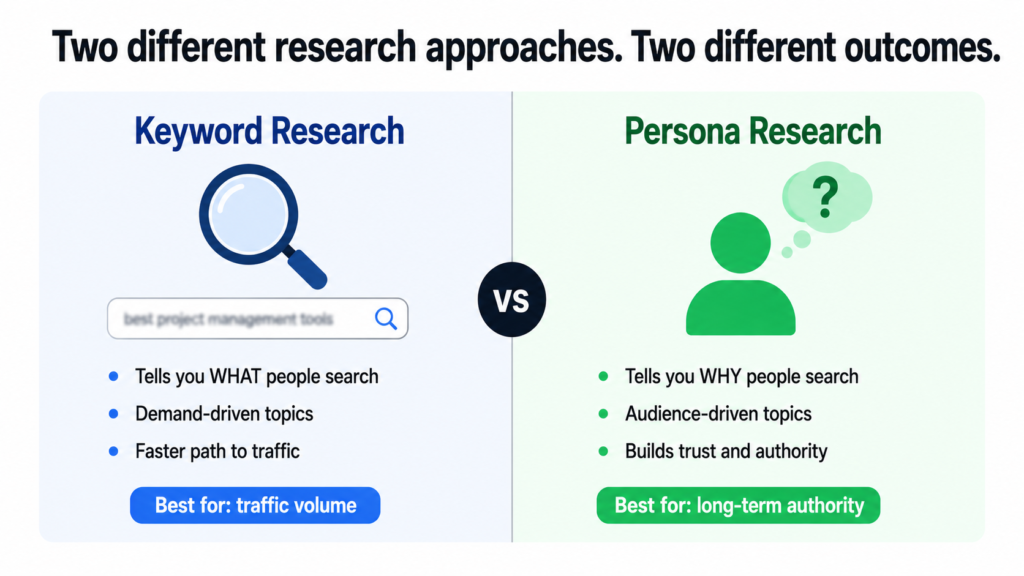
Keyword research tells you what people are searching for. Persona research tells you why they are searching for it and what they actually need when they get there.
Both matter. But for building long-term authority and genuine trust with your audience, persona-driven content wins. It speaks directly to the person behind the search rather than just matching the query. Readers feel understood. That is what makes them come back, share the content, and eventually reach out.
Content written without persona thinking tends to feel generic even when it is technically accurate. It covers the topic but it does not resonate with anyone in particular. It gets read and forgotten. It builds no relationship and no trust.
A blog that speaks to a specific person with a specific problem will always outperform a blog that speaks to everyone about a general subject. Specificity is what builds authority.
What a Buyer Persona Actually Is
A buyer persona is a detailed profile of an ideal customer. Not a demographic summary. A real picture of the person: their job role, their industry, what their day looks like, what keeps them stuck, what they are trying to achieve, what they search for when they have a problem, and what kind of content actually helps them make decisions.
Most businesses either have no defined personas or have ones that are too vague to be useful. Something like “marketing manager, 30 to 45, works at a mid-sized company” is not a persona. It is a demographic filter. A useful persona includes the specific frustrations, the exact questions they type into Google, and the outcomes they are trying to reach.
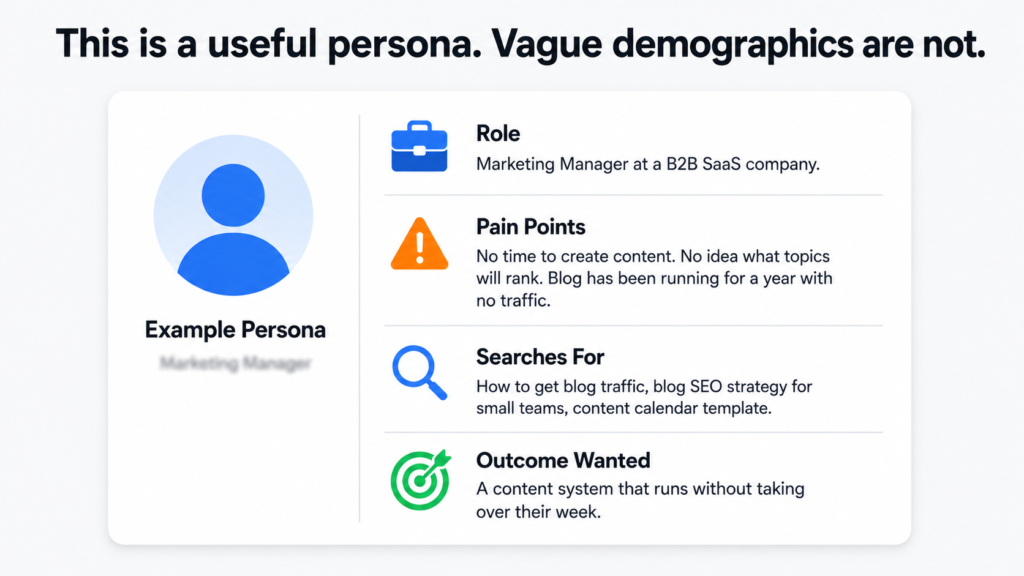
The good news is that you do not need a formal persona document to start. A rough description from someone who knows the customers well is enough to build on.
Why Blogs Without Persona Thinking Fail to Build Authority
The content is technically correct but feels like it could have been written for anyone. There is no consistent point of view. The topics jump around instead of building a coherent body of knowledge in one area. Readers do not feel like the brand actually understands their situation. They read, get the information they needed, and leave without ever considering the business behind the content.
Trust does not come from being informative. It comes from being specifically relevant to the person reading. That only happens when the content was built around a real understanding of who that person is.
The Full Process: From Personas to Published Calendar
Step 1 — Collect the buyer personas
Ask the business directly. Most will give you two to four personas without much prompting. What you need from each one: job title or role, the industry they work in, their biggest daily challenges, and the outcomes they are trying to achieve. If the business has never formally defined their personas, a rough description is fine to start. You are building a foundation, not a final document.
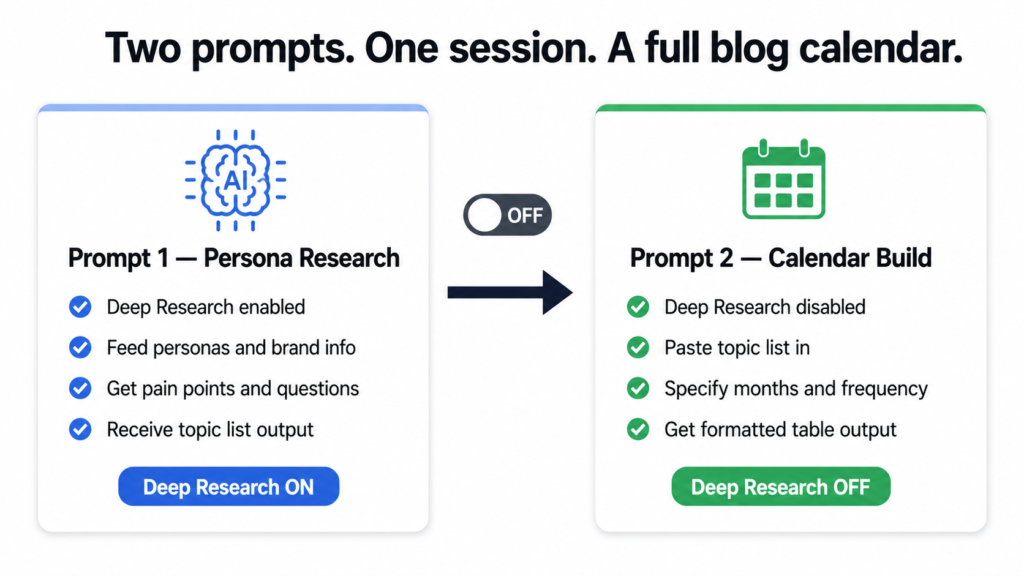
Step 2 — Use AI with Deep Research enabled
Open an AI tool that supports Deep Research mode. This feature allows the model to actively search the web rather than drawing only on its training data. That means the persona research it returns is grounded in current, real information: forums, communities, Reddit threads, LinkedIn discussions, industry publications, and survey data where it exists. This is what separates useful persona research from generic assumptions.
Step 3 — Run the persona research prompt
Feed the AI the business name and URL, a brief description of what it does and who it serves, the buyer personas, and the target location. Then ask it to research each persona in depth and return a specific number of blog topics based on what it finds. Here is the exact prompt to use:
I am building a blog content strategy for [Brand Name].
The website is [URL].
The brand [describe what it does and who it serves].

The buyer personas are:
[List each persona with job title or description]

Target location: [country or region]

Please use deep research to give me a detailed breakdown
of each persona including:
- Who they are
- Their biggest pain points and daily challenges
- The questions they commonly search for online
- The type of information they look for before making decisions
- What content would genuinely help them

After completing the research, generate [number] blog topic
ideas directly based on the pain points and questions you found.

Topics should be educational and informational, not promotional.
Format the topics as a numbered list.
Step 4 — Turn off Deep Research before the next step
Once you have the topic list, disable Deep Research. The next step is a formatting and planning task, not a research task. Keeping Deep Research on slows things down without adding value at this stage.
Step 5 — Build the calendar with a second prompt
Paste the topic list back into the AI and ask it to turn those topics into a structured blog calendar. Here is the prompt:
Using the blog topics listed above, please create a blog
calendar for [Brand Name].

Starting month: [month and year]
Blogs per month: [number]
Total duration: [number of months]

For each blog topic include:
- The topic title
- A brief content outline covering the key points
- The target buyer persona this post is written for
- A suggested publish date

Format this as a table with four columns:
Topic Title | Content Outline | Persona | Publish Date

So I can copy it directly into a spreadsheet.
In one working session, you now have a 3 to 6 month blog calendar with clear topics, content outlines, persona targeting, and publish dates. A writer can start immediately without further briefing. A client can review it as a deliverable.
What the Calendar Actually Gives You
The obvious output is a publishing plan. But the less obvious output is the removal of decision fatigue. One of the main reasons blogs become inconsistent is that every publishing cycle starts with the question of what to write next. That question never fully gets answered, the deadline passes, and the blog goes quiet for another month.
With a calendar in place, that question is already answered for the next six months. The only job left is execution. That shift from deciding to doing is what makes consistent publishing actually happen in practice rather than just in plans.
For consultants and agencies, the calendar also works as a client deliverable. It demonstrates strategic thinking beyond just writing. It shows that the content has a reason to exist, a defined audience, and a structure that builds toward something over time.
Why Consistency Is the Most Underrated Factor in Blog SEO
One blog post almost never produces meaningful results on its own. SEO from blogging is a compounding activity. The value builds as more posts are published, more keywords get covered, and Google increasingly recognises the website as a trustworthy source on a specific set of topics.
A business that publishes four well-targeted posts per month for six months has 24 pages competing for organic traffic. A business that publishes randomly has gaps, inconsistency, and a much weaker topical authority signal. Google notices the difference.
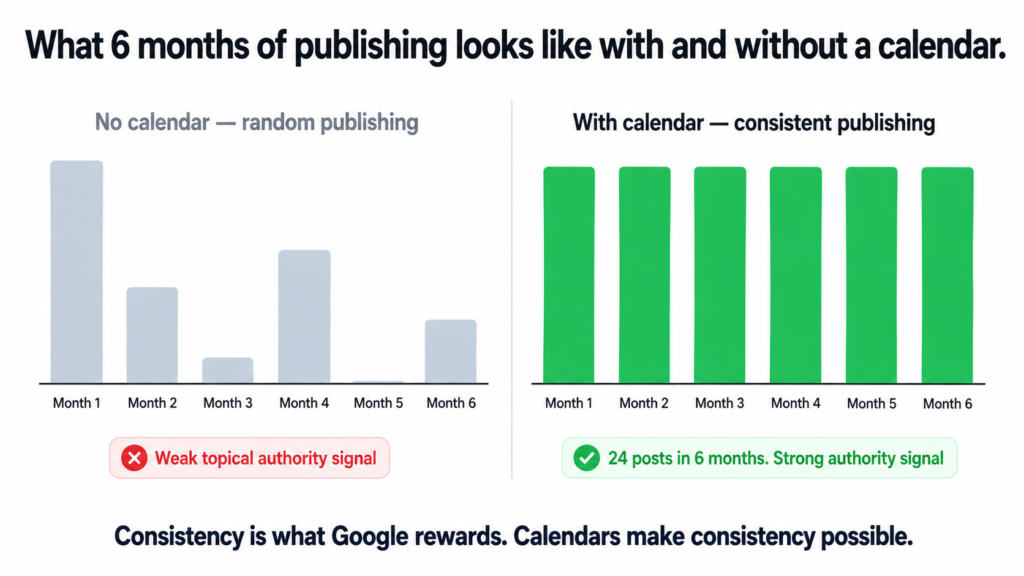
The calendar is not just a content planning document. It is the system that makes compounding SEO possible by turning irregular publishing into a predictable habit.
Topical authority does not come from one great post. It comes from consistent coverage of a specific subject area over time. Google needs to see a pattern before it starts treating a website as an authority on anything.
Competitor Approach vs Persona Approach — Which One Is Right
The competitor approach works best when there is proven search demand in the niche, multiple competitors are already getting blog traffic, and the primary goal is capturing a share of existing organic traffic as efficiently as possible.
The persona approach works best when the industry is niche or specialist, competitors are not actively blogging, the business wants to build a distinct voice, or the goal is long-term audience trust rather than short-term traffic volume.
The strongest content strategies use both. The competitor approach fills the calendar with high-demand topics that have a direct path to organic rankings. The persona approach fills the gaps with audience-first content that builds deeper relevance and trust over time. Together they cover both the traffic goal and the authority goal that I wrote about in the first post in this series.
Want Help Building This for Your Business?
A blog calendar built on real persona research gives you months of direction in a single session. But the research is only as good as the understanding of the audience behind it. If you want to build a content strategy that is actually tailored to your customers and your business goals, this is something I work through with clients directly.
Whether you need a full content strategy, help with SEO, or a conversation about what your blog should actually be doing for your business, book a call and we can get into the specifics.
See how I approach content and SEO strategy →
Dhruv is an SEO consultant working with business owners, founders, and agencies. If you want a blog that actually builds something, this is where to start.
How This Started
The brief was not complicated. A new AI implementation consultancy — Tiger Tail, based in Montclair, NJ — had just launched their website and needed a content strategy. They serve small and mid-size businesses across industries like legal, healthcare, real estate, home services, and finance. The site had industry pages and service pages already mapped out. What it did not have was a blog that could actually build organic traffic over time.
This is a situation I see constantly. The website exists. The pages are live. But without a content layer built around what the target audience is actually searching for, those pages sit there doing nothing. Google has no reason to show the site to anyone because there is no signal of depth, authority, or relevance yet.
The goal was to build that signal. Deliberately, systematically, over 24 months.
The Starting Point: Keywords and Page Mapping
Before writing a single brief or topic idea, the first step was understanding what the site was already trying to rank for and what search volume existed behind each page.
Every industry page and service page got mapped to its primary keywords and monthly search volumes. Not as a rough estimate but with specific data points that shaped priority decisions later.
A few examples from the service pages alone:
keyword-page-mapping.txt
Service Page                          Primary Keyword                    Monthly Searches

/services/ai-audit-strategy            ai strategy consultant                      880
/services/ai-audit-strategy            ai readiness assessment                     720
/services/growth-engineering           ai marketing automation                     720
/services/custom-ai-development        ai integration services                     590
/services/ai-audit-strategy            automation consultant                       480
/services/custom-ai-development        custom ai development company               480
/ai-for-legal                          ai for law firms                          1,300
/ai-for-real-estate                    ai real estate agent                        590
This mapping does two things. First, it tells you which pages matter most from a traffic potential standpoint. Second, it tells you which blog clusters need to be built first to support those pages with topical authority before competitors lock in their positions.
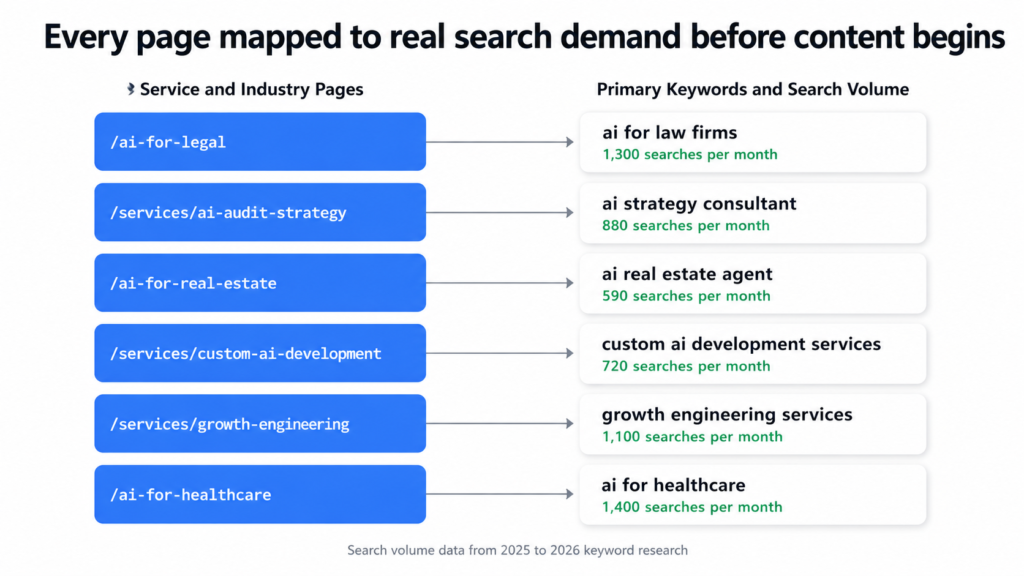
The legal page targeting “ai for law firms” at 1,300 searches per month, for example, is a page worth fighting for. But a new domain cannot rank for that keyword by just having a service page. It needs a cluster of supporting blog content that signals to Google that this site genuinely understands legal AI from multiple angles.
Building the Cluster Architecture
The core structural decision was to organise the entire blog around topical clusters rather than individual posts. Eleven clusters in total, each one mapped to either a service page or an industry page, each containing ten posts.
| Cluster | Parent Page | Posts |
|---|---|---|
| AI Audit and Strategy | /services/ai-audit-strategy | 10 |
| Workflow Automation | /services/workflow-automation | 10 |
| Custom AI Development | /services/custom-ai-development | 10 |
| Systems and Operations Design | /services/systems-operations-design | 10 |
| Growth Engineering | /services/growth-engineering | 10 |
| AI Training and Enablement | /services/ai-training-enablement | 10 |
| Home Services | /ai-for-home-services | 10 |
| Real Estate | /ai-for-real-estate | 10 |
| Legal | /ai-for-legal | 10 |
| Healthcare | /ai-for-healthcare | 10 |
| Finance and Accounting | /ai-for-finance-accounting | 10 |
110 posts total. Each cluster functions as a self-contained body of content on one subject, with every post linking back to the parent page and cross-linking to related posts within the same cluster. The effect builds over time: the more posts in a cluster, the stronger the topical authority signal, and the more likely every post in that cluster is to rank higher than it would in isolation.
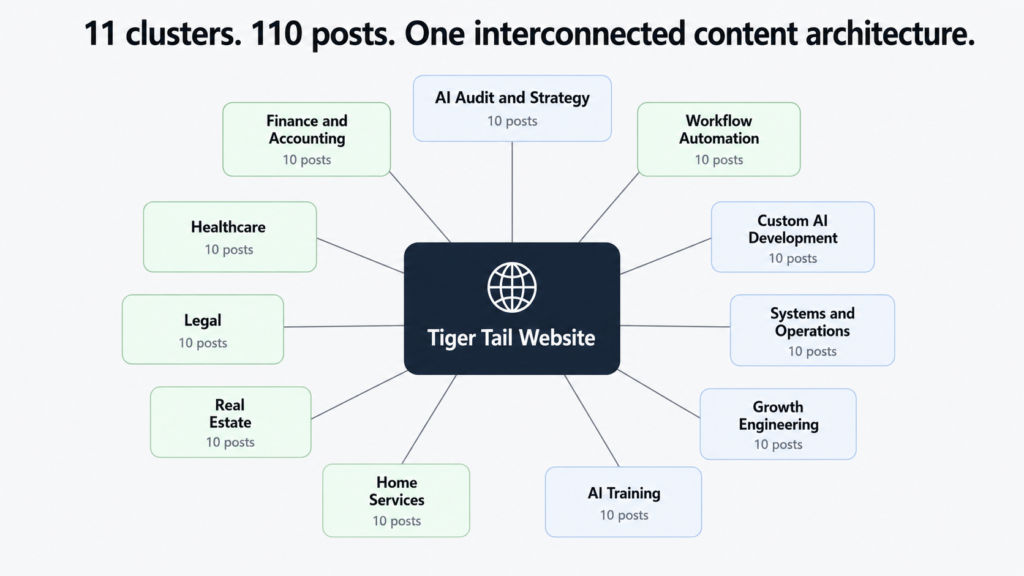
One post about AI for law firms is a blog post. Ten interconnected posts about AI for law firms, each covering a different angle and all linking back to the same service page, is a topical authority signal. Google treats these very differently.
The Research Layer: Where Most Strategies Stop Short
Topic ideas are the easy part. Every SEO agency can give you a list of blog titles. What separates a content strategy that actually performs from one that just fills up a blog page is the research behind each post.
For this project, every single post got its own research data pulled from Perplexity Sonar. Not generic AI training data. Live web research with real statistics, named sources, publication dates, and citation URLs.
The difference this makes is significant. A blog post about physician burnout that says “burnout is a growing problem in healthcare” is forgettable. A blog post that cites the AMA’s finding that 43.2 percent of physicians reported at least one symptom of burnout in 2024, down from 48.2 percent in 2023 but still far above 2011 levels, with a link to the source — that is a post that earns trust and ranks.
I cover exactly how I run the Perplexity Sonar research process in the next post in this series. The short version is that each cluster required a dedicated research prompt designed to return current statistics, pain points with quantified data, ROI benchmarks, and competitor content gaps. That research became the backbone of every brief.
The Publishing Strategy: Pace and Cluster Priority
A common mistake in content strategy is publishing randomly across topics and hoping something sticks. The publishing plan for this project was deliberately sequenced.
publishing-schedule.txt
# Publishing pace

Weeks 1 to 8    1 post per week on Mondays
Week 9 onwards  2 posts per week — Mondays and Thursdays
Total duration  approximately 24 months

# Cluster priority order (lowest to highest competition)

1.  AI Audit and Strategy       — establishes what the business does
2.  Home Services               — lower competition, local long-tail
3.  Workflow Automation         — strong long-tail, less dominated
4.  Legal                        — higher volume, domain has history by now
5.  Real Estate                  — competitive but authority building
6.  Healthcare                   — mid competition
7.  Finance and Accounting
8.  Custom AI Development
9.  Growth Engineering
10. Systems and Operations
11. AI Training and Enablement
The logic behind starting slow and ramping up is that Google needs time to learn a new domain. Publishing 20 posts in the first month on a brand new site does not accelerate that process. Publishing consistently, at a pace the site can sustain, signals stability and intent. The ramp to two posts per week after eight weeks happens once the foundation is established.
The cluster priority order follows a deliberate pattern too. Start with the clusters where competition is lowest so early posts have a realistic chance of ranking while the domain is still young. Build authority there. Then move into more competitive territory once Google has started to trust the site.
Publishing high-competition content too early on a new domain is one of the most common content strategy mistakes. The posts exist, they just sit on page eight indefinitely. Starting with winnable keywords lets early content generate signals that lift everything published later.
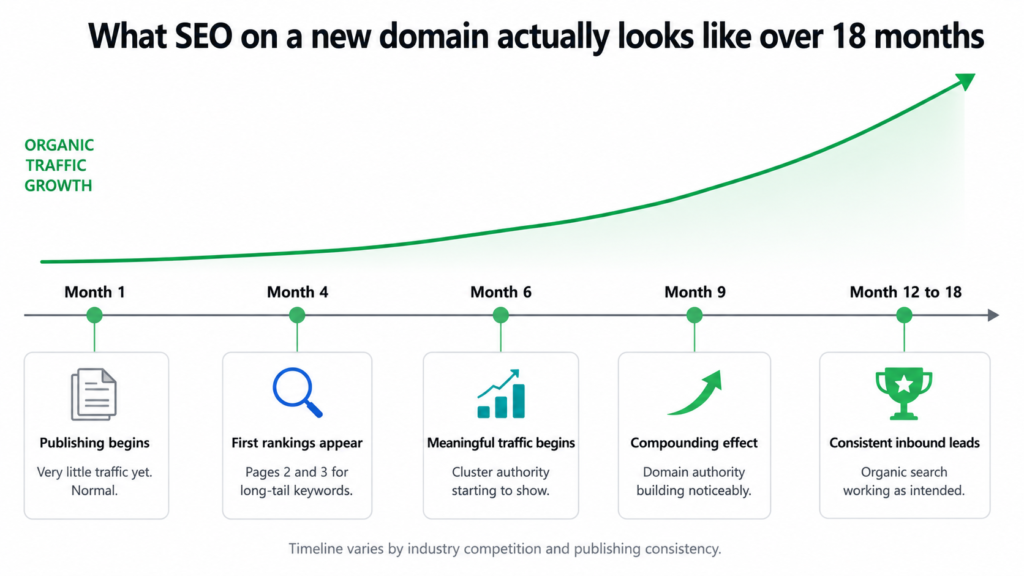
What the SEO Timeline Actually Looks Like
Part of building a strategy is being honest with the client about what to expect and when. Content SEO on a new domain does not produce results in the first month. Anyone who tells you otherwise is selling something.
seo-timeline-expectations.txt
Months 1 to 4
Publishing consistently. Very little organic traffic yet.
Google is learning the site. Foundation being built.

Months 4 to 6
First long-tail posts appearing on pages 2 and 3.
Some early page 1 wins on low-competition keywords.

Months 6 to 9
Meaningful organic traffic begins.
Cluster authority starts to show in rankings.

Months 9 to 12
Compounding effect begins.
Domain authority building noticeably.

Months 12 to 18
Consistent inbound leads from organic search.
Earlier posts climbing as domain strengthens.
This timeline is what I shared with the client upfront. Not because it is pessimistic but because it is accurate. Content SEO compounds. The value of every post published in month two does not peak in month two. It peaks in month ten when the domain has authority, the cluster has depth, and Google has seen consistent publishing for nearly a year.
The businesses that give up at month three are the ones that never find out what month twelve would have looked like.
The Writing Framework
With 110 posts across 11 different industries and service areas, consistency of quality was a real challenge. The solution was a master writing prompt that every post gets written through — one that carries the brand voice, tone rules, structural requirements, and humanizer guidelines, and adapts by industry.
The prompt covers things like: never open with “In today’s digital landscape,” no em dashes anywhere, every strong claim backed by a named source with an inline link, and a specific tone shift depending on whether the post is for a home services contractor or a law firm partner. Those two audiences need to be spoken to completely differently even if the underlying AI subject is similar.
I cover the full writing framework and how to build one in the last post in this series.
What This Whole Thing Actually Delivers
At the end of this process, the client had something most businesses never build: a content system with a reason behind every decision. Every post has a cluster it belongs to. Every cluster has a parent page it supports. Every parent page has keywords worth ranking for. And every keyword was chosen because real people search for it when they have a problem the client can solve.
That is not a blog. That is a compounding organic acquisition channel built to run for two years and keep delivering after that.
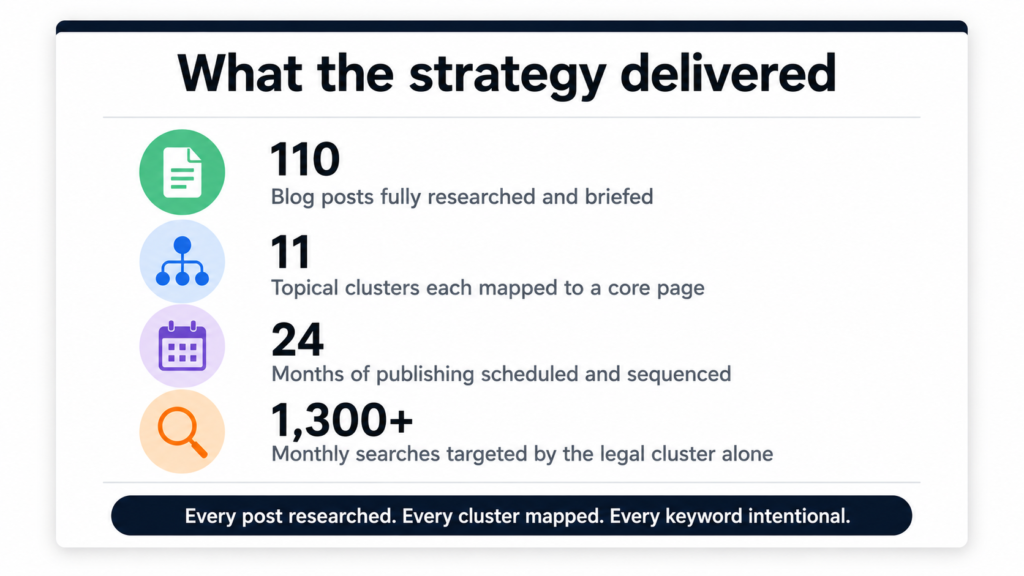
110 posts. 11 clusters. 24 months. Every post researched with real data, every cluster mapped to a page worth ranking, every keyword chosen with intent. This is what a content strategy looks like when it is built to actually work.
Want Something Like This for Your Business?
If you are running a business and your blog is either not working or not started yet, this kind of strategy is what bridges the gap between publishing and actually getting found. It is not about writing more. It is about building the right architecture before the first post goes live.
The next posts in this series go deeper into each layer of the process — keyword mapping, research with Perplexity Sonar, cluster architecture, publishing strategy, and the writing framework. If you want to talk about building this for your own business, book a call.
See how I build SEO strategy →
Dhruv is an SEO consultant working with business owners, founders, and agencies. If organic search is not delivering for your business, this is where to start.
Why I Built This
Running a niche SEO blog while managing client work is a time problem. You know you need to publish consistently. You know Google rewards sites that stay fresh and build topical depth. But actually writing two quality articles a day on top of everything else is not realistic for most people running a real business.
I looked at the standard options. Freelance writers cost $50 to $150 per article and still need briefing, editing, and back-and-forth. Generic AI writing tools produce content that reads like a Wikipedia article written by someone who has never done SEO. Content agencies are slow, expensive, and almost always off-brand.
None of those options solved the actual problem. I needed something that researched topics properly, wrote in a real voice, structured content for both readers and search engines, and ran every morning without me involved. So I built it for AI SEO Gazette from scratch.
What the System Actually Does
Every morning at 9 AM, a Python script wakes up on GitHub Actions and runs through the same sequence for two articles: one covering a current AI or SEO news story from the past 48 hours, and one covering an evergreen topic that practitioners are actively searching for right now.
For each article, it finds a topic worth writing about, pulls deep research from the web with real citations, hands that research to GPT-4o to write a structured 850 plus word article in HTML, fetches a featured image, uploads everything to WordPress with the right categories and tags, and immediately submits the new URL to Google Search Console for indexing.
Total runtime each morning: 8 to 12 minutes. Human involvement required: zero.
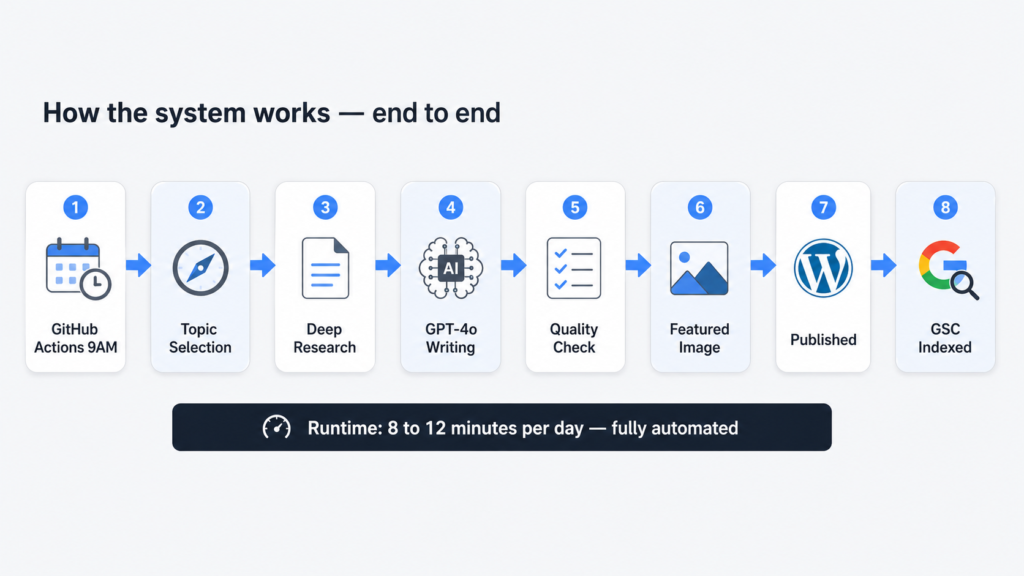
The Stack, Explained Simply
Here is every tool in the system and what it actually does:
stack-overview.txt
# THE FULL STACK

Scheduler      GitHub Actions (cron)     — runs at 9 AM IST daily, free tier
Topic finder   Perplexity Sonar API      — live web access, real current topics
Researcher     Perplexity Sonar API      — deep research with citation URLs
Writer         OpenAI GPT-4o            — structured HTML article output
Publisher      WordPress REST API + JWT  — posts directly to WordPress
Images         Unsplash API             — free high quality featured photos
Indexing       GSC Indexing API         — tells Google to crawl immediately
Language       Python 3                 — glues everything together
The most important thing to understand about this stack is that none of these tools are expensive or obscure. GitHub Actions is free. Unsplash is free. The Google Search Console Indexing API is free. The only real costs are the Perplexity and OpenAI API calls, and those add up to roughly $0.15 to $0.35 per day.
How the Pipeline Flows
The script runs as a single Python file. Here is the full flow from trigger to published article:
pipeline-flow.txt
GitHub Actions cron trigger (3:30 AM UTC = 9 AM IST)
         |
         v
WordPress JWT authentication
         |
         v
Bulk pre-load ALL categories + tags into memory
         (one single GET request — more on why this matters later)
         |
         v
FOR EACH article type [news, evergreen]:
         |
         +-- Perplexity Call 1: Topic selection
         |       returns: title, angle, source URL
         |
         +-- Perplexity Call 2: Deep research on that topic
         |       returns: 4000-8000 chars of research + citations
         |
         +-- Filter citations to authority domains only
         |
         +-- GPT-4o: Write full article as JSON
         |       input:  system prompt + research + citations
         |       output: title, HTML content, meta, categories, tags
         |
         +-- Validate: word count ≥700, FAQ block present,
         |          ≥3 categories, ≥4 tags
         |          (auto-retry once if failed)
         |
         +-- Unsplash: Fetch featured image
         |
         +-- WordPress: Upload image, resolve term IDs, publish post
         |
         +-- Google Search Console: Submit URL for immediate indexing
The Three Bugs That Nearly Broke Everything
The pipeline above looks clean now. It was not clean getting here. The system ran for several days publishing broken articles before I tracked down what was actually going wrong. Here are the three bugs in order of how much they cost me in time and frustration.
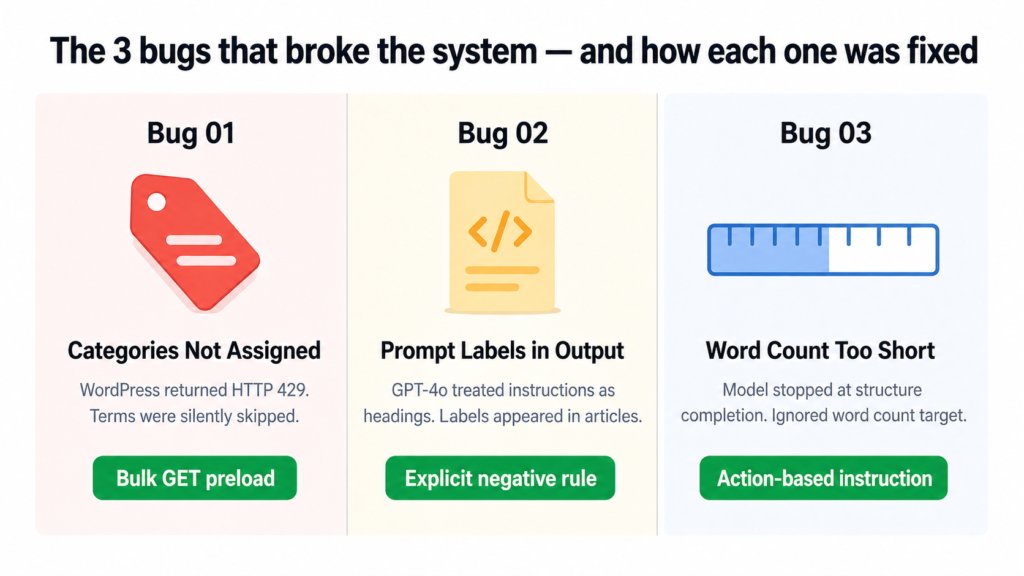
Bug One: WordPress Was Silently Ignoring Categories and Tags
Every article was publishing with exactly one category and zero tags. The script was not crashing. No errors were being thrown. It just quietly skipped every term after the first couple and moved on.
The cause was WordPress rate limiting. The original code called the REST API once per category and once per tag, sequentially. That is roughly 13 API calls in a row. WordPress started returning HTTP 429 errors after the first two or three calls, and the code was silently swallowing those errors and skipping the terms.
the-actual-log-output.txt
[WARNING] Skipping term 'AI in SEO': HTTP 400
[WARNING] Skipping term 'SEO Strategies': HTTP 429
[WARNING] Skipping term 'Content Optimization': HTTP 429
[WARNING] Skipping term 'SEO News': HTTP 429
[INFO] Categories: 1 assigned | Tags: 0 assigned
The fix was to stop making individual API calls entirely. Instead of asking WordPress for each term one by one, the script now makes a single GET request at startup that loads every existing category and tag into memory as a dictionary. From that point, term resolution is an instant lookup with no API calls at all.
preload_wp_terms.py
def preload_wp_terms():
    for taxonomy, cache in [("categories", WP_CATEGORY_CACHE), ("tags", WP_TAG_CACHE)]:
        page = 1
        while True:
            r = requests.get(
                WP_URL + "/wp-json/wp/v2/" + taxonomy,
                params={"per_page": 100, "page": page}, ...
            )
            items = r.json()
            for item in items:
                cache[item["name"].lower()] = item["id"]  # instant lookup later
            if len(items) < 100:
                break  # no more pages
            page += 1
Result: Both articles now consistently get 5 categories and 5 tags assigned on every single run.
Bug Two: GPT-4o Was Including Its Own Instructions Inside the Article
This one was embarrassing to find live on the site. Published articles had visible headings like “HOOK”, “FAQ Block”, and “External Links” appearing as actual text that readers could see. The model was treating the numbered section labels in the prompt as headings to include in the HTML output.
The original prompt framed the article structure like this:
broken-prompt-structure.txt
1. HOOK: One or two punchy opening sentences...
2. KEY TAKEAWAYS: Use this exact HTML block...
4. EXTERNAL LINKS: Naturally embed 2-3 links...
5. FAQ BLOCK: Exactly 4 Q&A pairs...

// GPT-4o read these as section titles and output them as <h2> tags
// Result: readers saw "HOOK" and "FAQ Block" as visible article headings
The fix was to rewrite the prompt structure entirely, replacing numbered labels with “Part 1, Part 2” framing and adding an explicit hard rule at the top of the prompt:
fixed-prompt-rule.txt
CRITICAL: Do NOT output any meta-labels or section titles like 'HOOK',
'BODY', 'FAQ Block', 'External Links', 'CTA', or any numbered section
markers as visible text in the article. These are writing instructions
for you, not headings to include in the output.
Result: Clean article output every time. No structural labels, no prompt bleed-through, content reads naturally from top to bottom.
Bug Three: Word Count Kept Falling Short Even After Retries
Articles were coming in at 526 to 637 words even though the prompt asked for 850 plus. The retry sometimes made it worse, not better. The model was finishing the article structure and stopping, treating “I have covered all the sections” as the signal to end rather than “I have hit the word count.”
The issue was that “write at least 850 words” was buried at the end of a long prompt and gave the model no actionable instruction for what to do when it was running short. The fix was to make the requirement impossible to miss and give the model a specific action to take if it was under target:
word-count-fix.txt
MANDATORY WORD COUNT: The 'content' field must contain AT LEAST 850 words
of readable text (excluding HTML tags). Count carefully.

If you finish the how-to section and the FAQ and you have fewer than
850 words, you have not written enough.

Add more H2 body sections before the FAQ until you reach 850 words.
Do not truncate early. The main body section alone must be at least
600 words by itself.
Result: Articles now consistently hit 700 to 850 words on the first attempt. When the retry triggers, it produces 820 plus words reliably.
What a Clean Run Looks Like
After all three fixes landed, here is what the actual log output looked like on the first fully successful run:
clean-run-log.txt
[INFO] WP term cache: 34 categories, 39 tags loaded.

[INFO] Article: Google AI Max Now Available (649 words)
[WARNING] Quality check failed — retrying...
[INFO] Retry result: PASSED (828 words)
[INFO] Categories: 5 assigned | Tags: 5 assigned
[INFO] Published: aiseogazette.com/google-ai-max-for-search-campaigns/
[INFO] GSC submitted: aiseogazette.com/google-ai-max-for-search-campaigns/

[INFO] Article: Mastering Generative Engine Optimization (762 words)
[INFO] Categories: 5 assigned | Tags: 5 assigned
[INFO] Published: aiseogazette.com/mastering-generative-engine-optimization/
[INFO] GSC submitted: aiseogazette.com/mastering-generative-engine-optimization/

[INFO] All 2 articles published successfully. Total runtime: 9 min 42 sec
What It Actually Costs
| Tool | Daily Cost | Monthly Cost |
|---|---|---|
| Perplexity Sonar API (4 calls/day) | ~$0.02 to $0.05 | ~$0.60 to $1.50 |
| OpenAI GPT-4o (2 to 4 calls/day) | ~$0.10 to $0.30 | ~$3 to $9 |
| GitHub Actions | $0 | $0 (free tier) |
| Unsplash API | $0 | $0 (free tier) |
| Google Search Console Indexing API | $0 | $0 (free tier) |
| Total | ~$0.12 to $0.35 | ~$4 to $10 |
To put that in perspective: two researched, structured, published, and indexed articles every single day for the cost of a coffee per month. The manual equivalent of this output would cost $2,600 to $7,800 a year in writer fees alone.
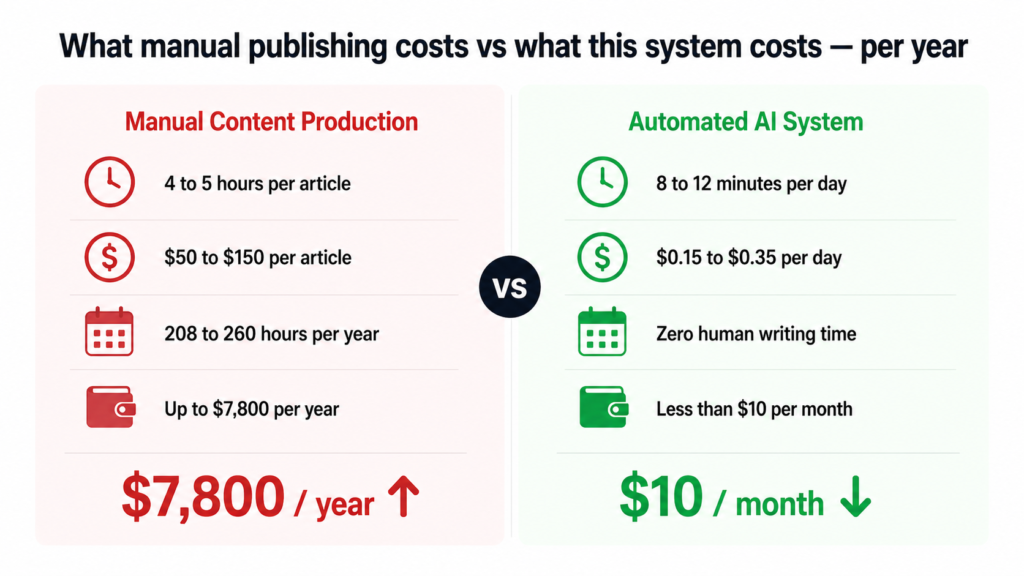
What the System Cannot Do Yet
I want to be honest about the current limits because this is a real working system, not a concept piece.
It does not yet handle internal linking, meaning it will not automatically link new articles to older relevant posts on the site. It does not post to social media after publishing. It does not check whether a very similar topic was covered recently. And it does not yet read Search Console performance data to inform future topic selection, though that is the most interesting thing on the roadmap.
These are solvable problems. They just have not been built yet.
Five Things This Build Taught Me
Rate limits fail silently and that is the worst kind of failure. The WordPress 429 issue ran for days before I caught it because the script never crashed. Always log every skipped item with the actual reason it was skipped.
Tell the model what NOT to do, not just what to do. The section label bug was only fixed when I added an explicit negative instruction. Describing the structure you want is not enough on its own. You also have to describe what you do not want in the output.
Give the model an action, not just a target. “Write 850 words” is easy to ignore. “If you are under 850 words, add more H2 sections before the FAQ” gives it something concrete to do. Targets without actions get approximated. Actions get followed.
Bulk operations eliminate entire categories of bugs. Switching from 13 sequential API calls to one bulk GET did not just make the code faster. It made a whole class of rate-limiting failure impossible. Whenever you see sequential API calls in a loop, ask whether they can be batched.
Read the actual logs. Several times during this build I thought I understood the failure and I was wrong. The logs told the real story every time. Assumptions are expensive. Logs are free.
Want This for Your Own Site?
If you run a WordPress site and want a content system like this built for your specific niche, your brand voice, and your existing category structure, this is something I can build and set up for you. The tools exist, the approach is proven, and the ongoing cost is trivial. What takes time is getting the prompt right for your voice and your audience.
Beyond automation, if your business needs to show up in Google search results and in AI-generated answers (AEO), that is exactly what I work on with agencies, founders, and business owners every day. SEO and AEO are not separate strategies anymore. The sites that win over the next two years will be the ones that are structured for both.
If you want to talk about your content operations, your search visibility, or building a system like this for your own site, book a call. No sales pitch. Just a real conversation about what would actually move the needle for your business.
Dhruv is an SEO and AEO consultant working with business owners, founders, and agencies. 500+ projects. 6+ years. If organic search is a problem for your business, this is the right place to start.
Let's Work Together.
Ready to grow? Pick the way that works for you.