
TL;DR
I built a system that writes, formats, and publishes two SEO blog posts every single day to AI SEO Gazette without me touching a keyboard. It picks its own topics, does its own research, writes 850 plus word articles, assigns categories and tags, adds featured images, and pings Google to index the URL immediately after publishing. The whole thing costs less than $10 a month to run. This post covers exactly how it works, the three bugs that nearly broke it, and what this means for your own site.
Why I Built This
Running a niche SEO blog while managing client work is a time problem. You know you need to publish consistently. You know Google rewards sites that stay fresh and build topical depth. But actually writing two quality articles a day on top of everything else is not realistic for most people running a real business.
I looked at the standard options. Freelance writers cost $50 to $150 per article and still need briefing, editing, and back-and-forth. Generic AI writing tools produce content that reads like a Wikipedia article written by someone who has never done SEO. Content agencies are slow, expensive, and almost always off-brand.
None of those options solved the actual problem. I needed something that researched topics properly, wrote in a real voice, structured content for both readers and search engines, and ran every morning without me involved. So I built it for AI SEO Gazette from scratch.
What the System Actually Does
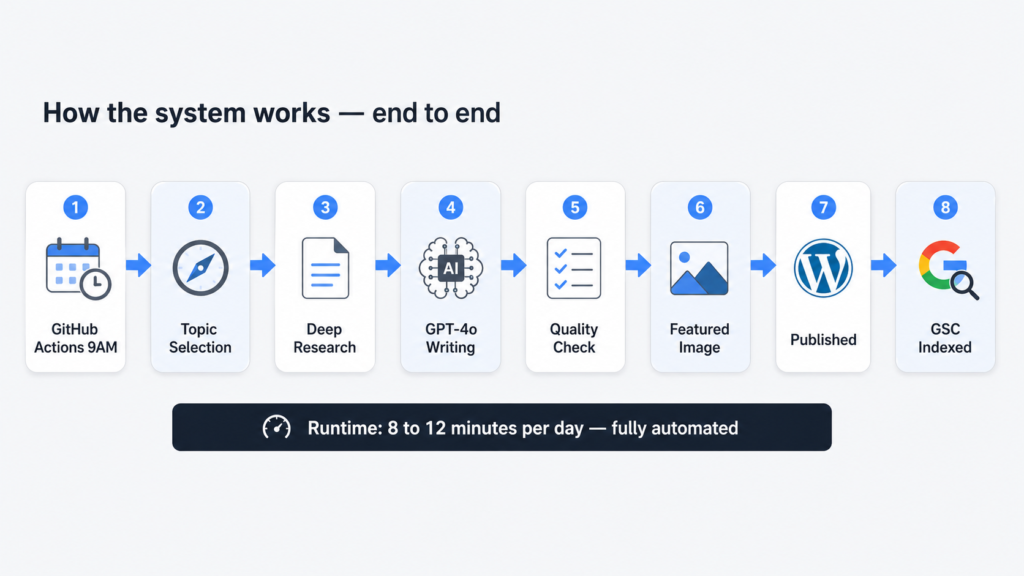
Every morning at 9 AM, a Python script wakes up on GitHub Actions and runs through the same sequence for two articles: one covering a current AI or SEO news story from the past 48 hours, and one covering an evergreen topic that practitioners are actively searching for right now.
For each article, it finds a topic worth writing about, pulls deep research from the web with real citations, hands that research to GPT-4o to write a structured 850 plus word article in HTML, fetches a featured image, uploads everything to WordPress with the right categories and tags, and immediately submits the new URL to Google Search Console for indexing.
Total runtime each morning: 8 to 12 minutes. Human involvement required: zero.
The Stack, Explained Simply
Here is every tool in the system and what it actually does:
stack-overview.txt
# THE FULL STACK

Scheduler      GitHub Actions (cron)     — runs at 9 AM IST daily, free tier
Topic finder   Perplexity Sonar API      — live web access, real current topics
Researcher     Perplexity Sonar API      — deep research with citation URLs
Writer         OpenAI GPT-4o            — structured HTML article output
Publisher      WordPress REST API + JWT  — posts directly to WordPress
Images         Unsplash API             — free high quality featured photos
Indexing       GSC Indexing API         — tells Google to crawl immediately
Language       Python 3                 — glues everything together
The most important thing to understand about this stack is that none of these tools are expensive or obscure. GitHub Actions is free. Unsplash is free. The Google Search Console Indexing API is free. The only real costs are the Perplexity and OpenAI API calls, and those add up to roughly $0.15 to $0.35 per day.
How the Pipeline Flows
The script runs as a single Python file. Here is the full flow from trigger to published article:
pipeline-flow.txt
GitHub Actions cron trigger (3:30 AM UTC = 9 AM IST)
         |
         v
WordPress JWT authentication
         |
         v
Bulk pre-load ALL categories + tags into memory
         (one single GET request — more on why this matters later)
         |
         v
FOR EACH article type [news, evergreen]:
         |
         +-- Perplexity Call 1: Topic selection
         |       returns: title, angle, source URL
         |
         +-- Perplexity Call 2: Deep research on that topic
         |       returns: 4000-8000 chars of research + citations
         |
         +-- Filter citations to authority domains only
         |
         +-- GPT-4o: Write full article as JSON
         |       input:  system prompt + research + citations
         |       output: title, HTML content, meta, categories, tags
         |
         +-- Validate: word count ≥700, FAQ block present,
         |          ≥3 categories, ≥4 tags
         |          (auto-retry once if failed)
         |
         +-- Unsplash: Fetch featured image
         |
         +-- WordPress: Upload image, resolve term IDs, publish post
         |
         +-- Google Search Console: Submit URL for immediate indexing
The Three Bugs That Nearly Broke Everything
The pipeline above looks clean now. It was not clean getting here. The system ran for several days publishing broken articles before I tracked down what was actually going wrong. Here are the three bugs in order of how much they cost me in time and frustration.
Bug One: WordPress Was Silently Ignoring Categories and Tags
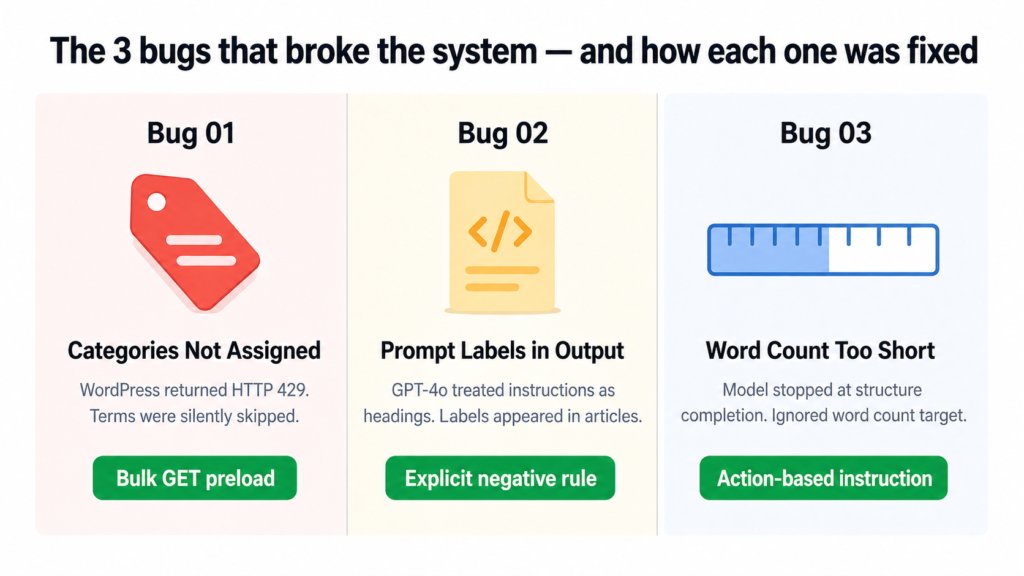
Every article was publishing with exactly one category and zero tags. The script was not crashing. No errors were being thrown. It just quietly skipped every term after the first couple and moved on.
The cause was WordPress rate limiting. The original code called the REST API once per category and once per tag, sequentially. That is roughly 13 API calls in a row. WordPress started returning HTTP 429 errors after the first two or three calls, and the code was silently swallowing those errors and skipping the terms.
the-actual-log-output.txt
[WARNING] Skipping term 'AI in SEO': HTTP 400
[WARNING] Skipping term 'SEO Strategies': HTTP 429
[WARNING] Skipping term 'Content Optimization': HTTP 429
[WARNING] Skipping term 'SEO News': HTTP 429
[INFO] Categories: 1 assigned | Tags: 0 assigned
The fix was to stop making individual API calls entirely. Instead of asking WordPress for each term one by one, the script now makes a single GET request at startup that loads every existing category and tag into memory as a dictionary. From that point, term resolution is an instant lookup with no API calls at all.
preload_wp_terms.py
def preload_wp_terms():
    for taxonomy, cache in [("categories", WP_CATEGORY_CACHE), ("tags", WP_TAG_CACHE)]:
        page = 1
        while True:
            r = requests.get(
                WP_URL + "/wp-json/wp/v2/" + taxonomy,
                params={"per_page": 100, "page": page}, ...
            )
            items = r.json()
            for item in items:
                cache[item["name"].lower()] = item["id"]  # instant lookup later
            if len(items) < 100:
                break  # no more pages
            page += 1
Result: Both articles now consistently get 5 categories and 5 tags assigned on every single run.
Bug Two: GPT-4o Was Including Its Own Instructions Inside the Article
This one was embarrassing to find live on the site. Published articles had visible headings like “HOOK”, “FAQ Block”, and “External Links” appearing as actual text that readers could see. The model was treating the numbered section labels in the prompt as headings to include in the HTML output.
The original prompt framed the article structure like this:
broken-prompt-structure.txt
1. HOOK: One or two punchy opening sentences...
2. KEY TAKEAWAYS: Use this exact HTML block...
4. EXTERNAL LINKS: Naturally embed 2-3 links...
5. FAQ BLOCK: Exactly 4 Q&A pairs...

// GPT-4o read these as section titles and output them as <h2> tags
// Result: readers saw "HOOK" and "FAQ Block" as visible article headings
The fix was to rewrite the prompt structure entirely, replacing numbered labels with “Part 1, Part 2” framing and adding an explicit hard rule at the top of the prompt:
fixed-prompt-rule.txt
CRITICAL: Do NOT output any meta-labels or section titles like 'HOOK',
'BODY', 'FAQ Block', 'External Links', 'CTA', or any numbered section
markers as visible text in the article. These are writing instructions
for you, not headings to include in the output.
Result: Clean article output every time. No structural labels, no prompt bleed-through, content reads naturally from top to bottom.
Bug Three: Word Count Kept Falling Short Even After Retries
Articles were coming in at 526 to 637 words even though the prompt asked for 850 plus. The retry sometimes made it worse, not better. The model was finishing the article structure and stopping, treating “I have covered all the sections” as the signal to end rather than “I have hit the word count.”
The issue was that “write at least 850 words” was buried at the end of a long prompt and gave the model no actionable instruction for what to do when it was running short. The fix was to make the requirement impossible to miss and give the model a specific action to take if it was under target:
word-count-fix.txt
MANDATORY WORD COUNT: The 'content' field must contain AT LEAST 850 words
of readable text (excluding HTML tags). Count carefully.

If you finish the how-to section and the FAQ and you have fewer than
850 words, you have not written enough.

Add more H2 body sections before the FAQ until you reach 850 words.
Do not truncate early. The main body section alone must be at least
600 words by itself.
Result: Articles now consistently hit 700 to 850 words on the first attempt. When the retry triggers, it produces 820 plus words reliably.
What a Clean Run Looks Like
After all three fixes landed, here is what the actual log output looked like on the first fully successful run:
clean-run-log.txt
[INFO] WP term cache: 34 categories, 39 tags loaded.

[INFO] Article: Google AI Max Now Available (649 words)
[WARNING] Quality check failed — retrying...
[INFO] Retry result: PASSED (828 words)
[INFO] Categories: 5 assigned | Tags: 5 assigned
[INFO] Published: aiseogazette.com/google-ai-max-for-search-campaigns/
[INFO] GSC submitted: aiseogazette.com/google-ai-max-for-search-campaigns/

[INFO] Article: Mastering Generative Engine Optimization (762 words)
[INFO] Categories: 5 assigned | Tags: 5 assigned
[INFO] Published: aiseogazette.com/mastering-generative-engine-optimization/
[INFO] GSC submitted: aiseogazette.com/mastering-generative-engine-optimization/

[INFO] All 2 articles published successfully. Total runtime: 9 min 42 sec
What It Actually Costs
| Tool | Daily Cost | Monthly Cost |
|---|---|---|
| Perplexity Sonar API (4 calls/day) | ~$0.02 to $0.05 | ~$0.60 to $1.50 |
| OpenAI GPT-4o (2 to 4 calls/day) | ~$0.10 to $0.30 | ~$3 to $9 |
| GitHub Actions | $0 | $0 (free tier) |
| Unsplash API | $0 | $0 (free tier) |
| Google Search Console Indexing API | $0 | $0 (free tier) |
| Total | ~$0.12 to $0.35 | ~$4 to $10 |
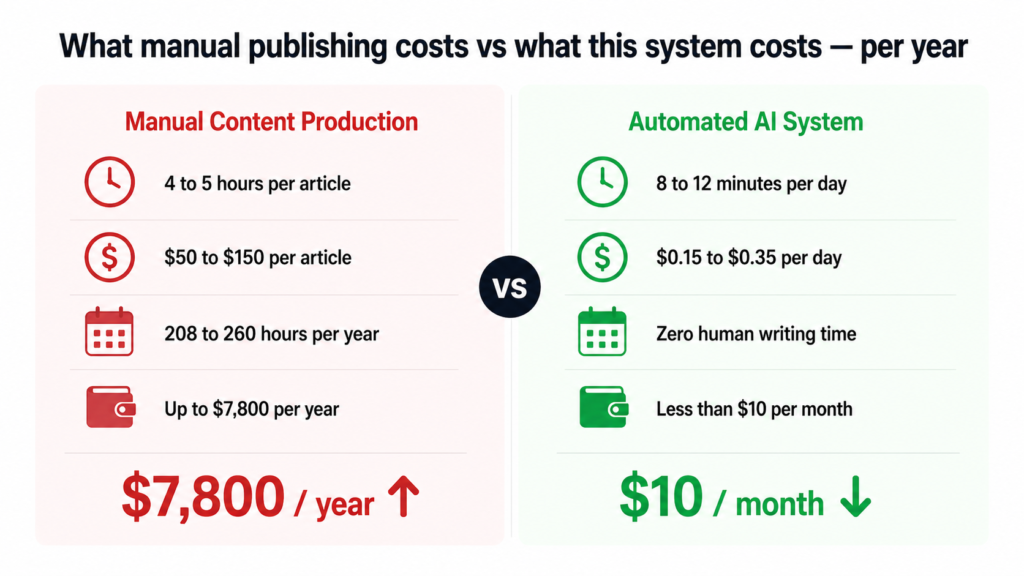
To put that in perspective: two researched, structured, published, and indexed articles every single day for the cost of a coffee per month. The manual equivalent of this output would cost $2,600 to $7,800 a year in writer fees alone.
What the System Cannot Do Yet
I want to be honest about the current limits because this is a real working system, not a concept piece.
It does not yet handle internal linking, meaning it will not automatically link new articles to older relevant posts on the site. It does not post to social media after publishing. It does not check whether a very similar topic was covered recently. And it does not yet read Search Console performance data to inform future topic selection, though that is the most interesting thing on the roadmap.
These are solvable problems. They just have not been built yet.
Five Things This Build Taught Me
Rate limits fail silently and that is the worst kind of failure. The WordPress 429 issue ran for days before I caught it because the script never crashed. Always log every skipped item with the actual reason it was skipped.
Tell the model what NOT to do, not just what to do. The section label bug was only fixed when I added an explicit negative instruction. Describing the structure you want is not enough on its own. You also have to describe what you do not want in the output.
Give the model an action, not just a target. “Write 850 words” is easy to ignore. “If you are under 850 words, add more H2 sections before the FAQ” gives it something concrete to do. Targets without actions get approximated. Actions get followed.
Bulk operations eliminate entire categories of bugs. Switching from 13 sequential API calls to one bulk GET did not just make the code faster. It made a whole class of rate-limiting failure impossible. Whenever you see sequential API calls in a loop, ask whether they can be batched.
Read the actual logs. Several times during this build I thought I understood the failure and I was wrong. The logs told the real story every time. Assumptions are expensive. Logs are free.
Want This for Your Own Site?
If you run a WordPress site and want a content system like this built for your specific niche, your brand voice, and your existing category structure, this is something I can build and set up for you. The tools exist, the approach is proven, and the ongoing cost is trivial. What takes time is getting the prompt right for your voice and your audience.
Beyond automation, if your business needs to show up in Google search results and in AI-generated answers (AEO), that is exactly what I work on with agencies, founders, and business owners every day. SEO and AEO are not separate strategies anymore. The sites that win over the next two years will be the ones that are structured for both.
If you want to talk about your content operations, your search visibility, or building a system like this for your own site, book a call. No sales pitch. Just a real conversation about what would actually move the needle for your business.
Dhruv is an SEO and AEO consultant working with business owners, founders, and agencies. 500+ projects. 6+ years. If organic search is a problem for your business, this is the right place to start.

Dhruv The SEO Guy
I do SEO for agencies, founders, and business owners. No fixed packages. No fluff. Just technical, revenue-focused strategies that scale your organic presence securely.
Ready to dominate search?
Stop reading about algorithms and start ranking. Book a quick 1-on-1 strategy call below.
Book a Strategy Call →