
I Built a Free Google Indexing Automation Tool. Here Is Exactly How It Works.
The Part Nobody Talks About When They Say “Just Request Indexing”
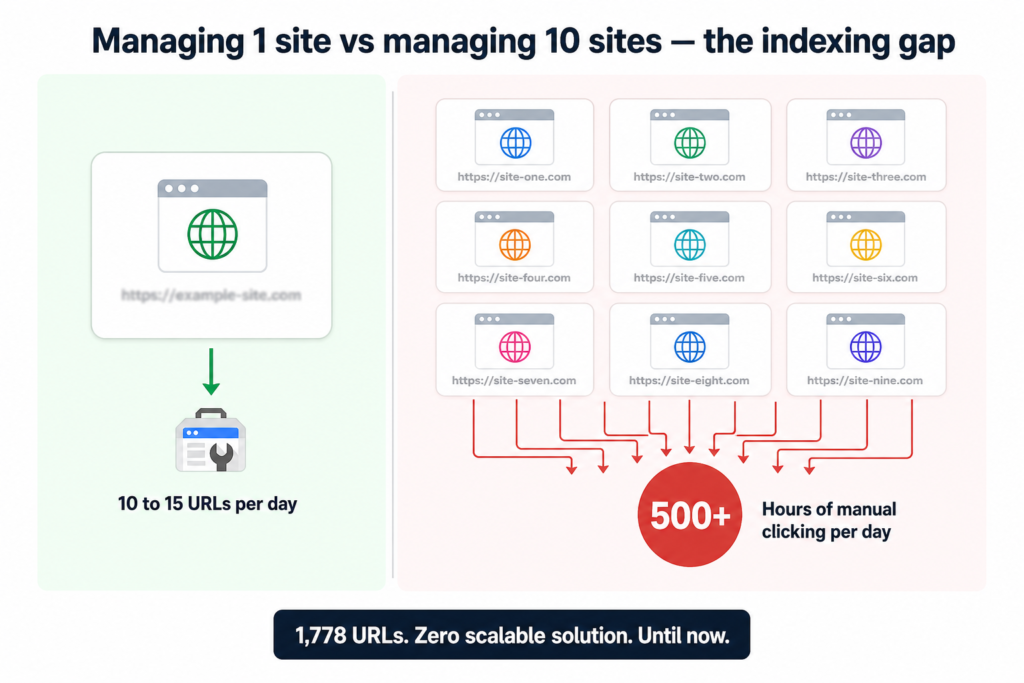
If you have spent any real time in Google Search Console, you know the drill. Open GSC, pick a property, go to URL Inspection, paste a URL, click Request Indexing, wait, go back, do it again. Google lets you do this for roughly 10 to 15 URLs per site per day through the manual interface.
That sounds manageable until you are running an agency with 10 client websites, each with 200 to 300 pages sitting unindexed. Suddenly you are looking at weeks of manual clicking just to get through the backlog. And while you are working through that backlog, new content keeps going live and joining the queue.
This was the exact situation I was dealing with. 1,778 URLs across multiple sites. No realistic way to handle it manually. No tool on the market that solved it the right way without costing a fortune or doing something shady.
So I built one.
Why Existing Tools Did Not Work
Before building anything, I looked at what was already available. The honest summary: most paid indexing tools either charge $50 to $200 per site per month, use methods that bend or break Google’s guidelines (link spam, fake crawl signals), spread their API quota across thousands of customers so you have no idea how much you are actually getting, or give you no visibility into what is happening under the hood.
None of that worked for client work. Clients need transparency. Agencies need control. And nobody needs another monthly subscription that delivers unclear results.
The only clean approach was to use Google’s own APIs directly. Free, official, documented, and fully within Google’s guidelines.
The Five APIs That Power This Tool
Before getting into what the tool does, it helps to understand what each API actually is. None of these require you to be a developer to understand. Think of each one as a different conversation you can have with Google’s infrastructure.
Google OAuth 2.0 is how the tool logs into Google on your behalf. You click Sign In with Google in your browser, approve access once, and your login token is saved locally. You never have to log in again unless you explicitly log out.
The Google Search Console API pulls the list of all websites connected to your Google account automatically. You do not type domain names in manually. The tool fetches everything at once. This matters especially when managing multiple client sites across different Gmail accounts.
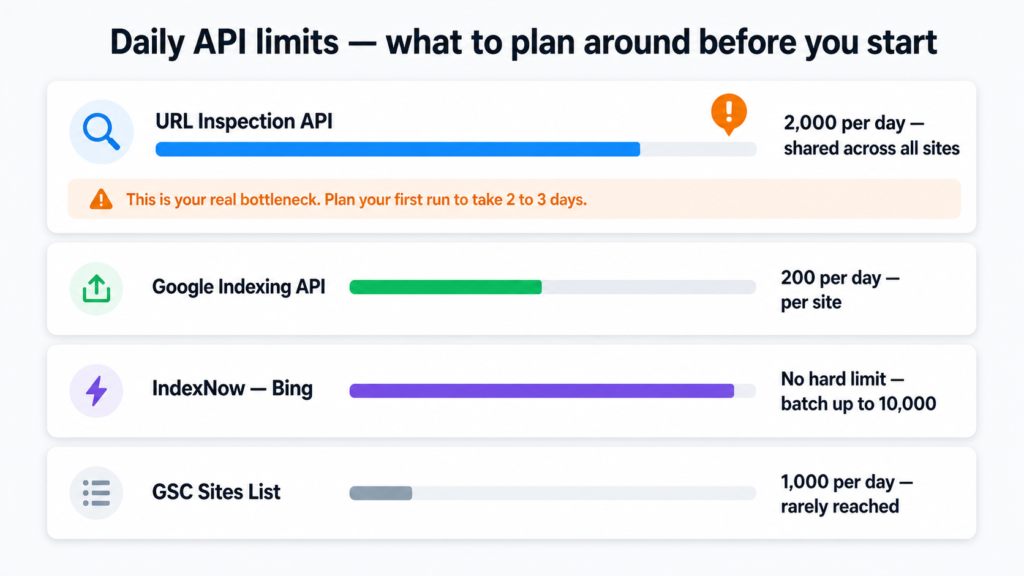
The GSC URL Inspection API is the most powerful piece. Think of it as having a Google employee tell you whether a specific page is in their database, without you having to open Search Console and check manually. For each URL, it returns whether it is indexed or not, when Google last crawled it, whether a noindex tag is blocking it, and whether robots.txt is preventing crawling. The daily limit is 2,000 checks across all your sites combined.
The Google Indexing API is what actually submits URLs to Google for crawling. The daily limit is 200 submissions per site per day. One honest caveat worth mentioning: Google officially designed this API for pages with job posting or livestream structured data. The broader SEO community has used it for all page types for years and it works in practice, but Google could restrict this at any time. It is the best tool available right now within Google’s ecosystem, but it is not a permanent guarantee.
IndexNow is Bing’s free open protocol for instant URL submission. No hard daily limit. You can batch up to 10,000 URLs in a single request and Bing often indexes within hours. The only setup is hosting a small verification text file at the root of your website, which can be tricky for client sites where you do not have direct server access.
The Daily Limits You Need to Plan Around
| API | Daily Limit | Important Note |
|---|---|---|
| GSC URL Inspection | 2,000 checks/day | Shared across ALL your sites |
| Google Indexing API | 200 submissions/day | Per site, not shared |
| Bing IndexNow | No hard limit | Batch-friendly, up to 10,000/request |
| GSC Sites List | 1,000/day | More than enough for any setup |
The URL Inspection limit is the one that actually shapes how you use this tool. With 10 sites at 200 submissions each, you can push 2,000 URLs to Google per day. For a fresh setup with a large backlog, expect to spend the first two to three days working through everything. Once the backlog clears, daily new content volumes are almost always well within the limits.
What the Tool Actually Does
The full workflow from start to finish looks like this:
tool-flow.txt
You open the tool → http://localhost:5000
         |
         v
Sign in with Google (one click, saved after first login)
         |
         v
Tool fetches all your GSC properties automatically
         |
         v
For each site:
         |
         +-- Reads sitemap XML → discovers all URLs
         |
         +-- URL Inspection API → checks indexed vs not indexed
         |
         +-- Queues all unindexed URLs for submission
         |
         +-- Google Indexing API → submits up to 200/day per site
         |
         +-- IndexNow / Bing → submits simultaneously
         |
         v
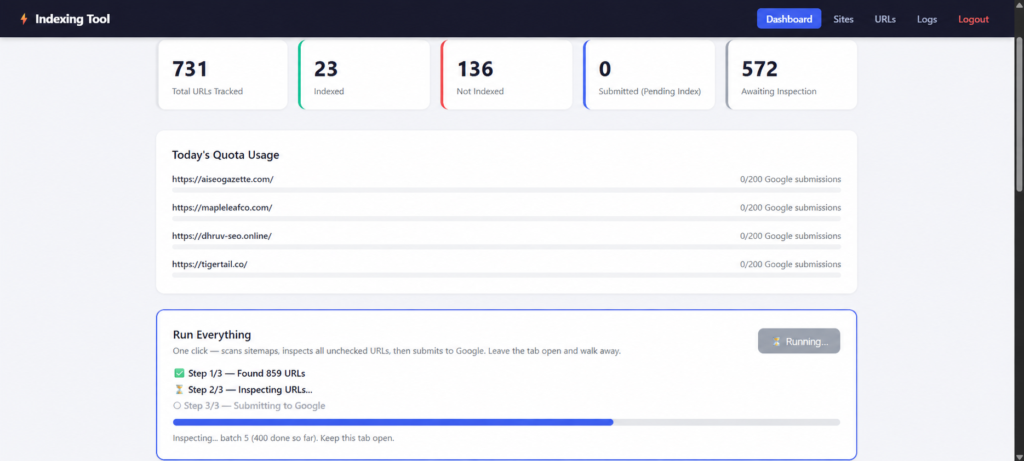
Dashboard shows live status, quota usage, and full logs
The “Run Everything” button handles the entire sequence in one click. A progress bar shows which step is running. For large sites it can take 30 to 60 minutes. You leave the tab open and walk away.
The Features That Actually Matter for Agency Use
Per-site on/off toggles. If a client is mid-redesign and you do not want their URLs being pushed to Google right now, you flip a toggle and that site is completely skipped in every scan, inspection, and submission. No workarounds. No worrying about accidentally submitting broken pages.
Multiple Google accounts. You connect additional Gmail accounts through a single button. All their GSC properties appear in the tool automatically, each associated with the correct account credentials. This is the feature that makes it genuinely usable for agency work rather than just personal sites.
URL Explorer. A filterable table of every URL in the database. Filter by site, by status (indexed, not indexed, submitted, pending), or search by URL text. Useful for spotting patterns in what is and is not getting picked up by Google.
Full logs. Every single API call is recorded: the site, the URL, the action, the result, and the exact API response. When something goes wrong, you know exactly what happened and when.
Daily scheduler. Four jobs run automatically each morning while the app is open: sitemap scan at 6 AM, URL inspection at 7 AM, Google submission at 8 AM, Bing submission at 8:05 AM. Set it up once and let it run.
The Project Structure
project-structure.txt
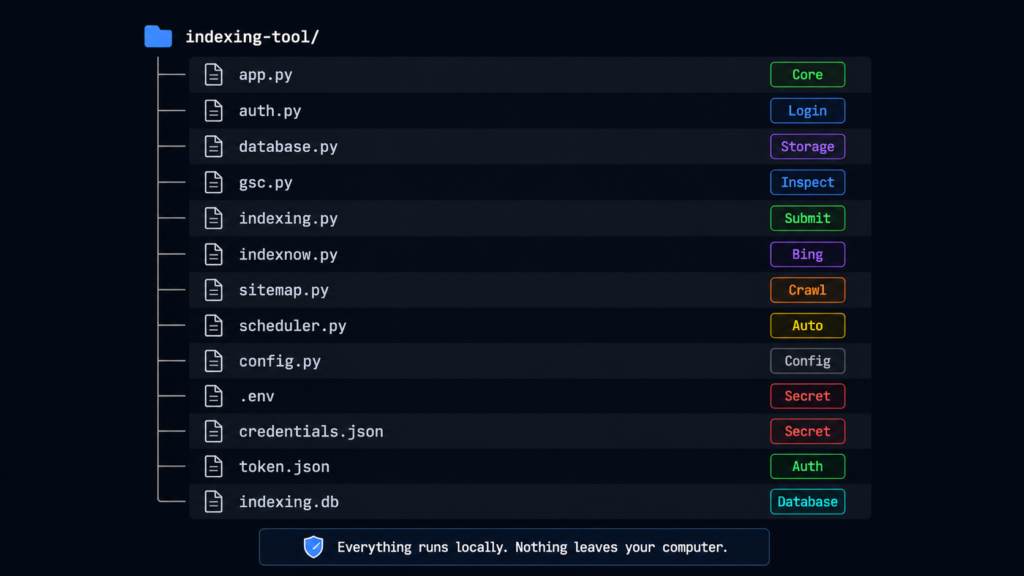
indexing-tool/
├── app.py           ← Main app and all web routes
├── auth.py          ← Google login, token storage, multi-account
├── database.py      ← All database operations
├── gsc.py           ← GSC URL Inspection API calls
├── indexing.py      ← Google Indexing API submission
├── indexnow.py      ← Bing IndexNow submission
├── sitemap.py       ← Sitemap parser (handles index files)
├── scheduler.py     ← Daily automation jobs
├── config.py        ← Loads settings from .env
├── templates/       ← HTML pages (dashboard, sites, URLs, logs)
├── static/          ← CSS and JavaScript
├── .env             ← Your secrets — never share or commit this
├── credentials.json ← Downloaded from Google Cloud Console
├── token.json       ← Auto-created after first login
└── indexing.db      ← Your local database (auto-created)
Everything runs on your own computer. Nothing gets sent to any external server. All data lives in a local SQLite file called indexing.db. For client data privacy, that matters.
The One Technical Step You Cannot Skip
The Google Cloud setup is the only part of this that requires some patience. It takes about 10 minutes and you only do it once.
google-cloud-setup.txt
Step 1: Go to console.cloud.google.com
         Create a new project → name it "Indexing Tool"

Step 2: APIs & Services → Library
         Enable: "Google Search Console API"
         Enable: "Web Search Indexing API"

Step 3: APIs & Services → Credentials
         Create OAuth 2.0 Client ID → Web Application
         Set redirect URI: http://localhost:5000/oauth2callback
         Download the JSON → rename it credentials.json

Step 4: Configure OAuth consent screen
         Set to External
         Add your Google account as a Test User
         Add these scopes (use the full URLs):
         https://www.googleapis.com/auth/webmasters.readonly
         https://www.googleapis.com/auth/indexing

Step 5: Drop credentials.json into your indexing-tool folder
When adding scopes, do not type the short names like webmasters.readonly. Use the full URL versions shown above, or simply check the checkboxes next to the entries in the scopes table. Either works. Typing short names does not.
How to Install and Run It
Once the Google Cloud setup is done, getting the tool running takes under two minutes.
install-and-run.txt
# Prerequisites: Python 3.10+ installed on your computer

# Step 1: Open terminal inside the indexing-tool folder
# (Right-click the folder → Open in Terminal on Windows 11)

# Step 2: Install dependencies
pip install -r requirements.txt

# Step 3: Start the tool
python app.py

# Step 4: Open your browser and go to:
http://localhost:5000

# Step 5: Click "Sign in with Google" and approve access
# That is it. The tool is running.
Keep the terminal window open while using the tool. If you close it, the tool stops. The scheduler also only runs while the app is active, so plan to leave it running during working hours or overnight if you want the automated daily jobs to fire.
What Happened When We Actually Ran It
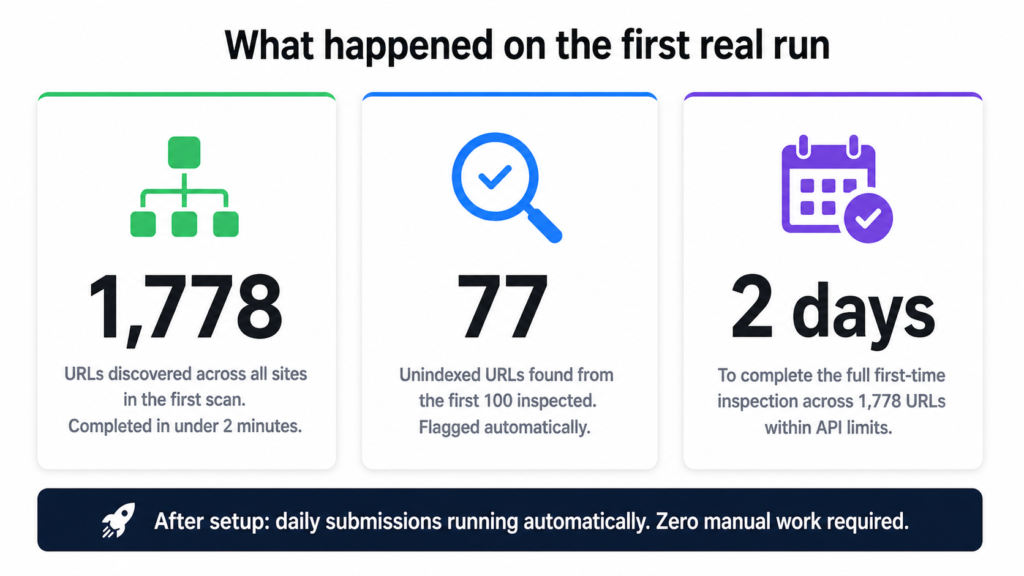
On the first real run across all connected sites, the sitemap scan completed in about two minutes and found 1,778 URLs. The URL Inspection step found 77 unindexed URLs from just the first 100 inspected. With the 2,000 per day inspection limit, the full first-time scan across everything took two days to complete.
The most time-consuming part of the entire setup was the Google Cloud configuration, not the tool itself. Once that was done, everything else ran cleanly.
After the first two days: full sitemap coverage, all unindexed URLs identified, daily submission running automatically. No manual GSC clicks. No spreadsheet tracking. No repetitive workflow.
What This Tool Cannot Do
Being straight about the limitations matters more than overselling what this does.
Submitting a URL is a crawl request, not a guarantee. Google decides whether to actually index a page based on content quality, relevance, site authority, and signals that no tool can influence. A page with thin content or duplicate issues will not get indexed just because you submitted it 200 times.
The 200 per day and 2,000 per day API limits are hard Google limits. The tool does not bypass them. If you have 5,000 unindexed URLs across 10 sites, you are working through them over multiple days. That is just how Google’s API works.
The Google Indexing API was officially built for job postings and livestreams. It works for general content right now, and has worked for years. But it is not a permanent guarantee and Google could tighten restrictions. Worth knowing before building your entire workflow around it.
And it does not work without the credentials.json file from Google Cloud. There is no way around that step.
The Bigger Point About AI-Built Tools
This entire tool, including the planning, the code, the debugging, and the feature additions, was built through a conversation with an AI. No developer was hired. No agency was briefed. No months of back and forth.
The barrier to building custom SEO tooling has genuinely never been lower. If you can describe the problem clearly and work through the iterations, you can have something functional and production-ready without a technical background. The hard part is not the code. It is knowing what the tool needs to do and being specific enough about it.
That applies to indexing tools, reporting dashboards, rank trackers, content workflows, client onboarding systems, and anything else that currently lives in a spreadsheet or happens manually. If it is repetitive and rule-based, it can probably be automated. And it probably does not need a six-month development project to get there.
Want This Built for Your Site or Your Agency?
If you manage multiple client websites and the indexing workflow is a real operational drain, this is something that can be built and configured for your specific setup. Every agency has different site structures, different GSC configurations, and different volume requirements. The tool above is a solid foundation and it can be adapted.
Beyond indexing automation, if you want your content to show up in both Google search results and AI-generated answers, that sits at the core of what I work on with agencies and business owners. AEO (Answer Engine Optimization) and custom SEO strategy are not separate from operational work like this. Getting indexed properly is step one. Being found and cited is what comes after.
If you want to talk through your indexing situation, your search visibility, or whether an automation like this makes sense for your setup, book a call. No pitch. Just a real conversation.
Dhruv is an SEO and AEO consultant working with business owners, founders, and agencies. If search visibility is a problem for your business, this is the right place to start.
Why I Built This
Running a niche SEO blog while managing client work is a time problem. You know you need to publish consistently. You know Google rewards sites that stay fresh and build topical depth. But actually writing two quality articles a day on top of everything else is not realistic for most people running a real business.
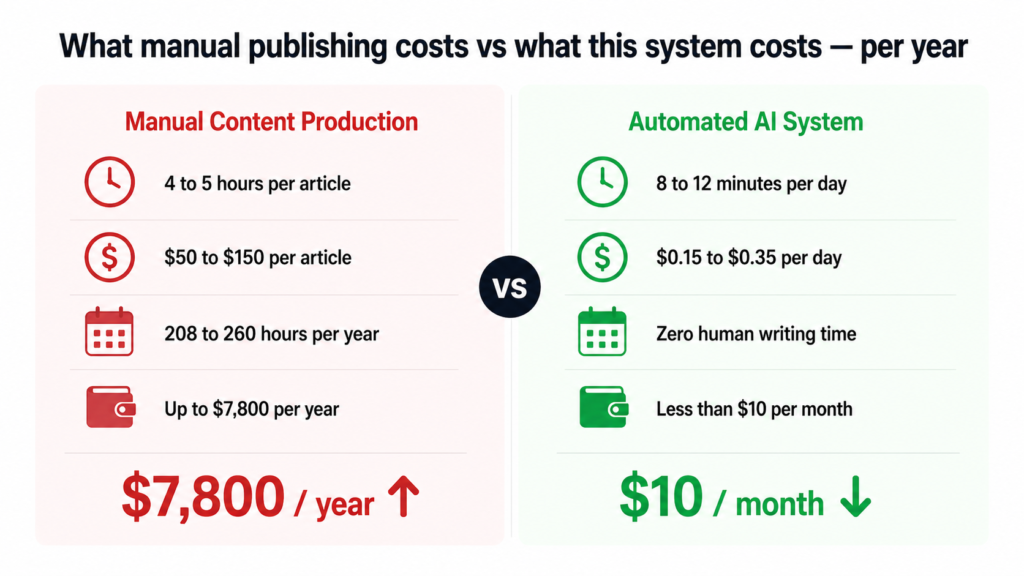
I looked at the standard options. Freelance writers cost $50 to $150 per article and still need briefing, editing, and back-and-forth. Generic AI writing tools produce content that reads like a Wikipedia article written by someone who has never done SEO. Content agencies are slow, expensive, and almost always off-brand.
None of those options solved the actual problem. I needed something that researched topics properly, wrote in a real voice, structured content for both readers and search engines, and ran every morning without me involved. So I built it for AI SEO Gazette from scratch.
What the System Actually Does
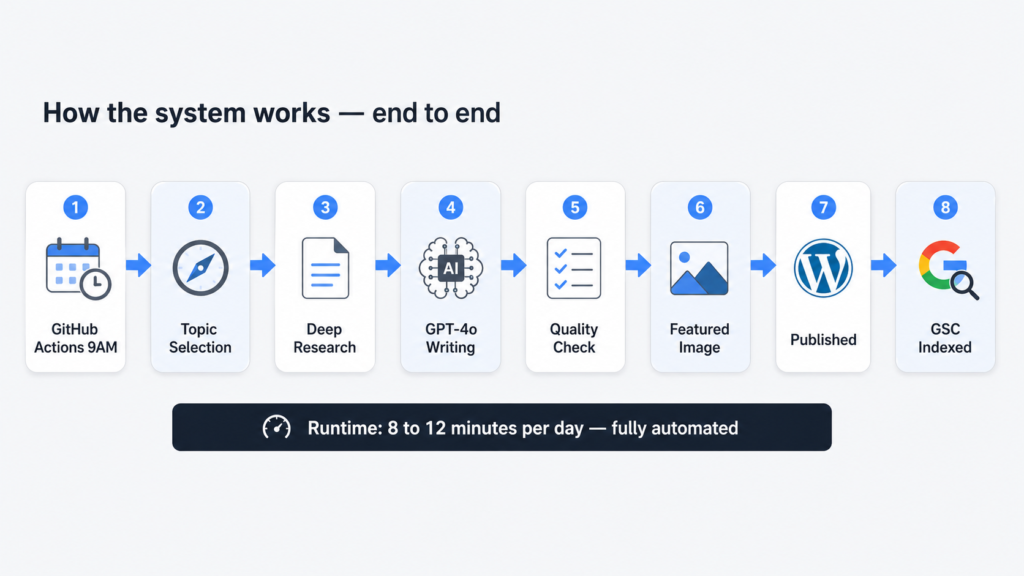
Every morning at 9 AM, a Python script wakes up on GitHub Actions and runs through the same sequence for two articles: one covering a current AI or SEO news story from the past 48 hours, and one covering an evergreen topic that practitioners are actively searching for right now.
For each article, it finds a topic worth writing about, pulls deep research from the web with real citations, hands that research to GPT-4o to write a structured 850 plus word article in HTML, fetches a featured image, uploads everything to WordPress with the right categories and tags, and immediately submits the new URL to Google Search Console for indexing.
Total runtime each morning: 8 to 12 minutes. Human involvement required: zero.
The Stack, Explained Simply
Here is every tool in the system and what it actually does:
stack-overview.txt
# THE FULL STACK

Scheduler      GitHub Actions (cron)     — runs at 9 AM IST daily, free tier
Topic finder   Perplexity Sonar API      — live web access, real current topics
Researcher     Perplexity Sonar API      — deep research with citation URLs
Writer         OpenAI GPT-4o            — structured HTML article output
Publisher      WordPress REST API + JWT  — posts directly to WordPress
Images         Unsplash API             — free high quality featured photos
Indexing       GSC Indexing API         — tells Google to crawl immediately
Language       Python 3                 — glues everything together
The most important thing to understand about this stack is that none of these tools are expensive or obscure. GitHub Actions is free. Unsplash is free. The Google Search Console Indexing API is free. The only real costs are the Perplexity and OpenAI API calls, and those add up to roughly $0.15 to $0.35 per day.
How the Pipeline Flows
The script runs as a single Python file. Here is the full flow from trigger to published article:
pipeline-flow.txt
GitHub Actions cron trigger (3:30 AM UTC = 9 AM IST)
         |
         v
WordPress JWT authentication
         |
         v
Bulk pre-load ALL categories + tags into memory
         (one single GET request — more on why this matters later)
         |
         v
FOR EACH article type [news, evergreen]:
         |
         +-- Perplexity Call 1: Topic selection
         |       returns: title, angle, source URL
         |
         +-- Perplexity Call 2: Deep research on that topic
         |       returns: 4000-8000 chars of research + citations
         |
         +-- Filter citations to authority domains only
         |
         +-- GPT-4o: Write full article as JSON
         |       input:  system prompt + research + citations
         |       output: title, HTML content, meta, categories, tags
         |
         +-- Validate: word count ≥700, FAQ block present,
         |          ≥3 categories, ≥4 tags
         |          (auto-retry once if failed)
         |
         +-- Unsplash: Fetch featured image
         |
         +-- WordPress: Upload image, resolve term IDs, publish post
         |
         +-- Google Search Console: Submit URL for immediate indexing
The Three Bugs That Nearly Broke Everything
The pipeline above looks clean now. It was not clean getting here. The system ran for several days publishing broken articles before I tracked down what was actually going wrong. Here are the three bugs in order of how much they cost me in time and frustration.
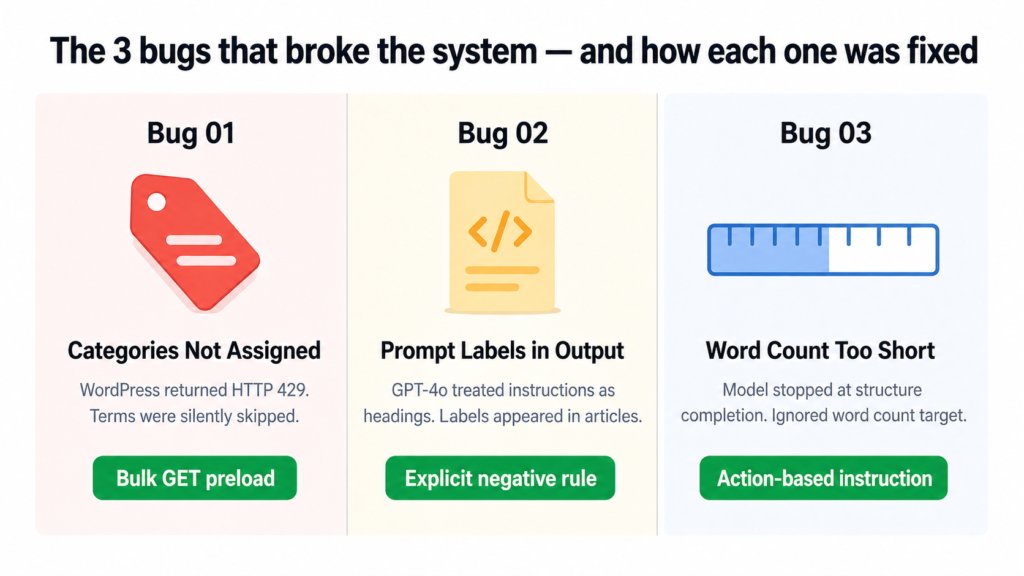
Bug One: WordPress Was Silently Ignoring Categories and Tags
Every article was publishing with exactly one category and zero tags. The script was not crashing. No errors were being thrown. It just quietly skipped every term after the first couple and moved on.
The cause was WordPress rate limiting. The original code called the REST API once per category and once per tag, sequentially. That is roughly 13 API calls in a row. WordPress started returning HTTP 429 errors after the first two or three calls, and the code was silently swallowing those errors and skipping the terms.
the-actual-log-output.txt
[WARNING] Skipping term 'AI in SEO': HTTP 400
[WARNING] Skipping term 'SEO Strategies': HTTP 429
[WARNING] Skipping term 'Content Optimization': HTTP 429
[WARNING] Skipping term 'SEO News': HTTP 429
[INFO] Categories: 1 assigned | Tags: 0 assigned
The fix was to stop making individual API calls entirely. Instead of asking WordPress for each term one by one, the script now makes a single GET request at startup that loads every existing category and tag into memory as a dictionary. From that point, term resolution is an instant lookup with no API calls at all.
preload_wp_terms.py
def preload_wp_terms():
    for taxonomy, cache in [("categories", WP_CATEGORY_CACHE), ("tags", WP_TAG_CACHE)]:
        page = 1
        while True:
            r = requests.get(
                WP_URL + "/wp-json/wp/v2/" + taxonomy,
                params={"per_page": 100, "page": page}, ...
            )
            items = r.json()
            for item in items:
                cache[item["name"].lower()] = item["id"]  # instant lookup later
            if len(items) < 100:
                break  # no more pages
            page += 1
Result: Both articles now consistently get 5 categories and 5 tags assigned on every single run.
Bug Two: GPT-4o Was Including Its Own Instructions Inside the Article
This one was embarrassing to find live on the site. Published articles had visible headings like “HOOK”, “FAQ Block”, and “External Links” appearing as actual text that readers could see. The model was treating the numbered section labels in the prompt as headings to include in the HTML output.
The original prompt framed the article structure like this:
broken-prompt-structure.txt
1. HOOK: One or two punchy opening sentences...
2. KEY TAKEAWAYS: Use this exact HTML block...
4. EXTERNAL LINKS: Naturally embed 2-3 links...
5. FAQ BLOCK: Exactly 4 Q&A pairs...

// GPT-4o read these as section titles and output them as <h2> tags
// Result: readers saw "HOOK" and "FAQ Block" as visible article headings
The fix was to rewrite the prompt structure entirely, replacing numbered labels with “Part 1, Part 2” framing and adding an explicit hard rule at the top of the prompt:
fixed-prompt-rule.txt
CRITICAL: Do NOT output any meta-labels or section titles like 'HOOK',
'BODY', 'FAQ Block', 'External Links', 'CTA', or any numbered section
markers as visible text in the article. These are writing instructions
for you, not headings to include in the output.
Result: Clean article output every time. No structural labels, no prompt bleed-through, content reads naturally from top to bottom.
Bug Three: Word Count Kept Falling Short Even After Retries
Articles were coming in at 526 to 637 words even though the prompt asked for 850 plus. The retry sometimes made it worse, not better. The model was finishing the article structure and stopping, treating “I have covered all the sections” as the signal to end rather than “I have hit the word count.”
The issue was that “write at least 850 words” was buried at the end of a long prompt and gave the model no actionable instruction for what to do when it was running short. The fix was to make the requirement impossible to miss and give the model a specific action to take if it was under target:
word-count-fix.txt
MANDATORY WORD COUNT: The 'content' field must contain AT LEAST 850 words
of readable text (excluding HTML tags). Count carefully.

If you finish the how-to section and the FAQ and you have fewer than
850 words, you have not written enough.

Add more H2 body sections before the FAQ until you reach 850 words.
Do not truncate early. The main body section alone must be at least
600 words by itself.
Result: Articles now consistently hit 700 to 850 words on the first attempt. When the retry triggers, it produces 820 plus words reliably.
What a Clean Run Looks Like
After all three fixes landed, here is what the actual log output looked like on the first fully successful run:
clean-run-log.txt
[INFO] WP term cache: 34 categories, 39 tags loaded.

[INFO] Article: Google AI Max Now Available (649 words)
[WARNING] Quality check failed — retrying...
[INFO] Retry result: PASSED (828 words)
[INFO] Categories: 5 assigned | Tags: 5 assigned
[INFO] Published: aiseogazette.com/google-ai-max-for-search-campaigns/
[INFO] GSC submitted: aiseogazette.com/google-ai-max-for-search-campaigns/

[INFO] Article: Mastering Generative Engine Optimization (762 words)
[INFO] Categories: 5 assigned | Tags: 5 assigned
[INFO] Published: aiseogazette.com/mastering-generative-engine-optimization/
[INFO] GSC submitted: aiseogazette.com/mastering-generative-engine-optimization/

[INFO] All 2 articles published successfully. Total runtime: 9 min 42 sec
What It Actually Costs
| Tool | Daily Cost | Monthly Cost |
|---|---|---|
| Perplexity Sonar API (4 calls/day) | ~$0.02 to $0.05 | ~$0.60 to $1.50 |
| OpenAI GPT-4o (2 to 4 calls/day) | ~$0.10 to $0.30 | ~$3 to $9 |
| GitHub Actions | $0 | $0 (free tier) |
| Unsplash API | $0 | $0 (free tier) |
| Google Search Console Indexing API | $0 | $0 (free tier) |
| Total | ~$0.12 to $0.35 | ~$4 to $10 |
To put that in perspective: two researched, structured, published, and indexed articles every single day for the cost of a coffee per month. The manual equivalent of this output would cost $2,600 to $7,800 a year in writer fees alone.
What the System Cannot Do Yet
I want to be honest about the current limits because this is a real working system, not a concept piece.
It does not yet handle internal linking, meaning it will not automatically link new articles to older relevant posts on the site. It does not post to social media after publishing. It does not check whether a very similar topic was covered recently. And it does not yet read Search Console performance data to inform future topic selection, though that is the most interesting thing on the roadmap.
These are solvable problems. They just have not been built yet.
Five Things This Build Taught Me
Rate limits fail silently and that is the worst kind of failure. The WordPress 429 issue ran for days before I caught it because the script never crashed. Always log every skipped item with the actual reason it was skipped.
Tell the model what NOT to do, not just what to do. The section label bug was only fixed when I added an explicit negative instruction. Describing the structure you want is not enough on its own. You also have to describe what you do not want in the output.
Give the model an action, not just a target. “Write 850 words” is easy to ignore. “If you are under 850 words, add more H2 sections before the FAQ” gives it something concrete to do. Targets without actions get approximated. Actions get followed.
Bulk operations eliminate entire categories of bugs. Switching from 13 sequential API calls to one bulk GET did not just make the code faster. It made a whole class of rate-limiting failure impossible. Whenever you see sequential API calls in a loop, ask whether they can be batched.
Read the actual logs. Several times during this build I thought I understood the failure and I was wrong. The logs told the real story every time. Assumptions are expensive. Logs are free.
Want This for Your Own Site?
If you run a WordPress site and want a content system like this built for your specific niche, your brand voice, and your existing category structure, this is something I can build and set up for you. The tools exist, the approach is proven, and the ongoing cost is trivial. What takes time is getting the prompt right for your voice and your audience.
Beyond automation, if your business needs to show up in Google search results and in AI-generated answers (AEO), that is exactly what I work on with agencies, founders, and business owners every day. SEO and AEO are not separate strategies anymore. The sites that win over the next two years will be the ones that are structured for both.
If you want to talk about your content operations, your search visibility, or building a system like this for your own site, book a call. No sales pitch. Just a real conversation about what would actually move the needle for your business.
Dhruv is an SEO and AEO consultant working with business owners, founders, and agencies. 500+ projects. 6+ years. If organic search is a problem for your business, this is the right place to start.
Let's Work Together.
Ready to grow? Pick the way that works for you.